35
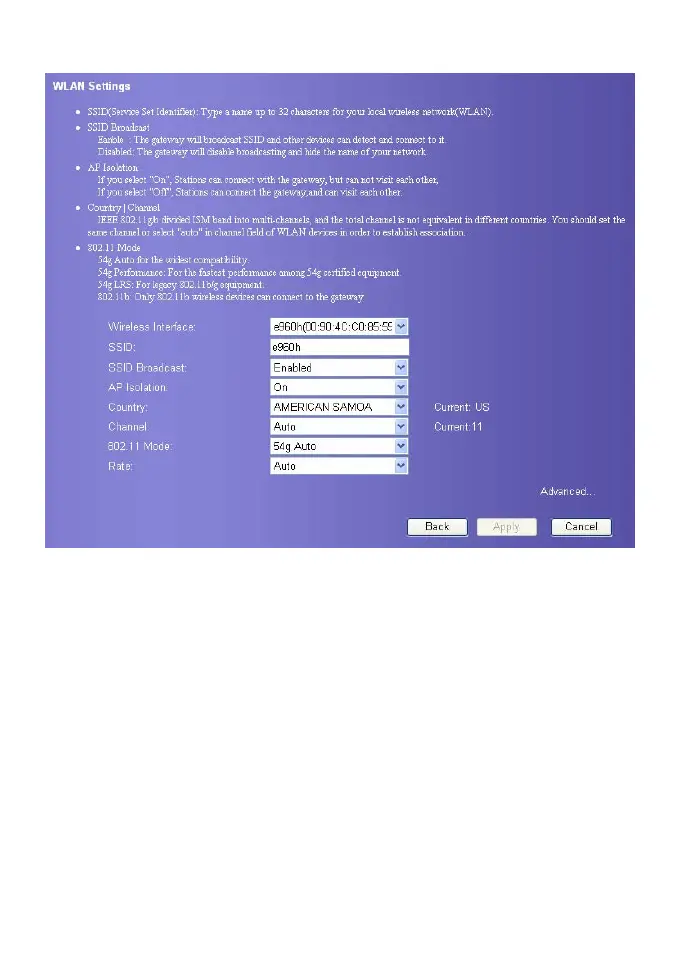
Select Wireless Interface
Wireless Interface: It refers to the SSID and MAC address used to identify the gateway.
Enter SSID
SSID: It refers to the server set ID used to identify a WLAN. A wireless terminal (such as a
PC) can communicate with the E960 only when they have the same SSID. To ensure the
WLAN security, please do not use the default SSID. You can enter a character string, such
as MyHome, as the SSID.
Enable or Disable the SSID Broadcast
y Enabled: The WLAN is an open network. The gateway broadcasts the SSID of this
WLAN. WLANs of this type are easy to access for users. Unauthorized users, however,
can also easily access WLANs of this type. This type of WLANs has very low security
level.
y Disabled: The WLAN is a closed network. The gateway does not broadcast the SSID of
this WLAN. Before accessing a WLAN of this type, the user must configure the SSID of
the WLAN on the wireless terminal (such as a PC). In this manner, the WLAN security
is ensured.









 To Next Page