HUAWEI G6-U10 Smartphone FAQs
1.10 Music
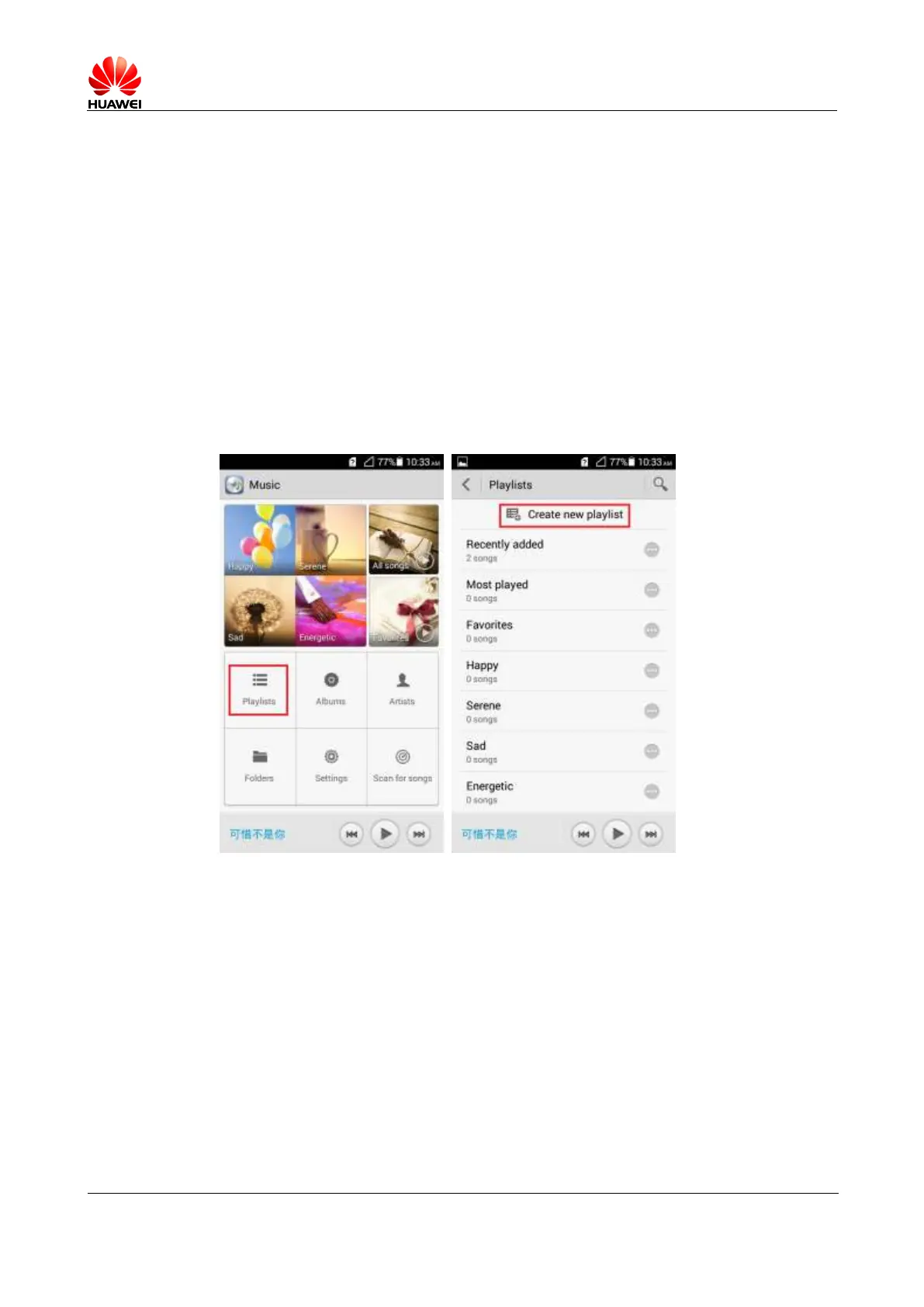
1.10.1 What are the meanings of Artists, Albums, Folders, Scan for
songs, and Playlists?
Playlist: contains the playlists you created.
Albums: lists songs grouped by album.
Artists: lists songs grouped by artist.
Folders: provides playlists available for your song scanning.
Scan for songs: displays songs scanned out from your phone and supported by the player.
1.10.2 How do I create a playlist?
1. Touch Music > Playlist > Create new playlist.
2. Input the name of the playlist you want to create and touch Save.
3. Touch OK in the Add songs to playlist window. Select your songs to add and touch
ADD.
1.10.3 What playback modes does my phone support?
Play in order (default): plays songs from the first and stops when the last song is played
in a playlist.
Shuffle: plays all the songs in a playlist in a random order, once only.
Repeat playlist: repeats all the songs in a playlist in sequence again and again.
Repeat song: repeats the current playing song again and again.



 To Next Page