Settings 100
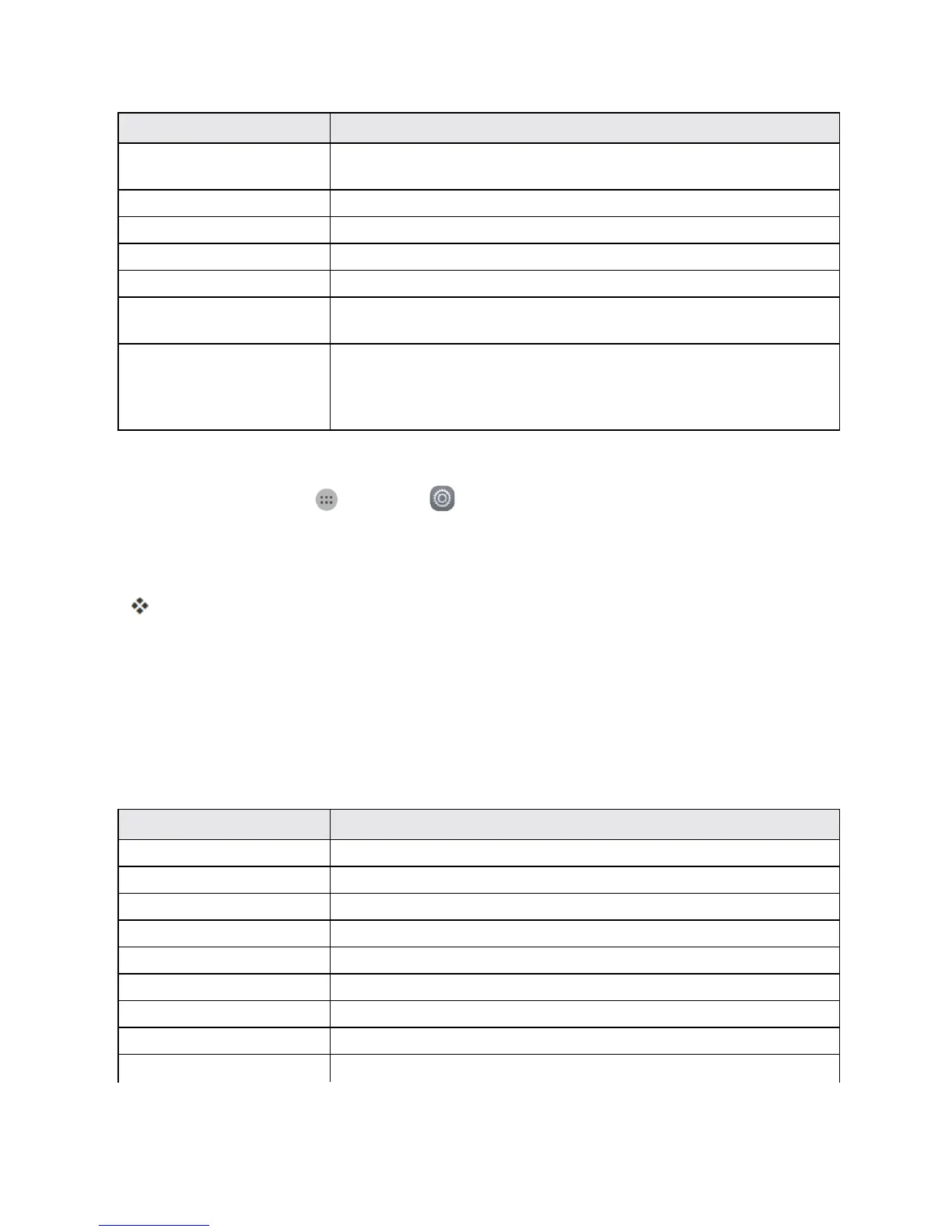
Display Setting Description
Daydream Enableordisablethescreensaver.Ifthisfunctionisenabled,thescreen
saverwillrunautomaticallywhileyourphoneisbeingcharged.
Indicator light Enableordisabletheblinkingindicatorwhenyoureceivenotifications.
Display carrier name Enableordisableyourcarriernameinthestatusbar.
Display network speed Displayorhidethecurrentnetworkspeed.
Brightness Setthedisplaybrightness.
Sleep Setwhenyourscreenturnsoff.Whenidleforaspecifiedperiod,thescreen
locksautomaticallytosavebatterypower.
Auto rotate screen Setwhetheryourscreenauto-rotates.Ifthisfunctionisturnedon,your
screen'sorientationwillchangeautomaticallywiththewayyouholdyour
phonewhenyouperformcertainactions,suchasbrowsingaWebpage,
viewingapicture,orwritingamessage.
Access Display Settings
1.
Fromhome,tapApps >Settings .
2. TapDisplay.
3. Setyourdisplayoptions.
Yourdisplaysettingsaresavedandapplied.
Sound Settings
Thesoundsettingsmenuletsyoucontrolyourphone’saudio,fromringtonesandalertstotaptones
andnotifications.
Sound Settings Overview
Thesoundsettingsmenuallowsyoutoconfigurethefollowingoptions:
Sound Setting Description
Volume Setvolumeforringtones,alarms,systemfeatures,etc.
Silent mode Setsilentmode.
Vibrate in silent mode Enableordisablevibrationwhenyourphoneisinsilentmode.
Vibrate Type Setvibrationtype.
Phone ringtone Setyourphone’sdefaultringtone.
Vibrate when ringing Enableordisablevibrationwhenyourphonerings.
Default notification tone Setatonefordefaultphonenotifications.
Dial pad touch tones Enabletonesforphonedialerscreen.
Touch sounds Settoneoptionsforscreentapes.



 To Next Page