Get Started 4
n SIMcardisreplaceable(atcost)incaseofloss/damage.
n ReturnSIMcardtothecompanywhencancellingsubscription.
n ReturnedSIMcardsarerecycledforenvironmentalpurposes.
n NotethatSIMcardspecificationsandperformancemaychangewithoutnotice.
n ItisrecommendedthatyoukeepaseparatecopyofinformationthatisstoredonSIMcard.The
companyisnotresponsiblefordamagesfromstoredinformationthatislost.
n AlwaysfollowemergencyprocedurestosuspendserviceifyourSIMcardorphone(SIMcard
inserted)islost/stolen.Fordetails,contactCustomerService.
n Alwayspoweroffphonebeforeinserting/removingSIMcard.
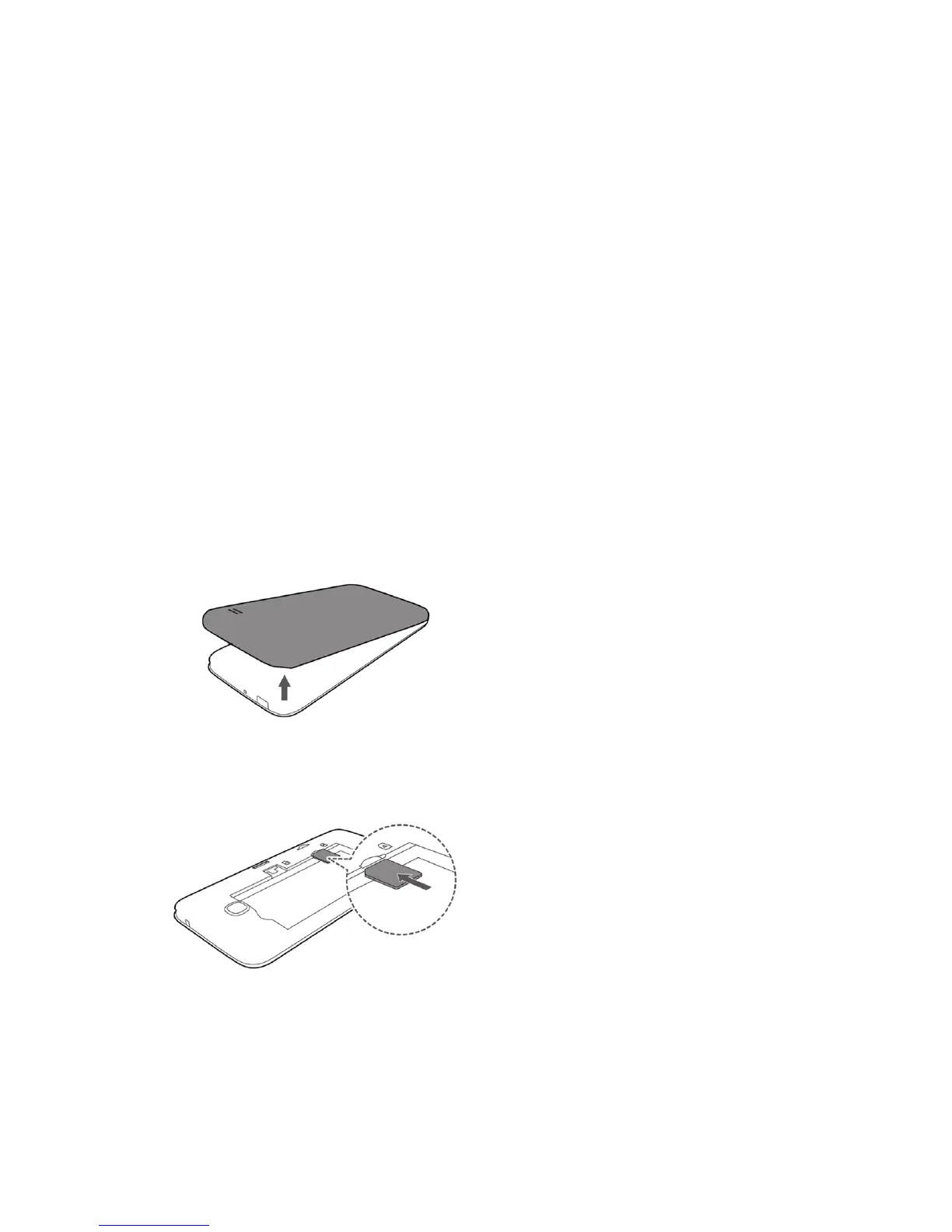
Insert a SIM Card
FollowtheseinstructionstoinsertaSIMcard.Remembertopoweroffyourphonebeforeinserting
aSIMcard.
Note:Yourphone’sSIMcardispreinstalled.Theseinstructionsareforreferenceonly.
1. Removethebatterycover.
l Liftgentlyinthedirectionshown.
2. InsertaSIMcard.
l InsertgentlywithgoldICchipfacingdownward.



 To Next Page