Your Phone Interface 31
Your Phone Interface
Thefollowingtopicsdescribehowtouseandcustomizeyourphone’shomescreen,understandthe
statusbar,andusethenotificationswindow.
Home Screen Basics
Thehomescreenisthestartingpointforyourphone’sapplications,functions,andmenus.Youcan
customizeyourhomescreenbyaddingapplicationicons,shortcuts,folders,widgets,andmore.
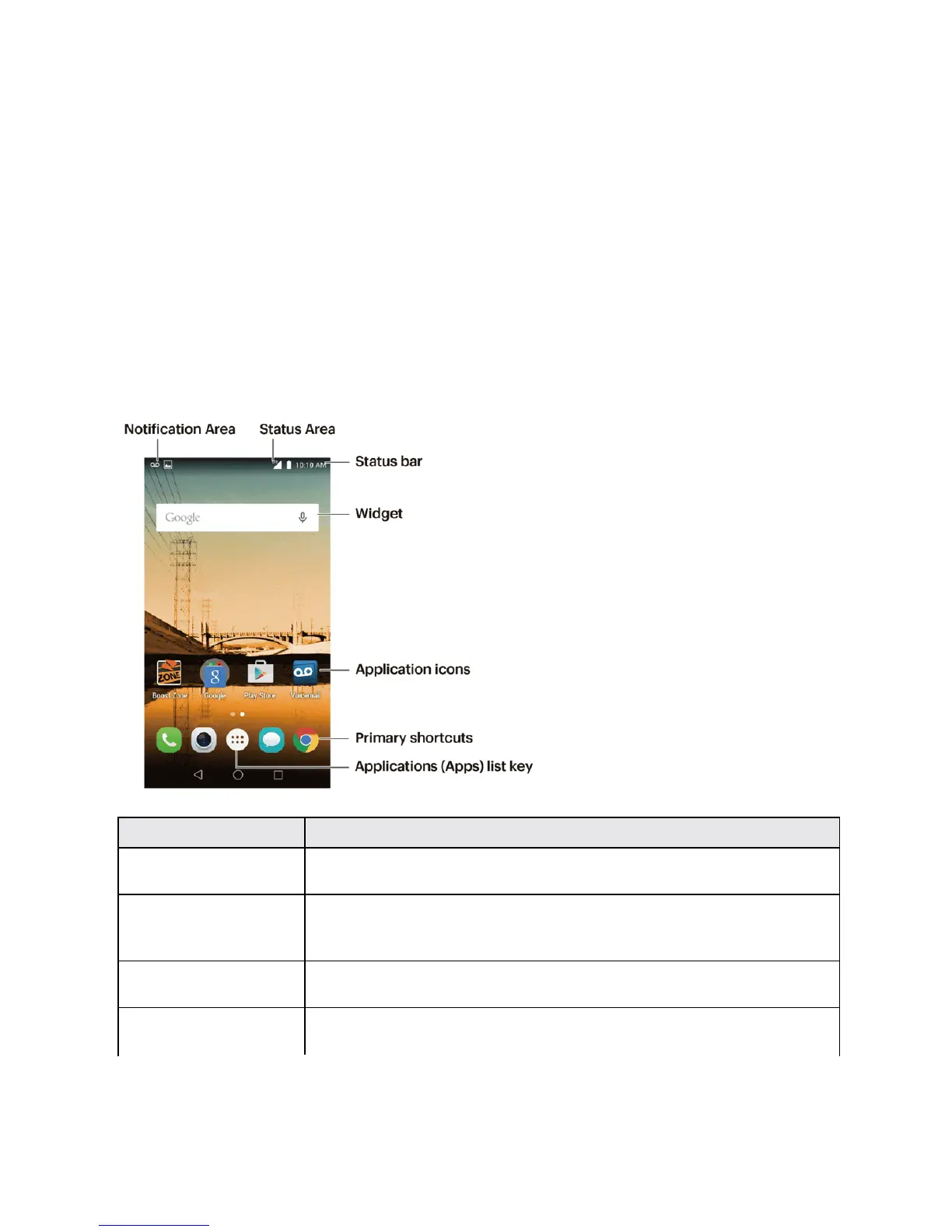
Home Screen Layout
Yourhomescreenextendsbeyondtheinitialscreen.Swipethescreenleftorrighttodisplay
additionalscreens.
Item Description
Notification Area ThenotificationareaoftheStatusBar(ontheleft)displaysnotificationsfor
incomingmessages,missedcalls,applicationupdates,andmore.
Status Area ThestatusareaoftheStatusBar(ontheright)displaysphoneandservice
statusinformationsuchassignalstrength,batterystatus,Wi-Fianddata
connectivity,ringerstatus,andtime.
Status bar Thestatusbardisplaysiconstonotifyyouofyourphone’sstatus(ontheright
side)andnotifications(ontheleftside).
Widget Widgetsareself-containedonscreenappsthatresideonyourphone’shome
screen.



 To Next Page