Get Started 2
Get Started
Thefollowingtopicsgiveyoualltheinformationyouneedtosetupyourphoneandwirelessservice
thefirsttime.
Parts and Functions
Thesetopicsillustrateyourphone’sprimarypartsandkeyfunctions.
Note:Yourphone'sscreensandappslayoutsaresubjecttochange.Thisuserguideusessample
imagesonly.
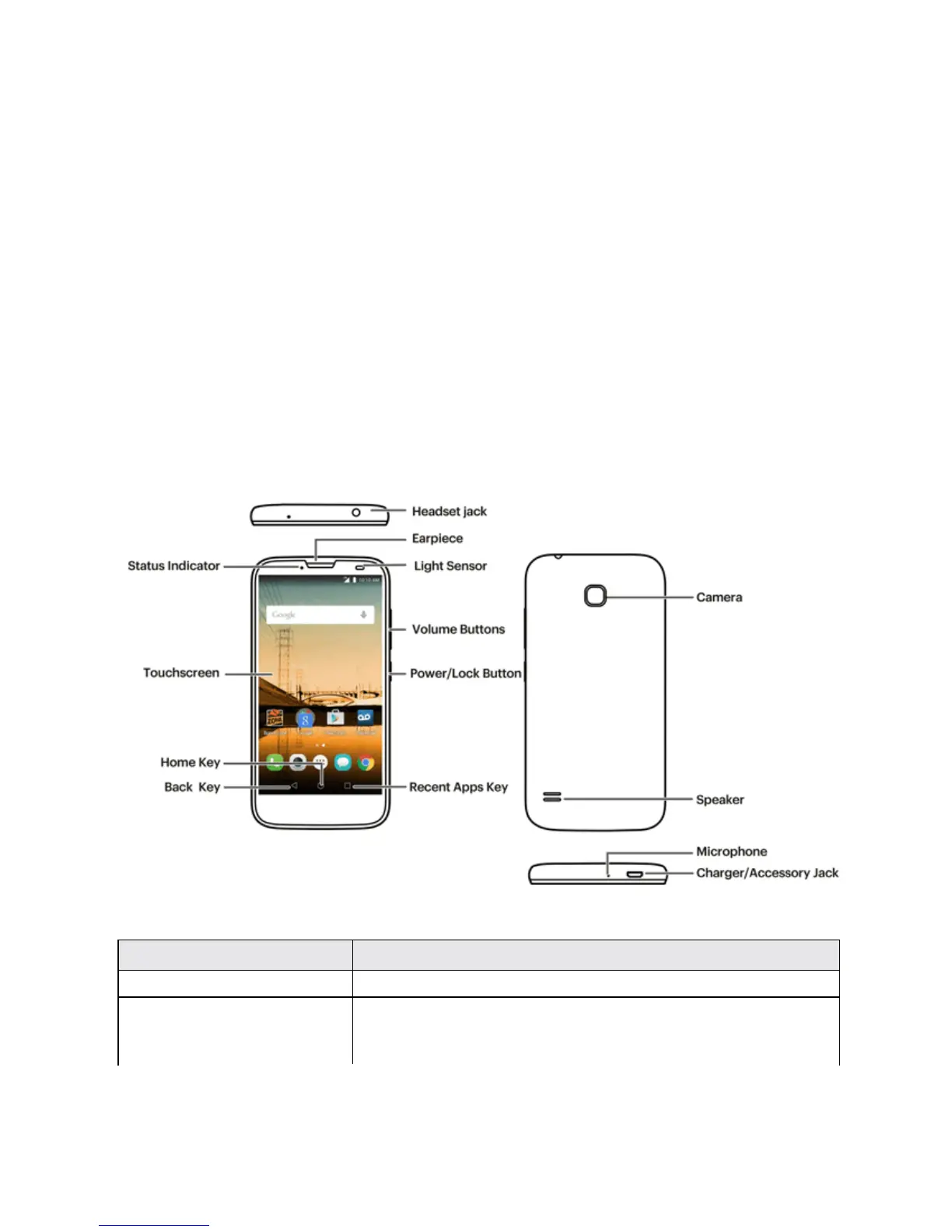
Phone Layout
Thefollowingillustrationoutlinesyourphone’sprimaryexternalfeaturesandkeys.
Note:Beforeyoustart,removetheTPprotectivefilm.
Part Description
Statusindicator Displaysaphonenotification,chargingstatus,oralert.
Touchscreen Displaysalltheinformationneededtooperateyourphone,suchasthe
callstatus,theContactslist,andthedateandtime.Alsoprovidesone-
tapaccesstoallofyourfeaturesandapplications.



 To Next Page