Get Started 9
AlldataontheSDcardiserased,andthecardisformattedforuseonyourphone.
Battery Use
Thefollowingtopicsexplainhowtoinsertandremoveyourphone’sbattery.
Battery Cautions
Storage:Avoidstoringorleavingbatterywithnochargeremaining.Savedinformationand
settingsmaybecomelostorchanged,orbatterymaybecomeunusable.Chargeonceeverysix
monthsbeforestoringorleavingunusedforalongperiod.
Bulges:Dependingonuse,bulgesmayappearnearendofbatterylife.Thisdoesnotaffect
safety.
Replacing Battery:Thebatteryisaconsumableitem.Itneedstobereplacedifoperatingtime
shortensnoticeably.Purchaseanewbattery.
Cleaning:Cleansoiledterminalsbetweenbatteryandphonewithaclean,drycottonswab.
Soiledterminalscanresultinapoorconnectionandpreventcharging,etc.
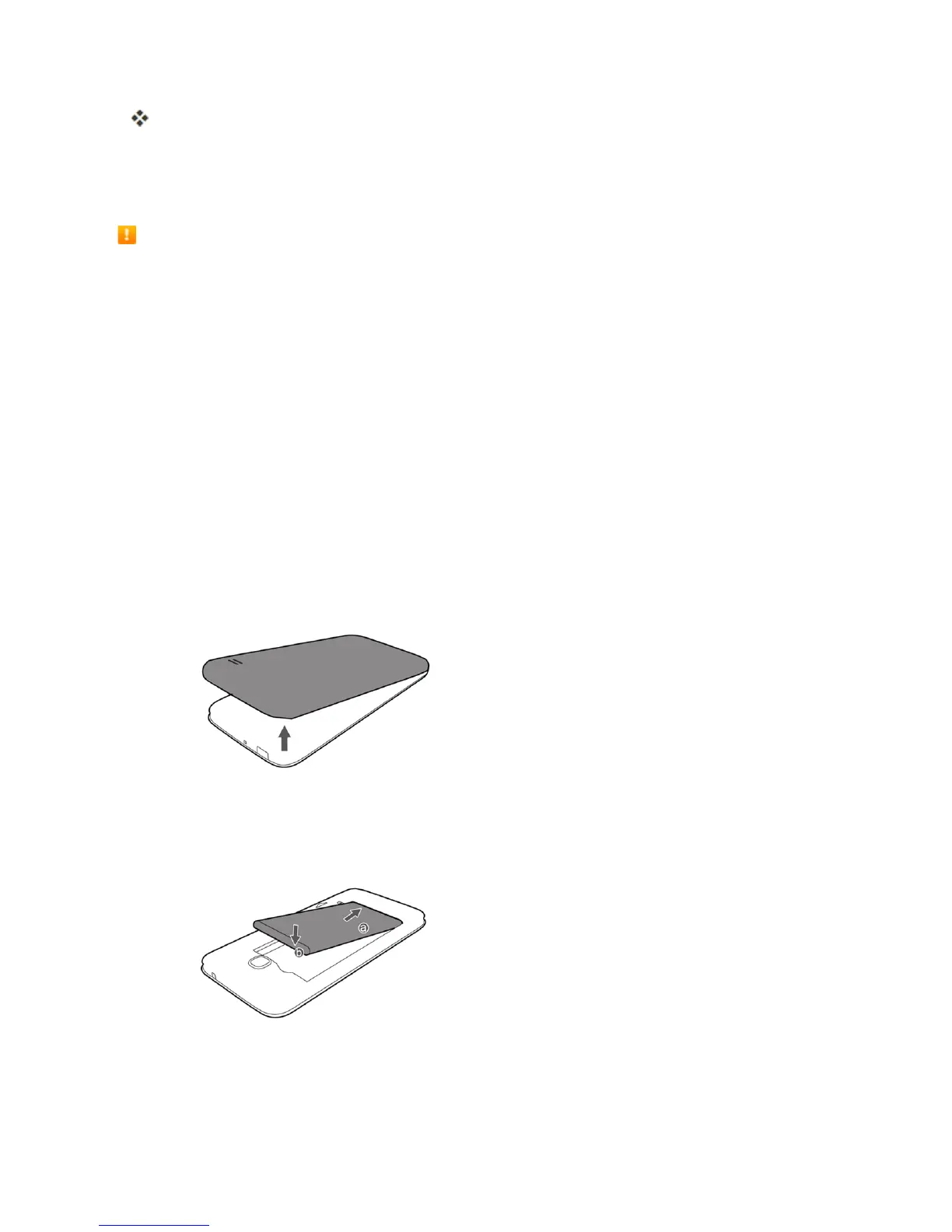
Insert the Battery
Followtheseinstructionstoinsertyourphone’sbatterysafelyandproperly.
1. Removethebatterycover.
l Liftgentlyinthedirectionshown.
2. Insertthebattery.
l Alignthecontactsofthebatterywiththecontactsinthephone.



 To Next Page