13
2.2 radio contol functions
2.2 radio contol functions
rADIO CONTrOL
DrONE FUNCTIONS
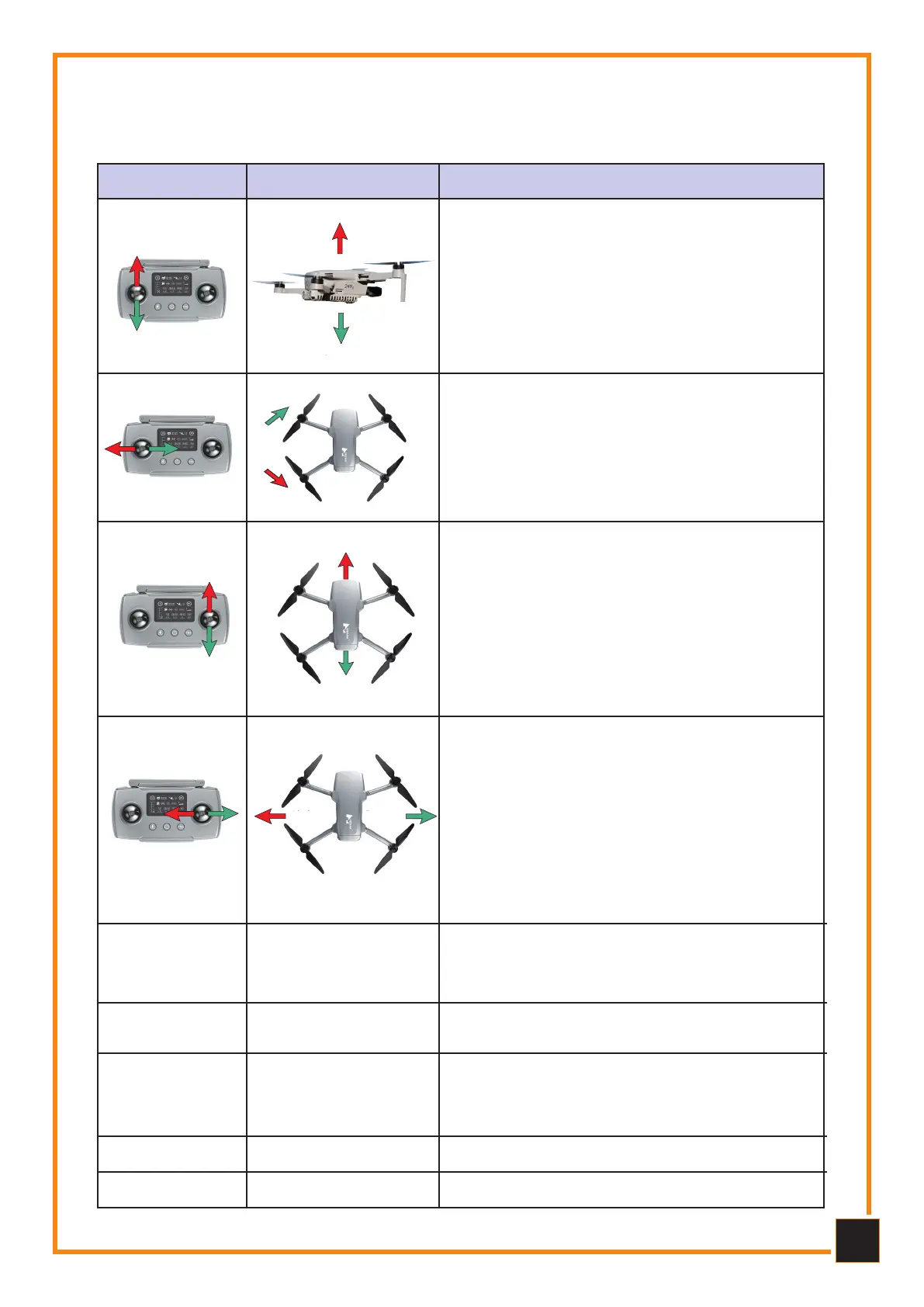
The power stick is used to make the drone ascend or
descend. Pushing the stick forward makes the Drone
go up, pushing it back makes the Drone go down.
When the stick is in the central position the Drone
maintains height. The stick must be pushed forward
to allow the Drone to take off. The faster it is pushed,
the higher the Drone climbs. Slowly and gradually
push the stick back to achieve a soft landing.
The rudder is used to control the rotations of the
Drone. By pushing the stick to the left the Drone ro-
tates counterclockwise, while pushing it to the right
it will rotate clockwise. With the stick in the center
position the angular speed is equal to 0° therefore
the Drone does not rotate. The faster the stick is op-
erated, the faster the rotation will be.
The stick controls the forward or backward movement
of the Drone. By pushing the stick forward the Drone
will tilt and fly forward. By pushing the stick back the
Drone will tilt and fly backwards. The stick, in the cen-
tral position, will maintain the hover position. The de-
gree of push of the stick will determine the degree of
inclination of the drone and therefore the speed of the
forward or backward movement. The greater the stick
thrust, the greater the inclination angle and the speed
both forwards and backwards.
The stick controls the left or right movement of the
Drone. By pushing the stick to the left the Drone will
tilt and fly to the left. By pushing the stick to the right
the Drone will fly to the right. The stick, in the central
position, will maintain its altitude height (hovering).
The sudden movement of the stick will determine the
degree of inclination of the Drone and therefore the
speed of its movement, left or right. The greater the
thrust of the stick, the greater the inclination angle
and the flight speed of the Drone both to the left and
to the right.
Rotazione in senso orario
Rotazione in senso antiorario
Long press the button to enter RTH mode, short
press to exit.
During the return flight, the Remote Control will
emit "Beep ... Beep ..." (once every three seconds).
RTH
(Return to home)
3
Press the button first briefly and then for a long time
to turn it on or off.
Switch of
power supply
4
Film mode: aircraft flight speed 1 m/s. - Nomal
Mode: the Drone flies at the maximum speed set by
the APP, 10 m/s. - Spots Mode: The maximum flight
speed of the Drone is 16m/s.
Mode
Film
Normal
Sport
5
View flight parameters.Display6
Make a short press to take photos.Photo7
B 2
B 2
A 1
A 1
Climb
Descent
rotate clockwise
rotate counteclockwise
FORWARD
BACK
LEFT RIGHT



 To Next Page