16
2.6
2.6
radio contol calibation
radio contol calibation
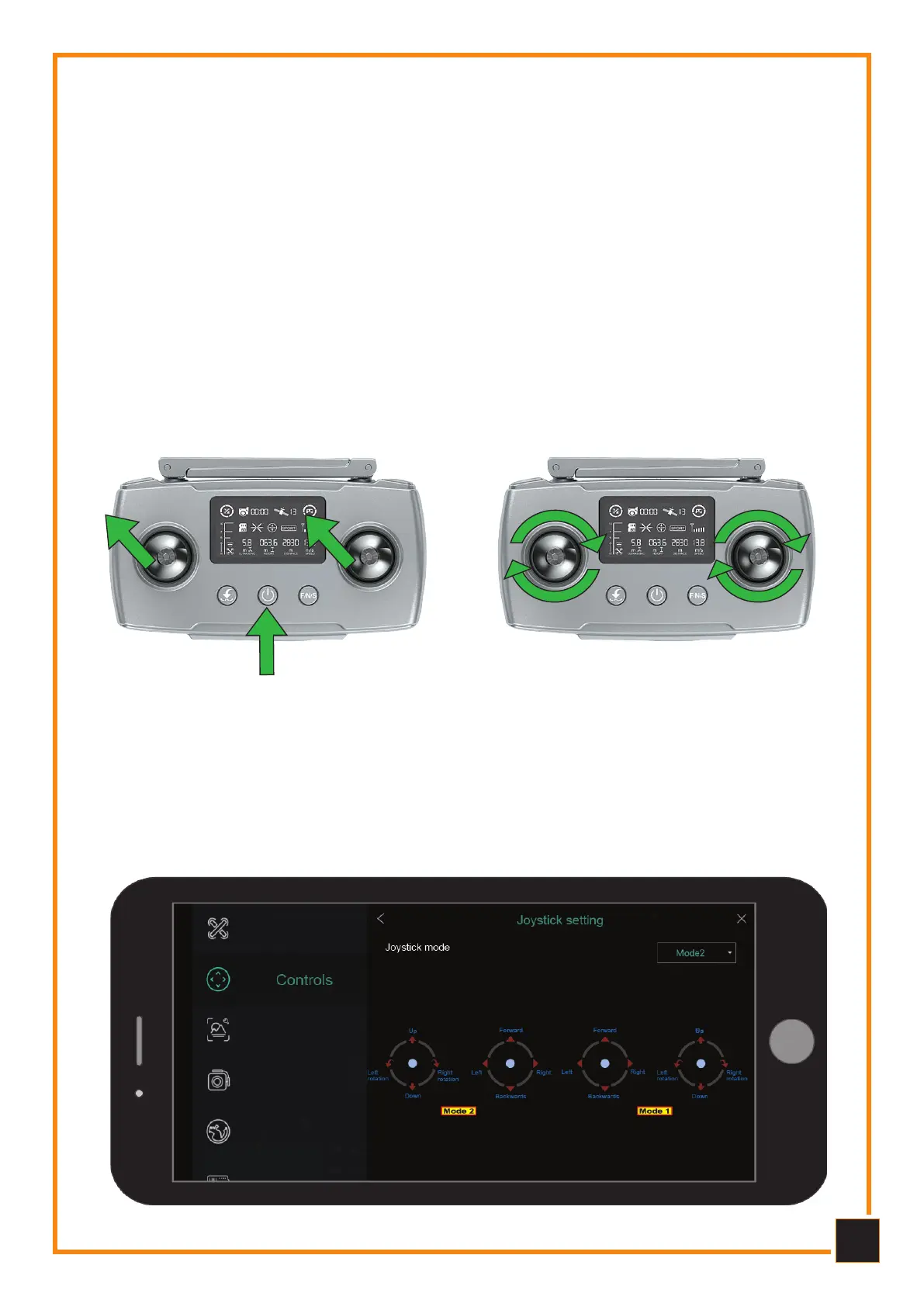
1 - Pull both joysticks to the top left corner and simultaneously press and hold the
power button to turn on the Remote Control, release the power button and the sticks
after hearing the Remote Control emits some beeps.
2 - Rotate both sticks to the maximum angle clockwise at least 3 times, then release
the sticks.
3 - Long press any button (except the powe button) on the transmitter, when the
remote control emits 3 beeps and the display indicates the battery level and the trans-
mission signal level, the calibration has been completed.
4 - Turn off and restart the radio control.
2.7
2.7
Setting the adio contol sticks
Setting the adio contol sticks
Open the menu from the App: Settings - Control - Stick Control Settings. The setting
allows you to change the control mode (Mode 1 - Mode 2). Please remember that the
default setting is MODE 2



 To Next Page