7.3
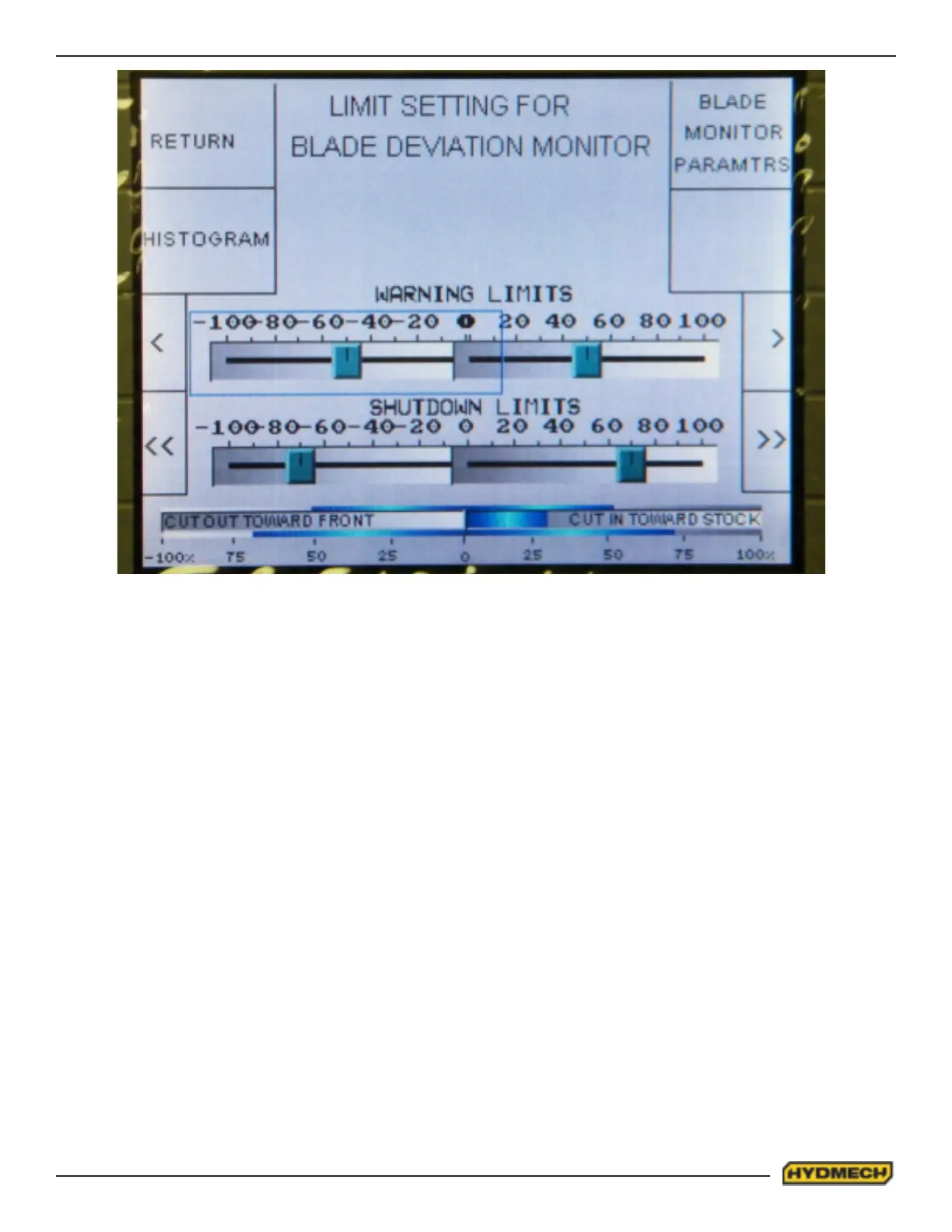
Fig.2
WARNING AND SHUTDOWN LIMITS ADJUSTMENTS
To adjust the warning and shutdown limits, enter the MONITOR LIMIT SETTING screen by pressing function key F1
labeled LMTSET (Screen will change as shown in Fig.2)
There are two scales, the upper one showing the preset right and left warning limits, and the lower scale showing the
preset right and left shutdown limits. All four limits (right and left warning, and right and left shutdown) are set
independently.
To adjust the limits, move the cursor to the desired limit and then use the function keys F3, F4, F7 and F8 to change its
value.
Cut out warning limit – (out - cutting towards outfeed, range 0 ~100) This parameter will adjust the warning limit if the
blade is cutting towards the part. Increasing this value decreases sensitivity, which will result in a warning further away
from nominal straight.
Cut in warning limit – (in - cutting towards infeed, range -100 ~ 0) This parameter will adjust the warning limit if the blade
is cutting towards the stock. Decreasing this value decreases sensitivity, which will result in a warning further from away
nominal straight.
Cut out maximum limit – (out - cutting towards outfeed, range 0 ~100). This parameter will adjust the shutdown limit
if blade is cutting towards the part. Increasing this value decreases sensitivity, which will result in a larger deviation from
nominal straight, before the shutdown sequence is initialized.
Cut in maximum limit – (in - cutting towards infeed, range -100 ~ 0) This parameter will adjust the shutdown limit if the
blade is cutting towards the stock. Decreasing this value decreases sensitivity, which will result in a larger deviation from
nominal straight, before the shutdown sequence is initialized.


 To Next Page