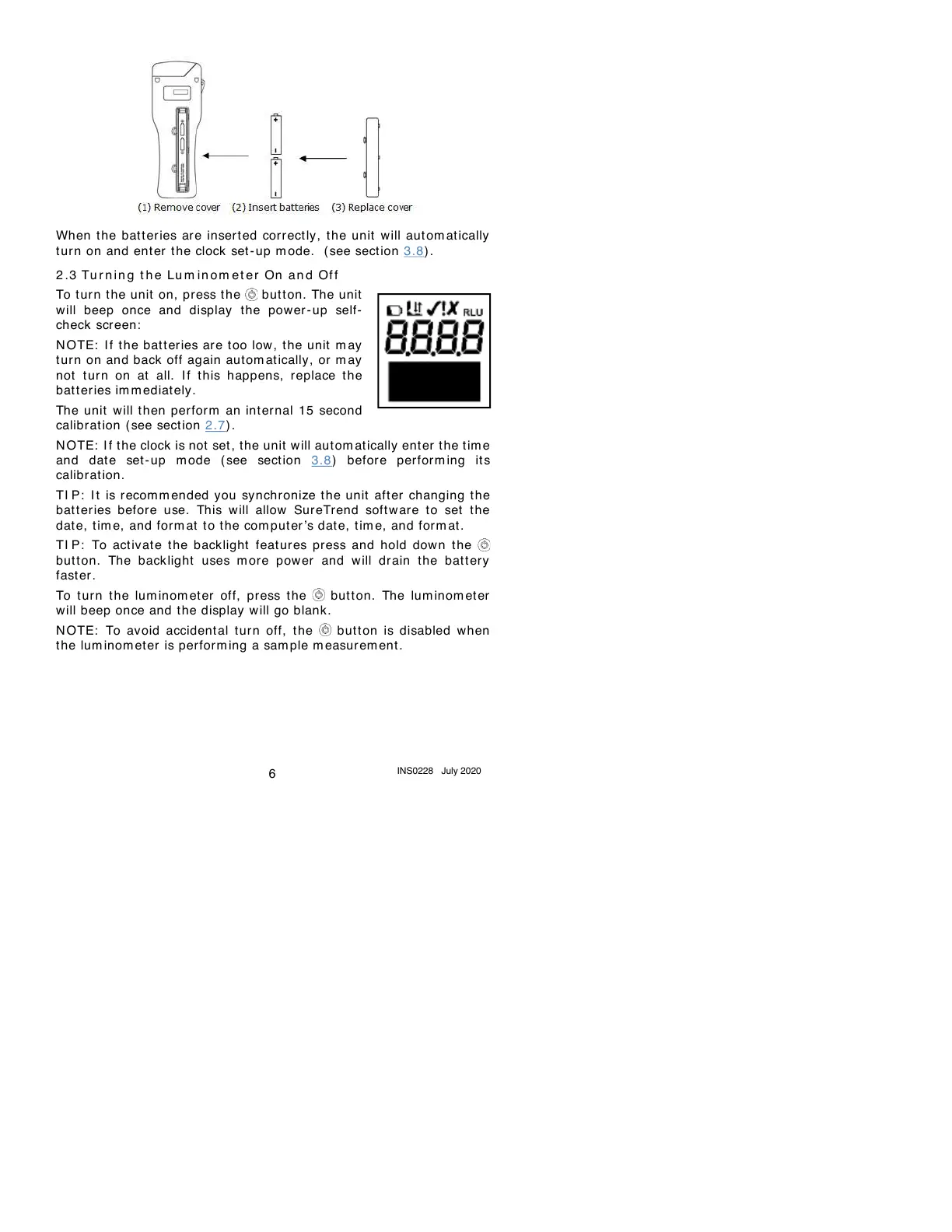
When the bat t er ies are inser t ed correct ly , the unit will aut om at ically
tur n on and ent er the clock set-up m ode. ( see sect ion 3.8) .
2 .3
Tu r n in g t h e Lu m in o m et er On an d Of f
To turn t he unit on, press t he button. The unit
will beep once and display the power- up self-
check screen:
N OTE: If the bat t eries are too low, the unit m ay
tur n on and back off again autom at ically, or m ay
not turn on at all. I f this happens, replace the
bat t er ies im m ediat ely.
The unit will t hen perfor m an internal 15 second
calibration (see sect ion 2.7) .
N OTE: I f t he clock is not set, the unit will autom at ically ent er the t im e
and date set - up m ode (see section 3.8) before perform ing its
calibration.
TI P: I t is recom m ended you sy nchronize the unit after changing the
bat t er ies before use. This will allow SureTrend software to set the
dat e, tim e, and for m at t o the com puter ’s date, tim e, and form at .
TI P: To act iv at e the backlight featur es press and hold dow n the
but t on. The backlight uses m ore power and will drain t he bat t ery
fast er .
To t urn the lum inom eter off, press the but t on. The lum inom et er
will beep once and the display will go blank.
N OTE: To avoid accidental tur n off, the but t on is disabled when
the lum inom et er is perfor m ing a sam ple m easur em ent .



 To Next Page