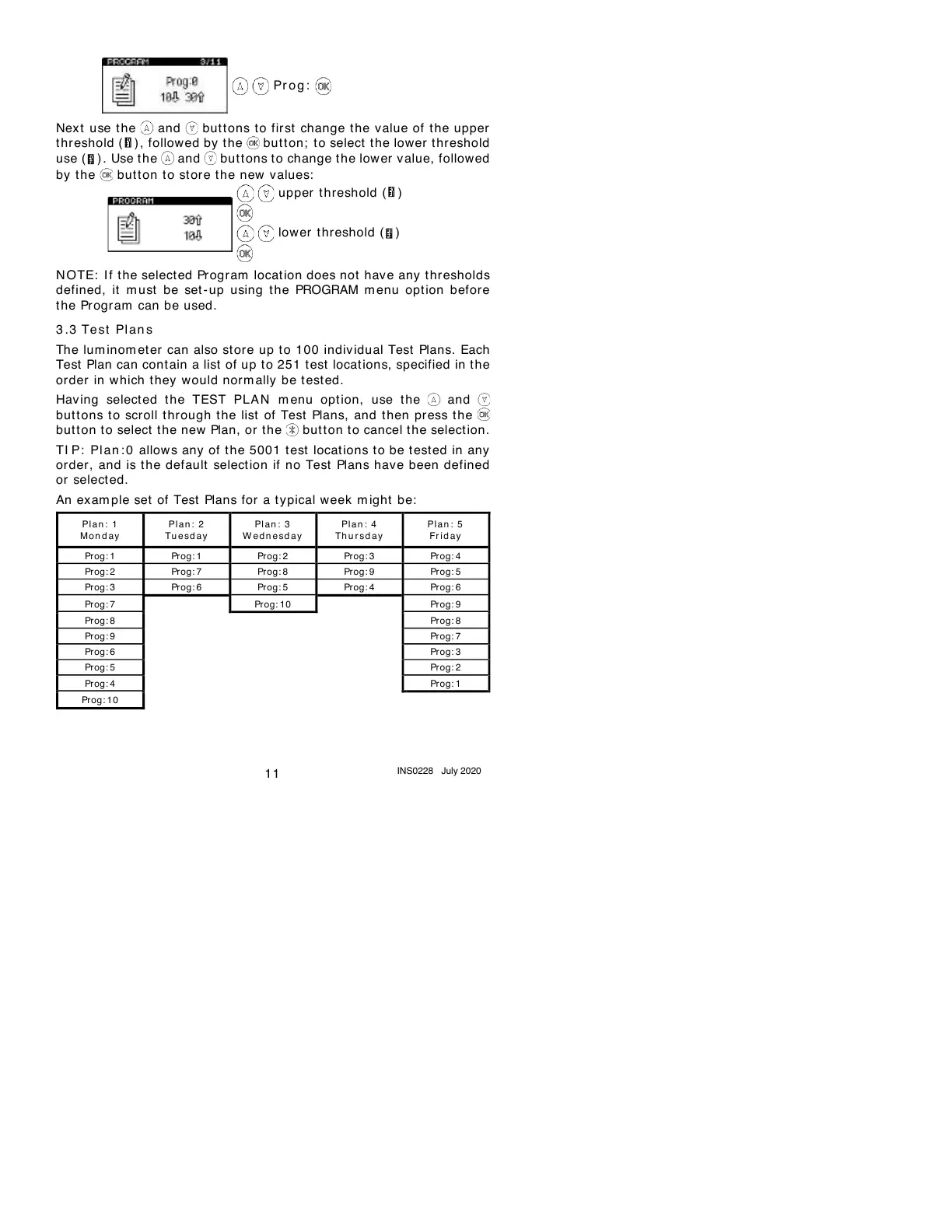
Next use t he and but t ons to first change the v alue of the upper
thr eshold ( ) , followed by t he but t on; t o select the lower t hreshold
use ( ) . Use t he and but t ons to change t he lower value, follow ed
by the button to store the new values:
N OTE: I f t he select ed Pr ogram locat ion does not hav e any t hr esholds
defined, it m ust be set - up using the PROGRAM m enu option befor e
the Program can be used.
3 .3
Te s t Pl an s
The lum inom et er can also st ore up t o 100 individual Test Plans. Each
Test Plan can cont ain a list of up to 251 test locations, specified in the
order in which they would norm ally be test ed.
Having select ed the TEST PLA N m enu opt ion, use the and
but t ons to scroll through the list of Test Plans, and then press t he
but t on to select t he new Plan, or t he butt on to cancel the selection.
TI P: Pl an : 0 allows any of t he 5001 test locat ions to be test ed in any
order, and is the default select ion if no Test Plans have been defined
or selected.
An exam ple set of Test Plans for a typical week m ight be:


 To Next Page