EasyManua.ls Logo

Hytera PT580 - Main Board Disassembly

Hytera PT580
104 pages
Print Icon
To Next Page IconTo Next Page
To Previous Page IconTo Previous Page
Loading...
Service Manual
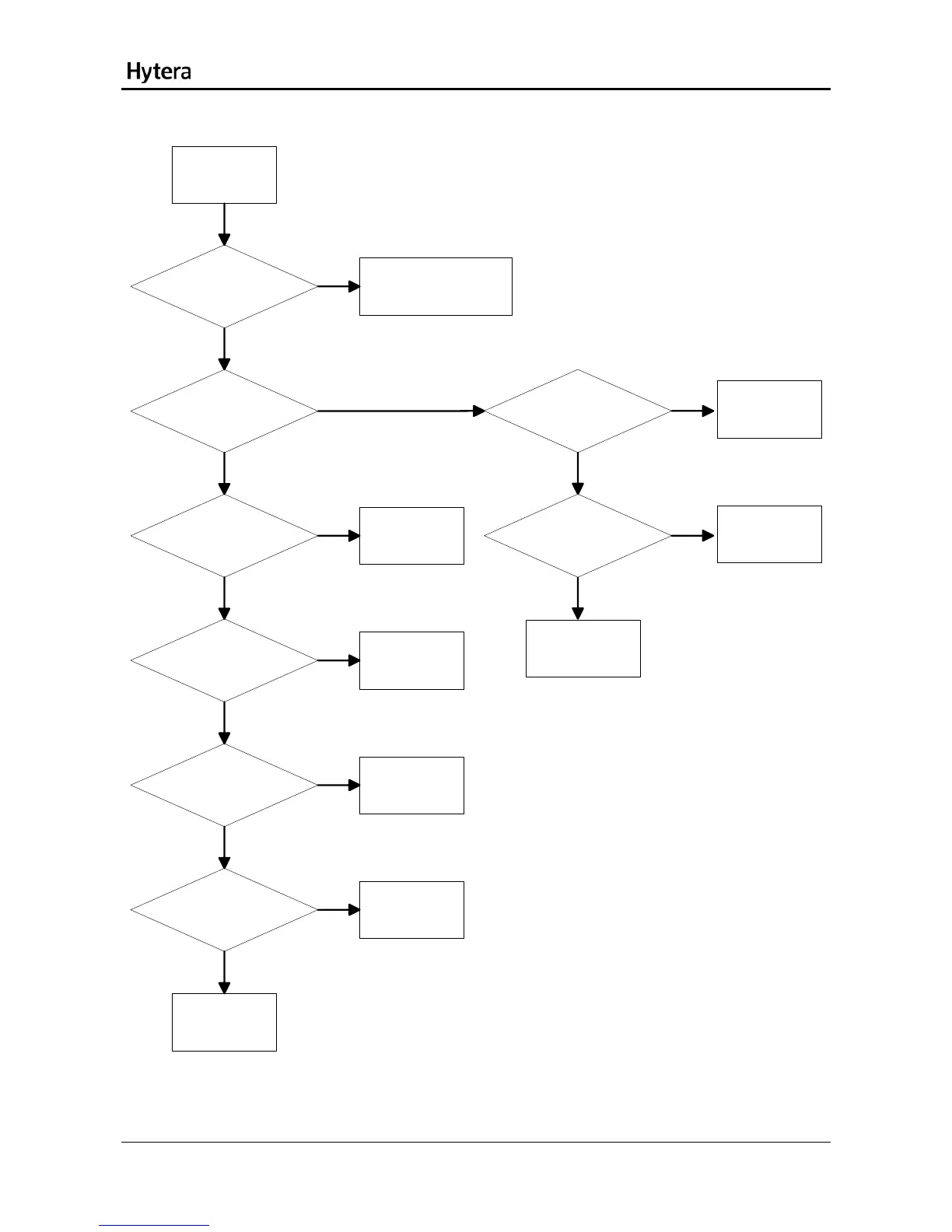
No Audio during Talk
Check whether the
receiver is normal. [1]
Refer to the section No
Audio from Speaker.
Check whether the main
board is normal. [2]
Refer to the
section RF
POPWER
Circuit.
Check whether U7211
works normally. [4]
Replace U7211.
Check whether U7209
works normally. [5]
Check U7209.
Check whether U7210
works normally. [6]
Check U7210.
Check whether the MIC
works normally. [7]
Replace the MIC.
No audio from
the receiver
during talk
Check U7209 or
the 70-pin
connector
Yes
Yes
Yes
Yes
Yes
Yes
No
No
No
No
No
No
Check whether the I/Q
signal is normal. [3]
Yes
Yes
No
No
Check whether
Pin58/Pin60 of U2101
outputs audio signal.
Check U2101.
Check the 70-pin
connector on the
main board and
related parts.
34

Table of Contents

Related product manuals