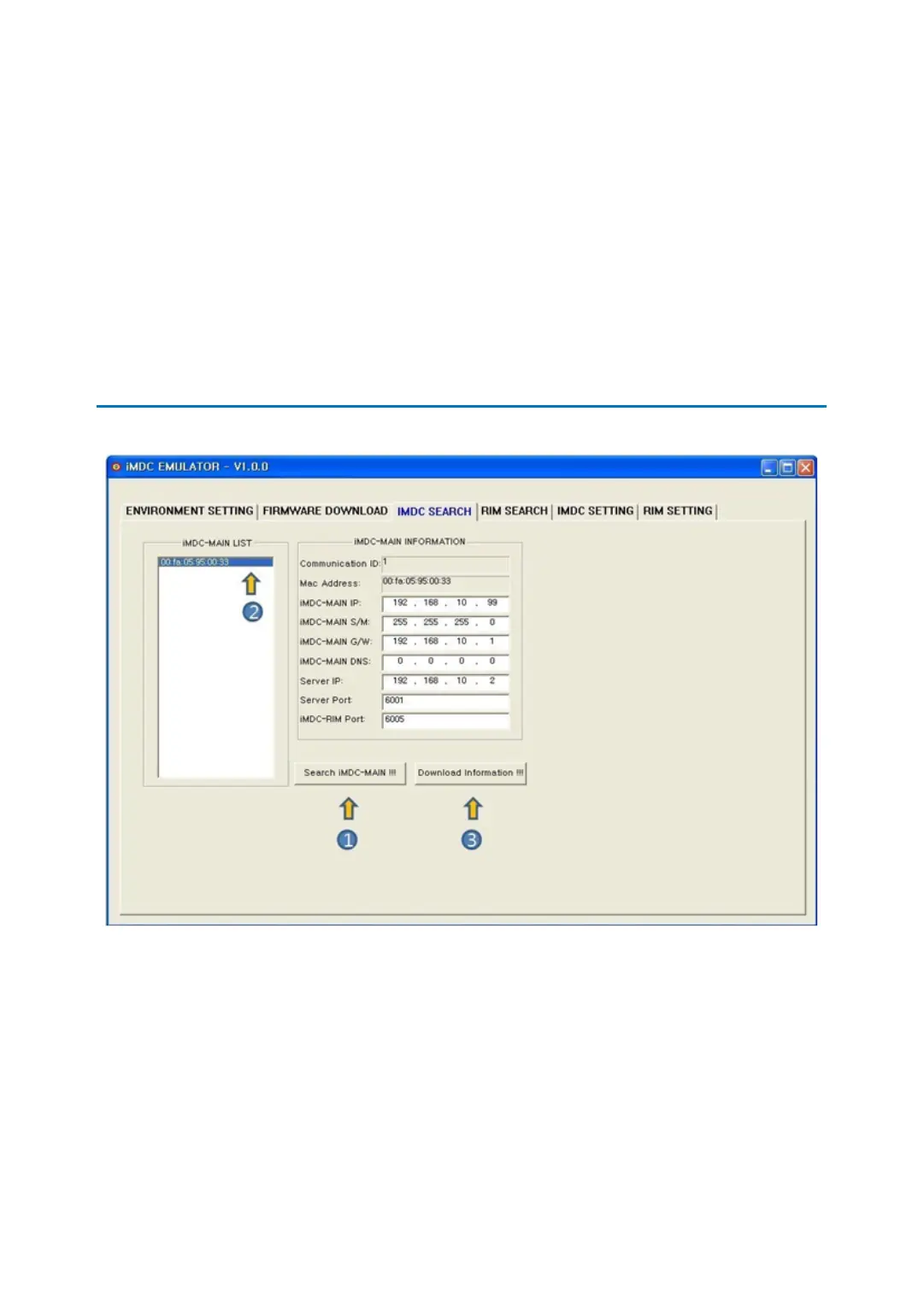
iMDC EMULATORp.50
mation on the same network. Searched iMDC-MAIN’s MAC Address is displayed on the
iMDC-MAIN LIST.
2. Double click iMDC-MAIN’s MAC Address you want to confirm or change.
3. [Download Information!!!]: This button is to change the network information of the iM
DC-MAIN. in ‘iMDC-MAIN LIST’, double click iMDC-MAIN’s MAC Address you want to c
hange then applicable information is displayed in ‘iMDC INFORMATION’. Check and cha
nge the information and then click the [Download Information] button to complete this
process.
4 RIM SEARCH
1. [Search RIM!!!] : This button is to search all existing iMDC-RIM network information on
the same network. Searched iMDC-RIM’s MAC Address is displayed on the iMDC-RIM LI
ST.
2. Double click iMDC-RIM’s MAC address you want to confirm or change.
3. [Download Information!!!]: This button is to change the network information of the iM
DC-RIM. Double click iMDC-RIM’s MAC Address you want to change then the applicabl
e iMDC-RIM information is displayed in ‘iMDC INFORMATION’. Check and change the in
formation and then click the [Download Information] button to complete this process.



 To Next Page