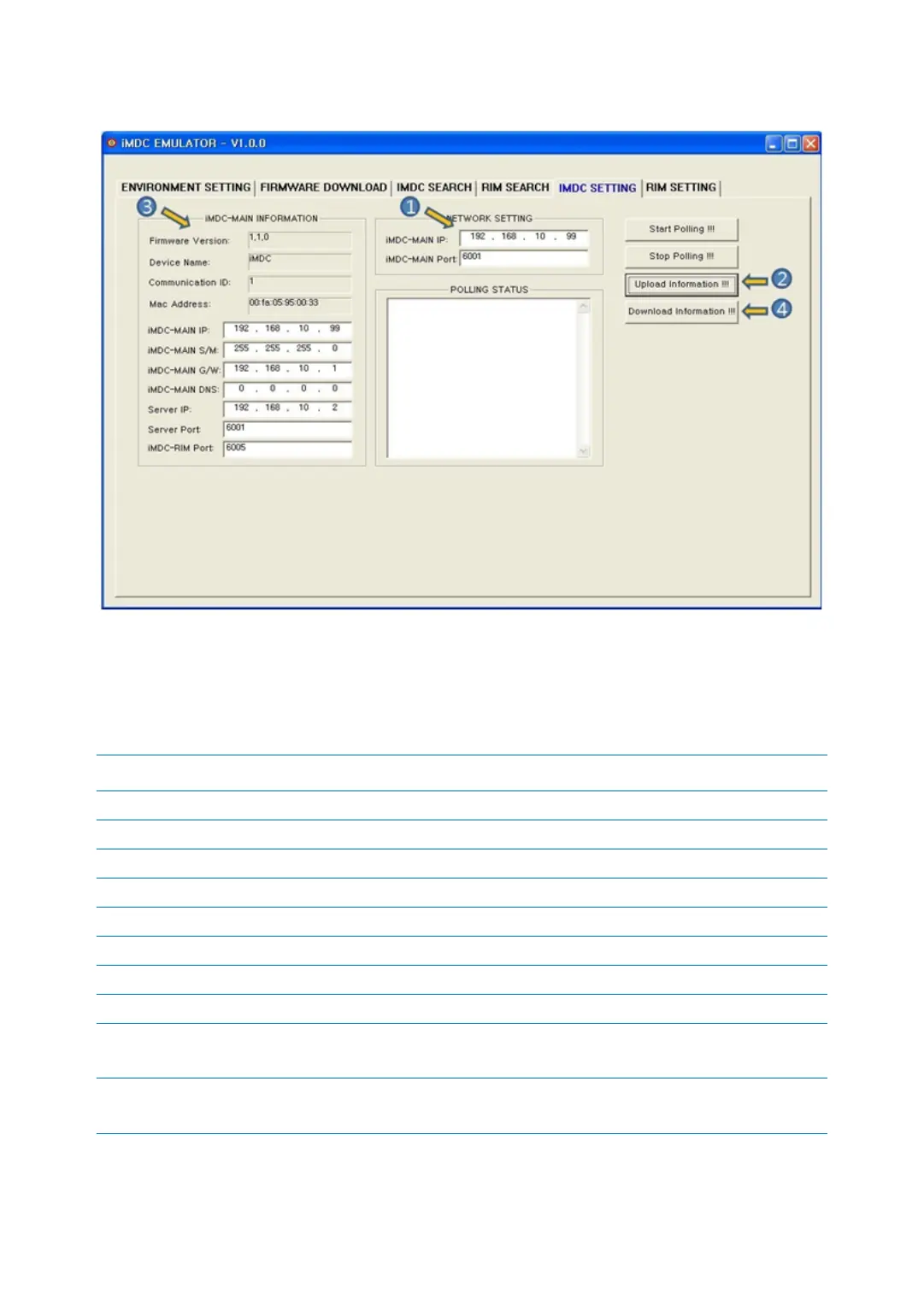
iMDC EMULATORp.52
5.2 iMDC–MAIN NETWORK SETTING
1. Enter the iMDC-MAIN’s IP address and port you want to use.
2. [Upload Information!!!]: This button is to search iMDC-MAIN network information.
3. Searched iMDC-MAIN’s network information is displayed.
iMDC-MAIN INFOMATION Description
Firmware Version It shows version of iMDC-MAIN.
Device Name It shows searched device name. iMDC-MAIN is displayed as iMDC.
Mac Address It’s the Mac address for Ethernet Card.
Communication ID It’s the address for communication.
iMDC-MAIN IP It’s searched iMDC-MAIN board IP address.
iMDC-MAIN G/W It’s searched gateway address of iMDC-MAIN board.
iMDC-MAIN DNS It’s searched DNS address of iMDC-MAIN board.
Server IP It’s PC’s IP address which installed communication server.
Server Port It’s the PC’s port which installed communication server.
Using default (6001) is recommended.
iMDC-RIM Port It’s the port number to connect iMDC-MAIN and iMDC-RIM.
Using default (6005) is recommended.



 To Next Page