iMDC EMULATORp.54
Mac Address It’s Mac address of Ethernet card
iMDC-RIM IP It’s IP address of searched iMDC-RIM board.
iMDC-RIM G/W It’s gateway address of searched iMDC-RIM board.
iMDC-RIM DNS It’s DNS address of searched iMDC-RIM board.
iMDC-RIM PORT It’s port address of searched iMDC-RIM board.
It is used to communicate between iMDC-RIM board and iMDC-MAIN. Usi
ng default (6005) is recommended.
iMDC-MAIN IP It’s IP address of iMDC-MAIN to connect iMDC-RIM board.
iMDC INFOMATION Description
4. If you want to change the iMDC-RIM’s network setting, change the network setting in ‘i
MDC-RIM INFORMATION and click the [Download Information!!!] button to complete.
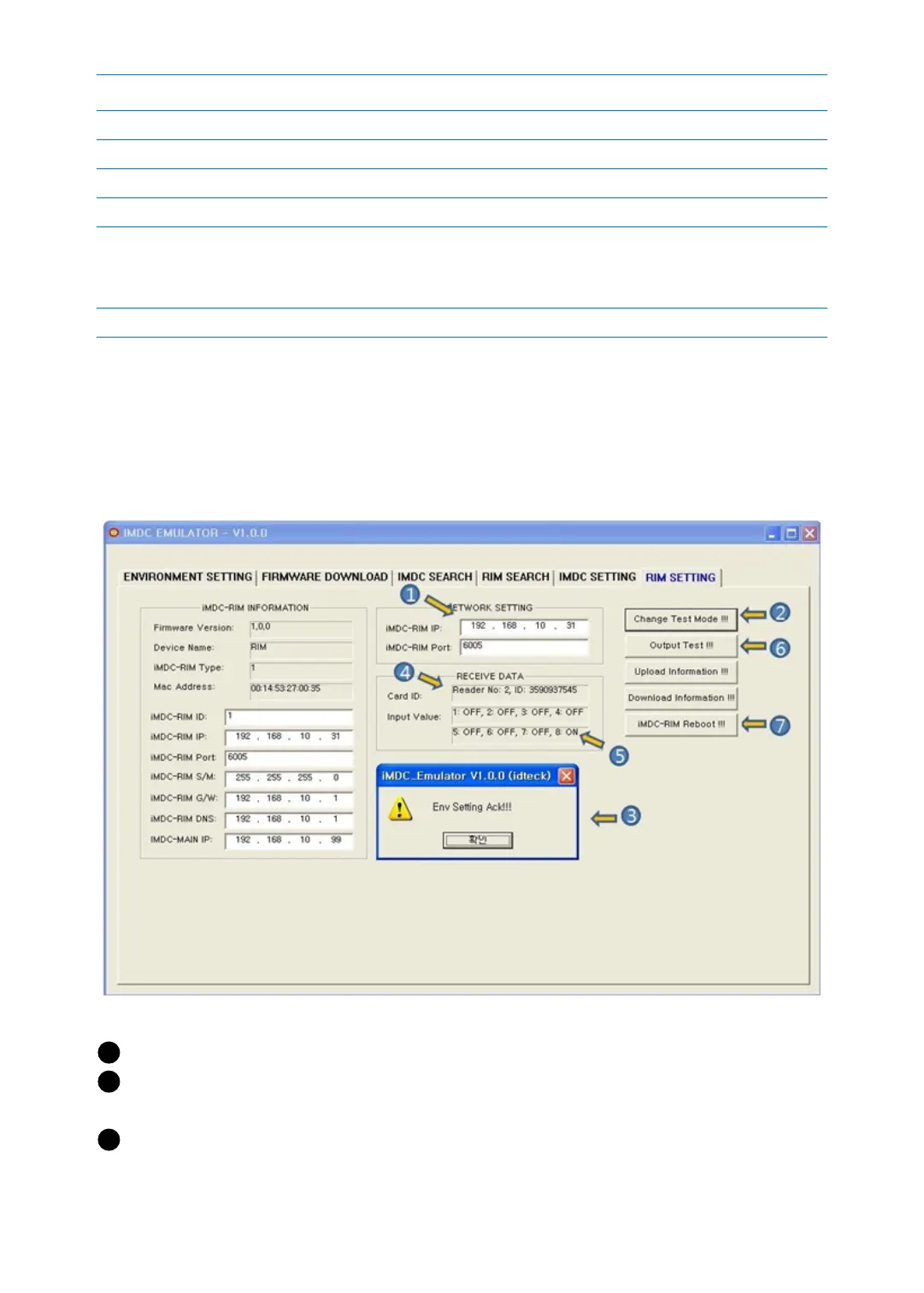
6.2 iMDC-RIM TEST
1 Input the iMDC-RIM IP address and port you want to search.
2 [Change Test Mode!!!]: This button is to change the applicable iMDC-RIM (192.168.10.
31) board to Test Mode.
3 If the ‘Env Setting Ack!!!’ message appears. It means iMDC-RIM (192.168.10.31) is set a



 To Next Page