NETWORK SETTINGp.40
2 PUBLIC IP NETWORK SETTING
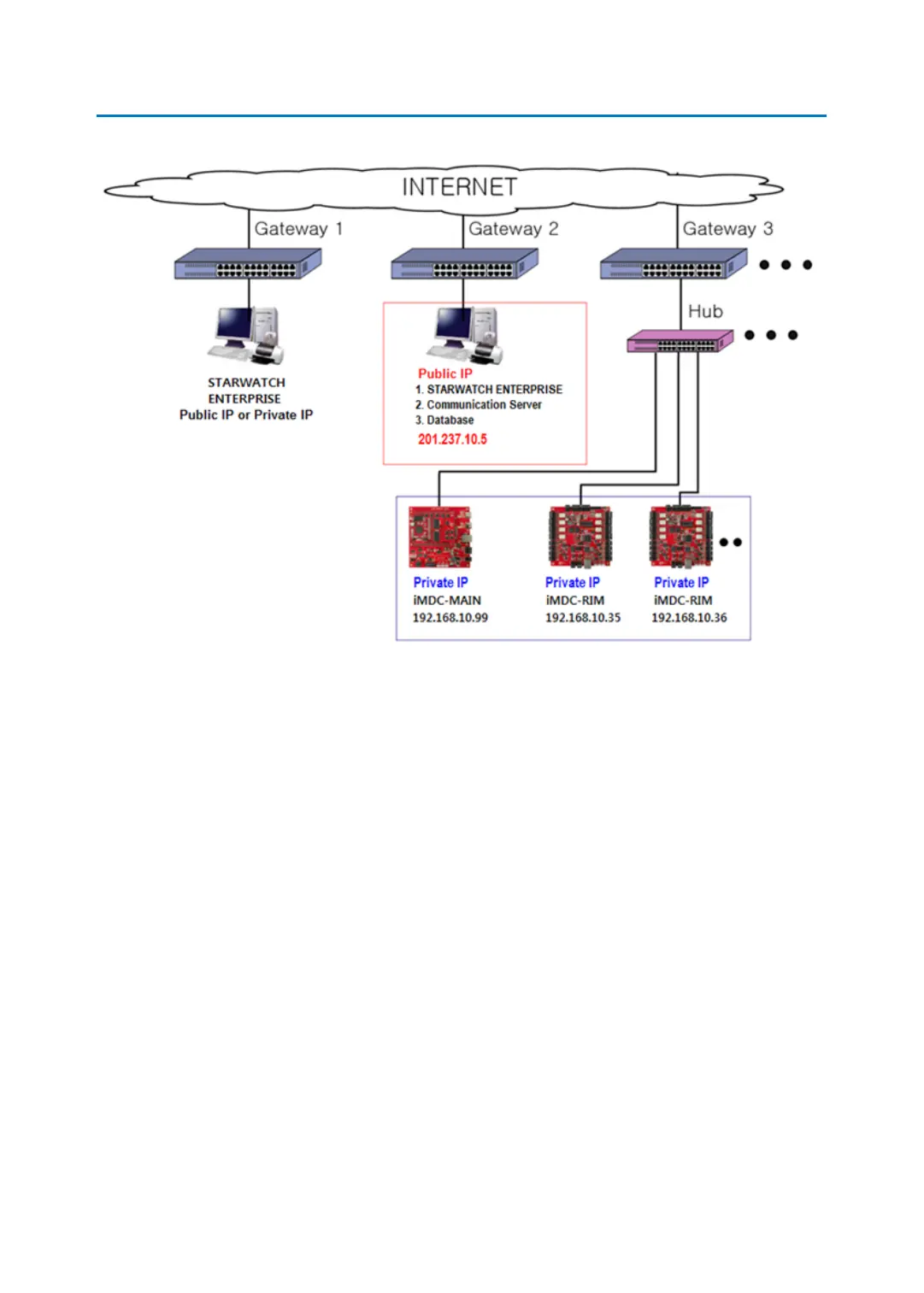
Above figure is the configuration using public IP broadband.
If you use the same public IP broadband, it is possible to search all of the iMDC-MAIN, iMDC
-RIM board connected on the same network by using automatic searching function of STAR
TWHATCH ENTERPRISE or iMDC EMULATOR. (Please refer to ‘6.Network setting’, ‘7.iMDC E
MULATOR’)
But if you use different IP broadband, it is possible to search the information of the iMDC-M
AIN, iMDC-RIM board by manual searching function.
If firewall of PC blocks the port used for iMDC-MAIN and iMDC-RIM (iMDC-MAIN, iMDC-RI
M, communication server), Set the firewall cancellation about the ports. Otherwise the firew
all may block the applicable ports used to communicate with STARWATCH ENTERPRISE.
2.1 iMDC-MAIN IP ADDRESS SETTING
STARTWATCH ENTERPRISE program is needed to set the IP adress of iMDC-MAIN and iMDC
-RIM board. Refer to the STARTWATCH ENTERPRISE manual for the detailed installing meth
od. The content below to set IP adress of iMDC-MAIN and iMDC-RIM board would be descri



 To Next Page