p.53RIM SETTING
4. If you want to change iMDC-MAIN’s network setting, change network setting in ‘iMDC-
MAIN INFORMATION’ and click the [Download Information!!!] button to complete.
6 RIM SETTING
6.1 iMDC-RIM NETWORK SETTING
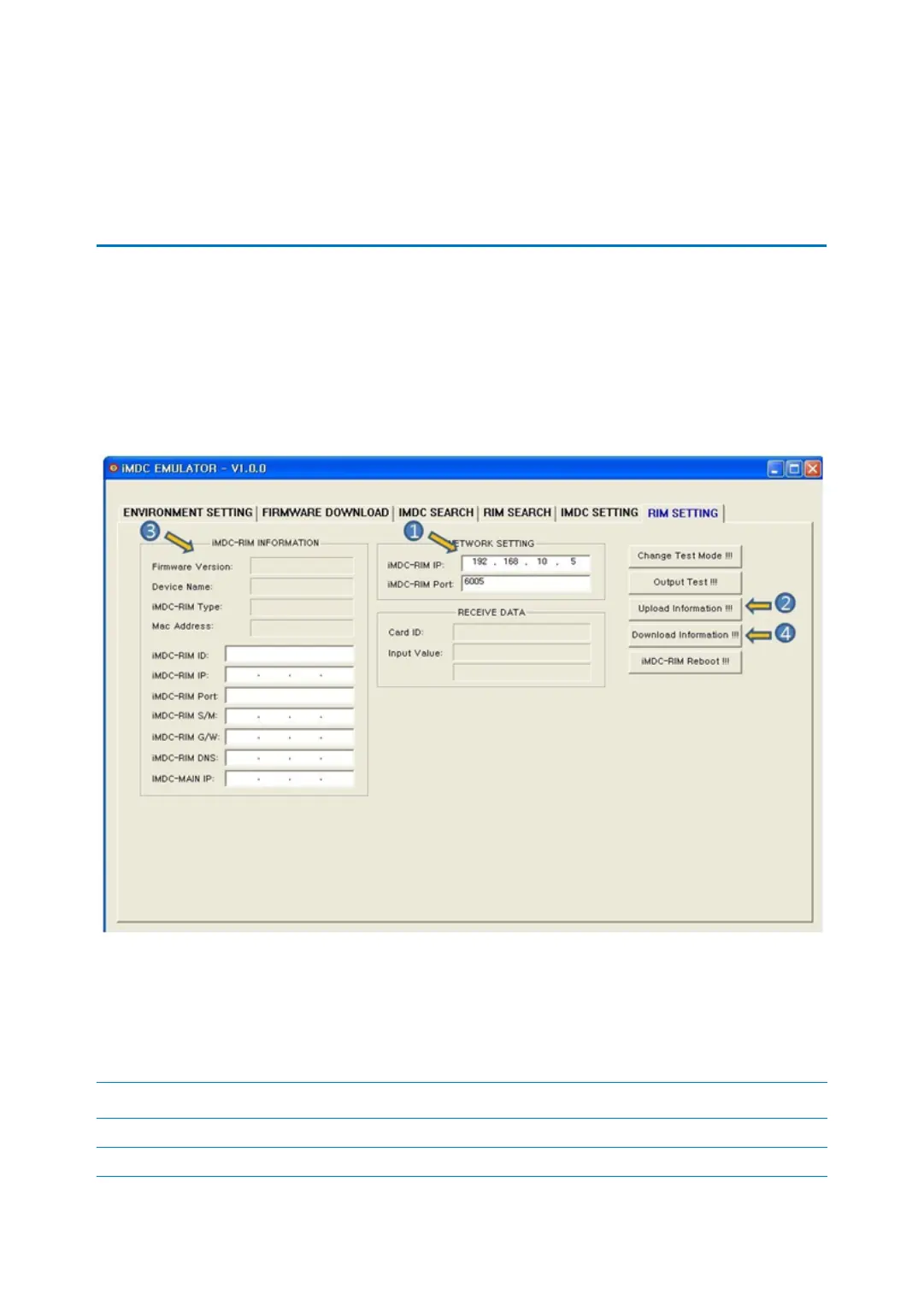
In terms of the specific iMDC-RIM, you can test how to operate or change network informati
on. The difference between ‘RIM SEARCH’ and ‘RIM SETTING’ is that “RIM SETTING’ is able to
select specific iMDC-RIM you want to use.
1. Input the iMDC-RIM’s IP address and port you want to use.
2. [Update Information]: This button is to search iMDC-RIM’s network information.
3. Searched iMDC-RIM’s network information is displayed.
iMDC INFOMATION Description
Firmware Version It shows the version of iMDC-MAIN
Device Name It shows searched device name. iMDC-MAIN is displayed as iMDC



 To Next Page