3D sensor
18
9. Set-up
After power on the device is put into operation. After 15 seconds the sensor is in the evaluation mode
where saved applications are executed. The indicators signal the current operating state (→ 8).
Up to 32 applications can be saved on the sensor. An application can be activated in different ways:
● ifm Vision Assistant software
● Process interface command
● Switching input 1 and 2
● Switching input 1 and trigger input
9.1 Set parameters of the device
The sensor is set using the ifm Vision Assistant software (→ see software manual).
The software ifm Vision Assistant and detailed information about the measuring principle of the
device are described in the software manual.
The ifm Vision Assistant software is available free of charge on our website:
www.ifm.com
The software manual is available on our website:
www.ifm.com
9.2 Detect object
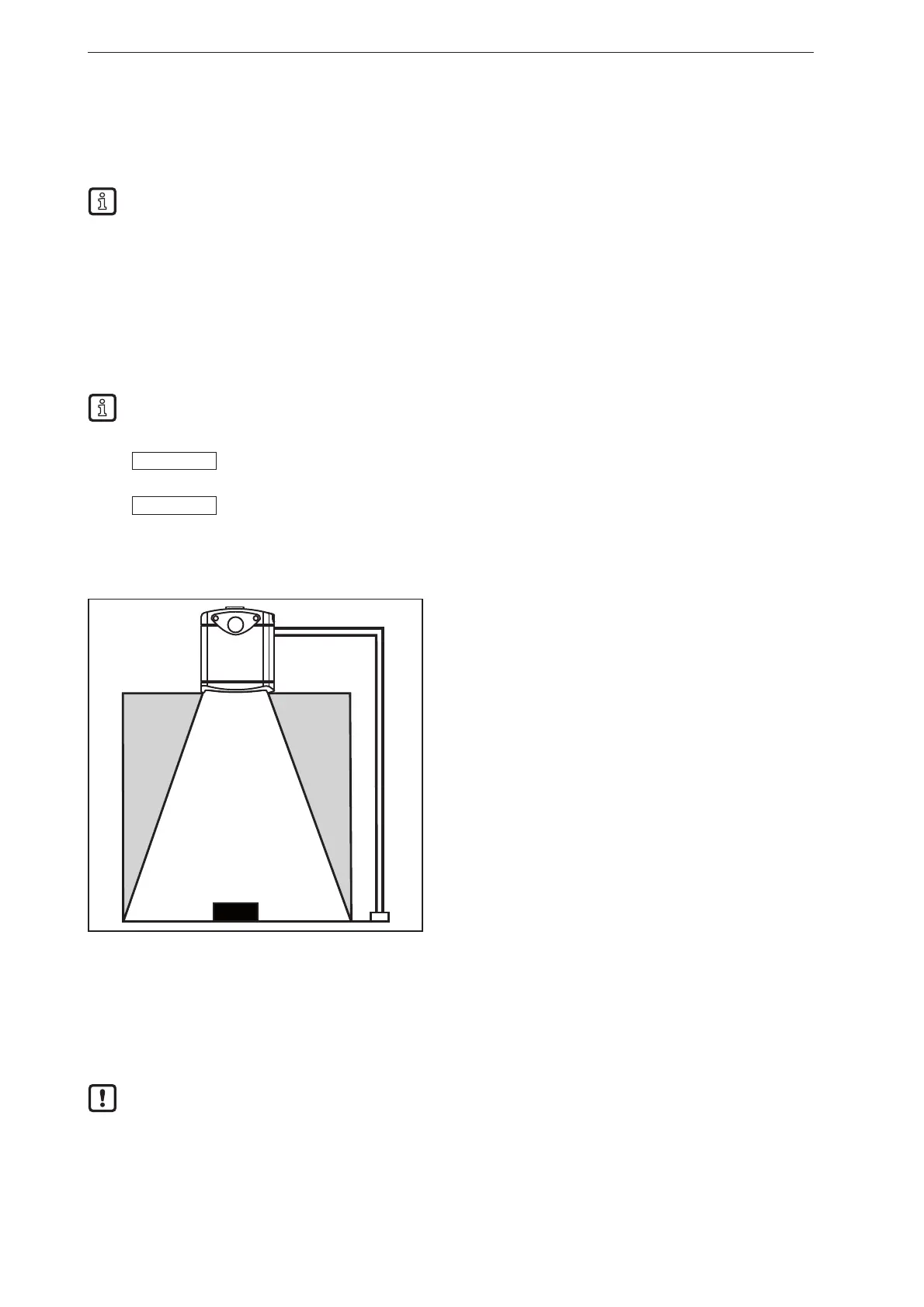
The conditions which lead to a high detection rate of objects are described below.
③
②
④
②
①
① Device
② Zone of influence
③ Field of view
④ Object
Optimum detection of an object ④ is given if the following conditions are met:
● Object is positioned in the field of view ③
● Object is the nearest visible object to the sensor ①
● Zone of influence ② is clear from objects (obstructions etc.)
● Lens window of the sensor is free from soiling.
If the conditions are not met, measurement errors may occur.



 To Next Page