3D sensor
36
13.1.2 Receiving Images
For receiving the image data a TCP/IP socket communication is established. The default port number is
50010. The port number may differ based on the configuration. After opening the socket communication,
the O3D3XX device will automatically (if the device is in free run mode) send the data through this socket
to the TCP/IP client (PC).
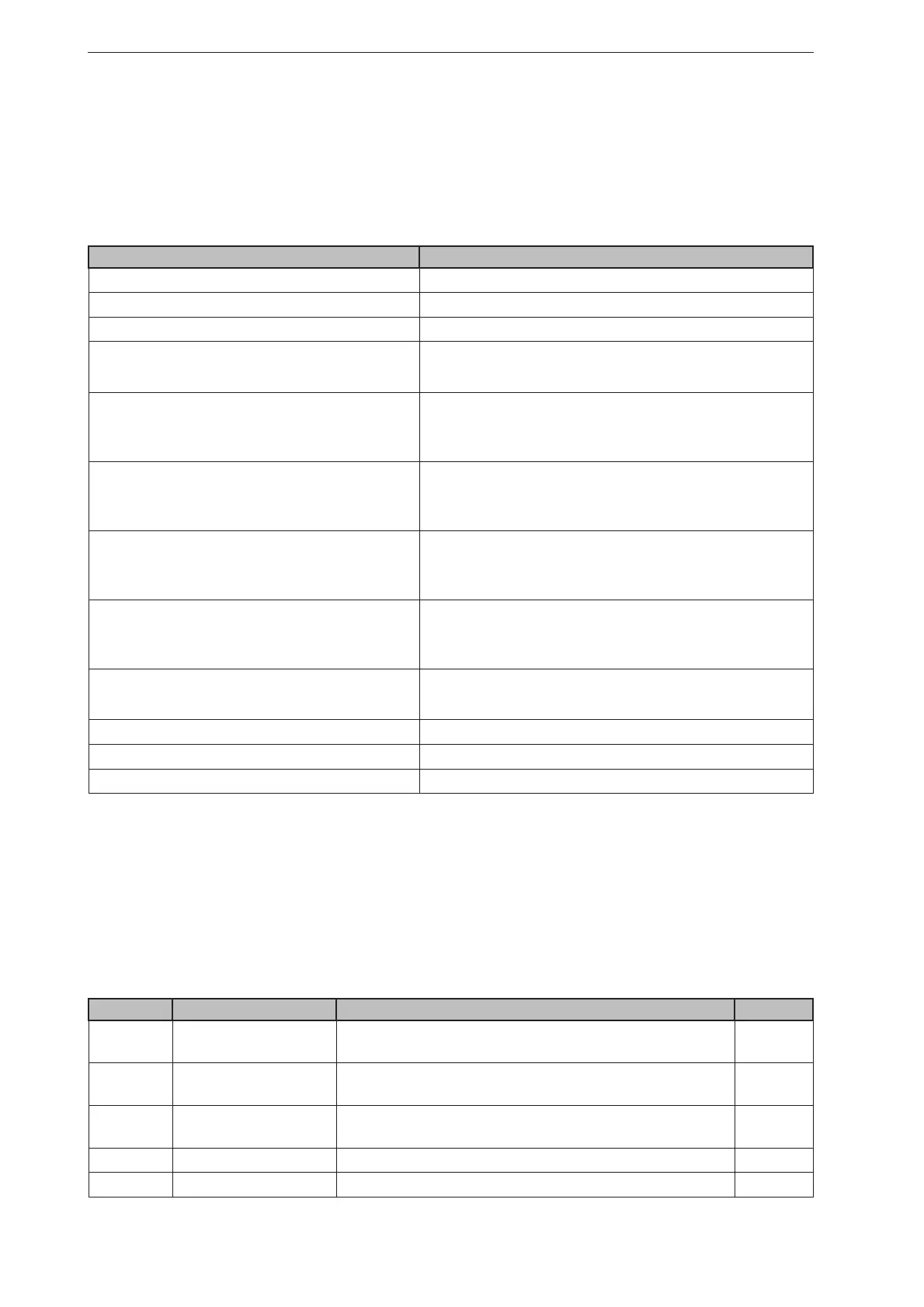
PCIC output per frame. The following data is submitted in this sequence:
Component Content
Ticket and length information (→ 13.2.2)
Ticket "0000"
Start sequence String "star" (4 bytes)
Normalised amplitude image
Output format: 16-bit unsigned integer
1 image
Distance image
Output format: 16-bit unsigned integer.
Unit: mm
1 image
X image
Output format: 16-bit signed integer.
Unit: mm
1 image
Y image
Output format: 16-bit signed integer.
Unit: mm
1 image
Z image
Output format: 16-bit signed integer.
Unit: mm
1 image
Confidence image
Output format: 8-bit unsigned integer
1 image
Diagnostic data
Stop sequence String "stop" (4 bytes)
Ticket signature <CR><LF>
13.1.3 Image data
For every image there will be a separate chunk. The chunk is part of the response frame data of the
process interface.
The header of each chunk contains different kinds of information. This information is separated into bytes.
The information contains e.g. the kind of image which will be in the “PIXEL_DATA” and the size of the
chunk.
Chunk type
Offset Name Description Size [byte]
0x0000 CHUNK_TYPE Defines the type of the chunk. For each distinct chunk
an own type is defined.
4
0x0004 CHUNK_SIZE Size of the whole image chunk in bytes. After this count
of bytes the next chunk starts.
4
0x0008 HEADER_SIZE Number of bytes starting from 0x0000 until PIXEL_
DATA.
4
0x000C HEADER_VERSION Version number of the header 4
0x0010 IMAGE_WIDTH Image width in pixel 4



 To Next Page