Implen OD600
®
User Manual Version 1.0
32
4. Connect to Wi-Fi via smartphone/computer: The device-Hotspot can be connected in two ways
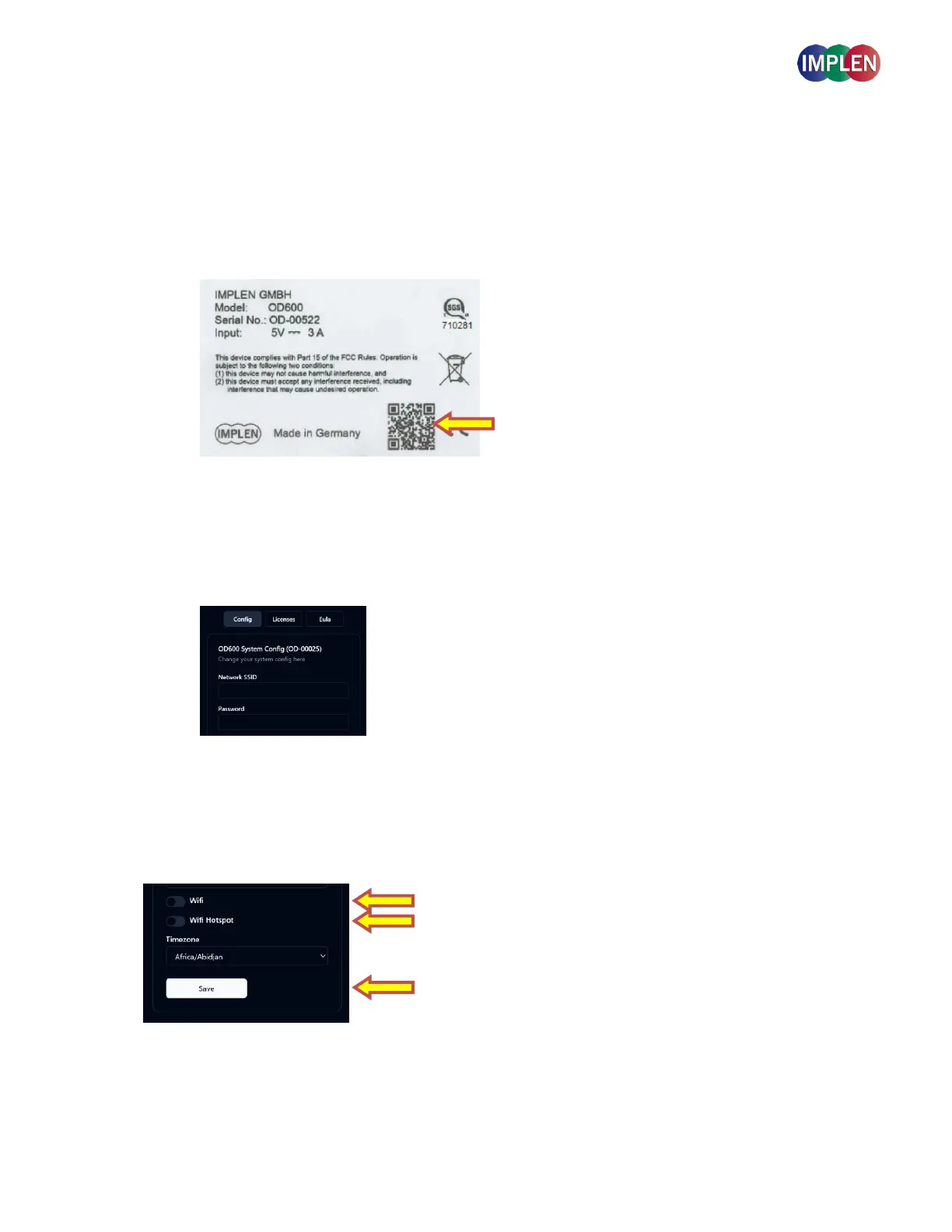
Connect a smartphone: Scan the QR-code on the bottom of the device to connect to the devices
hotspot. Once connected, open a web browser and enter the IPv4 Address (192.168.4.1). This will
launch the device's network settings interface.
Connect a Computer: Connect a computer to the Implen OD600® via the Wi-Fi Hotspot. The
Password to connect your device is “Implenuser”. Once connected open a web browser and enter
the IPv4 Address (192.168.4.1). This will launch the device's network settings interface.
5. Configure Network Settings: In the network settings interface in the webbrowser, you can enter the
Network SSID (WI-FI Name) and password of the desired Wi-Fi network to connect the Implen OD600® to it.
Select Wi-Fi and Wi-Fi hotspot to be active and press save.
Additionally, you can adjust the time zone and access the End User License Agreement (EULA) along with all
related licenses.



 To Next Page