Implen OD600
®
User Manual Version 1.0
22
Container selection & Calibration
This guide provides step-by-step instructions for selecting tubes and calibrating your instrument for accurate
measurement of turbidity using McFarland units (MFU). Proper tube selection and calibration are essential for
obtaining reliable results.
1. Container Selection
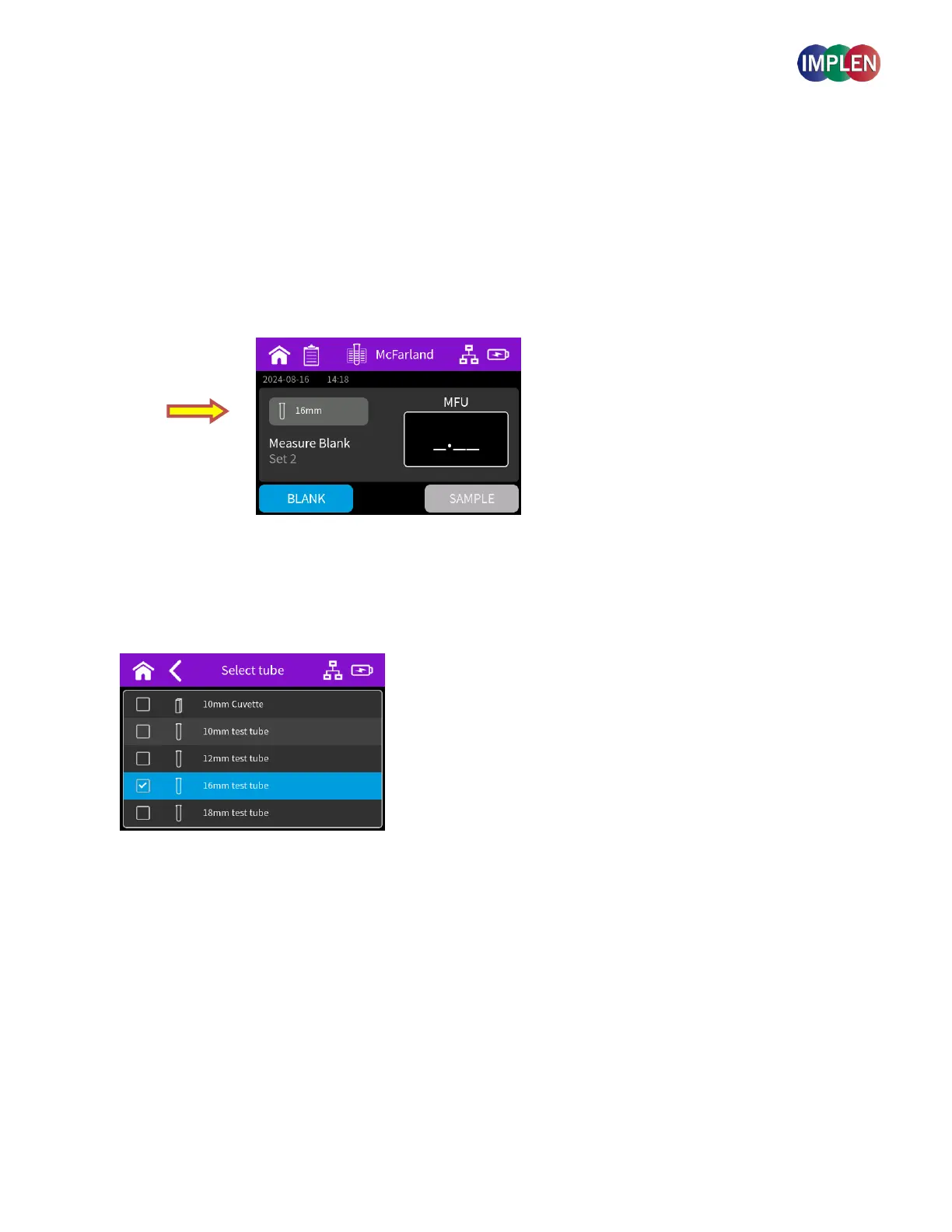
Before calibrating your instrument, ensure the correct tube/cuvette type is selected. Press the button indicating the
tube that is currently in use.
A menu table will appear with options for tube types, including 10 mm cuvette, 10 mm test tube, 12 mm test tube, 16
mm test tube (default), and 18 mm test tube.
The default tube type for McFarland measurements is the 16 mm test tube. This will be indicated by a tick box.
Tap on the corresponding tube type to select it.
If no calibration has been done for the selected tube type, a popup will state "No calibration data available. Start new
calibration?" You can then choose to exit or proceed with calibration.
Note: The default 16mm tube calibration curve was generated using the McFarland standard set from Company ProLab,
Serial Number 395123, traceable to 260-140 SD2350, with a calibration date of February 27, 2024.
Note: Please be aware that standards can vary between batches and supplier. For optimal accuracy, it is recommended to
create your own calibration curve using your own standards, as these can differ and may expire over time.



 To Next Page