User’s Manual of CLEO Patient Monitor
- 7 -
CONTROLS, INDICATORS, AND SYMBOLS
FRONT AND SIDE PANEL
REAR PANEL
SYMBOLS
FRONT AND SIDE PANEL
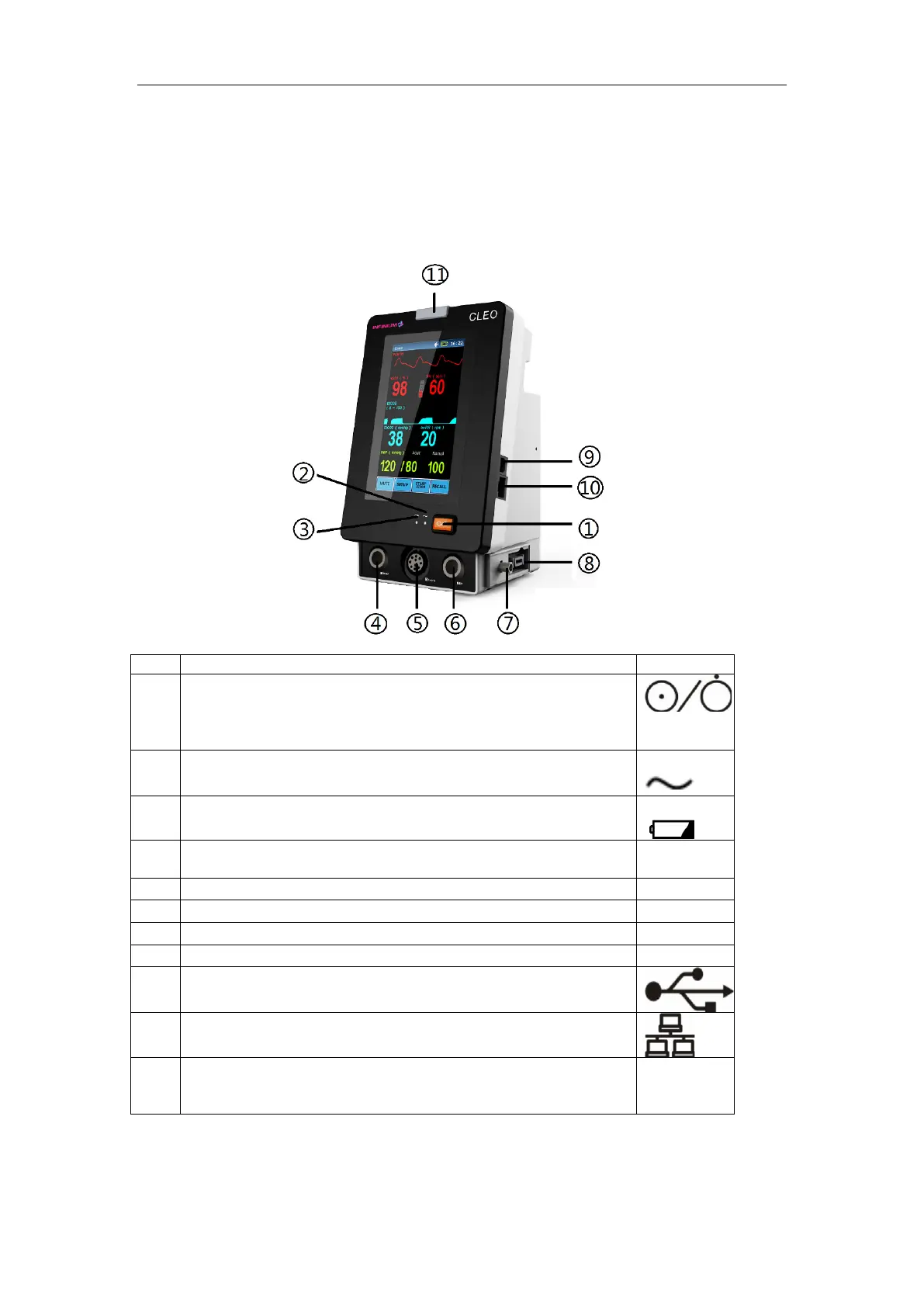
Figure 1: Front and Side Panel
This toggle switch turns the secondary power from on to off.
The monitor will continue to charge the battery as long as the
AC cable is plugged in, even if the power switch is turned off.
This LED indicates that the monitor is powered by AC.
This LED indicates that the monitor is powered by battery.
NIBP Port for the connection with the blood pressure cuff
hose
Oxygen Saturation Sensor Port for Infinium SpO
2
Sensor Port for External EtCO
2
Oxygen Saturation Sensor Port for Nellcor
Transfer data to PC; Upgrade program
Upgrade program
In normal mode, no indicator lights.
In alarm mode, the alarm indicator lights up or flashes.



 To Next Page