User’s manual of CLEO Patient Monitor
- 26 -
ALARM LIMIT SETUP
Limits
Patient
SYS UPPER LIMIT
(mmHg)
SYS LOWER LIMIT
(mmHg)
DIA UPPER LIMIT
(mmHg)
DIA LOWER LIMIT
(mmHg)
Adult
30~240
Factory setting:150
30~240
Factory setting:100
15~180
Factory setting:90
15~180
Factory setting:50
Pediatric
30~240
Factory setting:120
30~240
Factory setting:70
15~180
Factory setting:70
15~180
Factory setting:40
Neonatal
30~240
Factory setting:90
30~240
Factory setting:40
15~180
Factory setting:60
15~180
Factory setting:20
The alarm limit must be changed in increments of at least 1 mmHg.
FACTORY SETUP
This function is for servicing engineer only.
NIBP LIST OBSERVATION
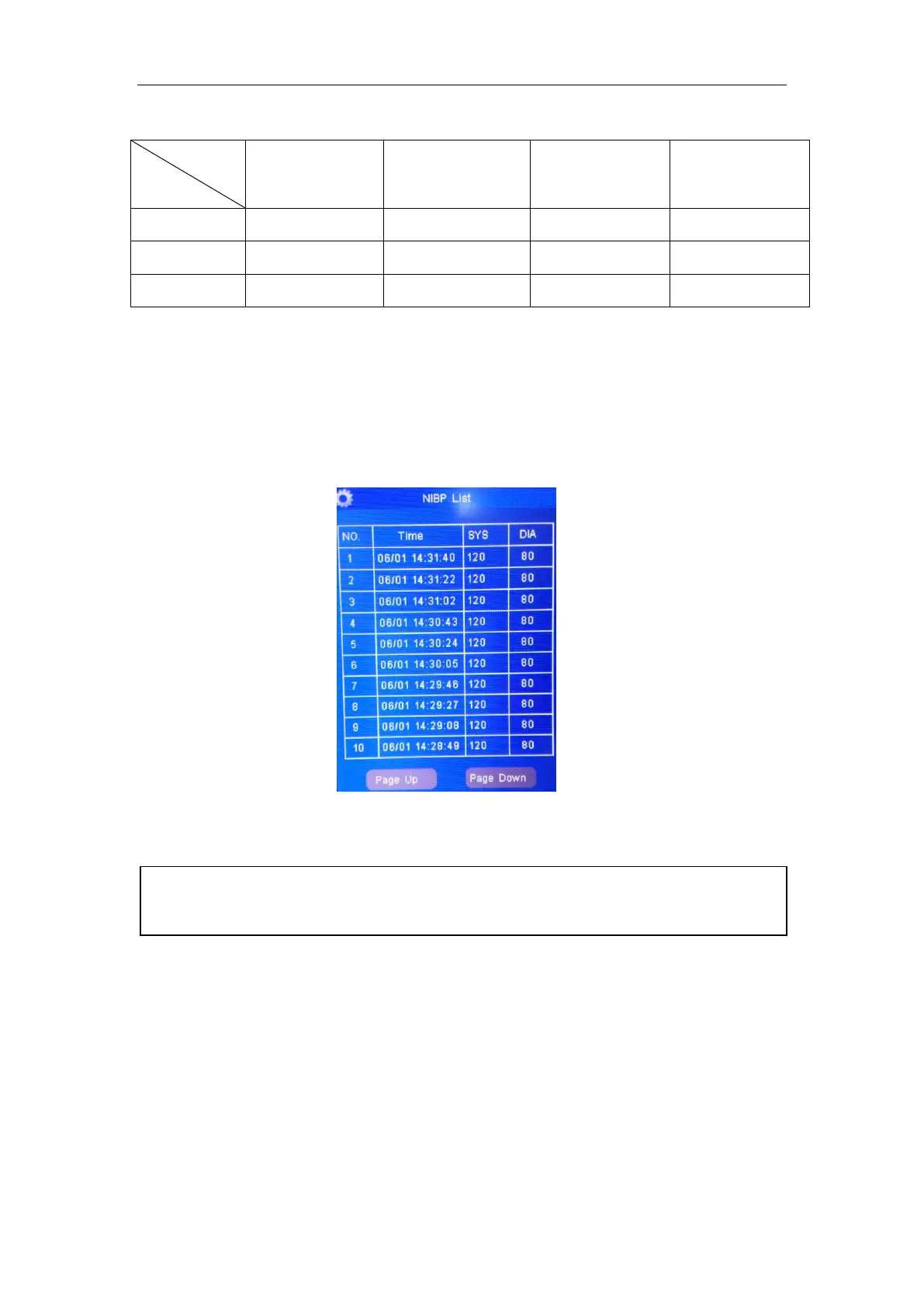
Touch the “NIBP List” menu item to open the NIBP List Tabular.
Figure 8: Window for NIBP List Observation
The NIBP list can save 300 groups of data.
MEASUREMENT LIMITATIONS
For certain patient conditions, the oscillometric measurement has certain limitations. The
measurement must find regular arterial pressure. When the patient’s condition makes it
difficult to detect this pressure, the measurement will be unreliable and take longer to
complete. In some cases, the patient’s condition will make a measurement impossible.
Such issues may arise under the following circumstances:
PATIENT MOVEMENT
Measurements will be unreliable or impossible to take if the patient is moving, shivering or
having convulsions. These motions may interfere with the detection of the pulses in
arterial pressure and increase the time needed to take the measurement.
[NOTE]: Only after the NIBP value has been measured can it be added to the NIBP
Data List. NIBP list can save up to 300 groups of data. If exceed, the new data will
remove the oldest data from the list and be added to the list.



 To Next Page