Page 44 Interactive Touch Display Hardware Guide
Startup & shutdown
Tap Startup & shutdown, or the Startup & shutdown icon.
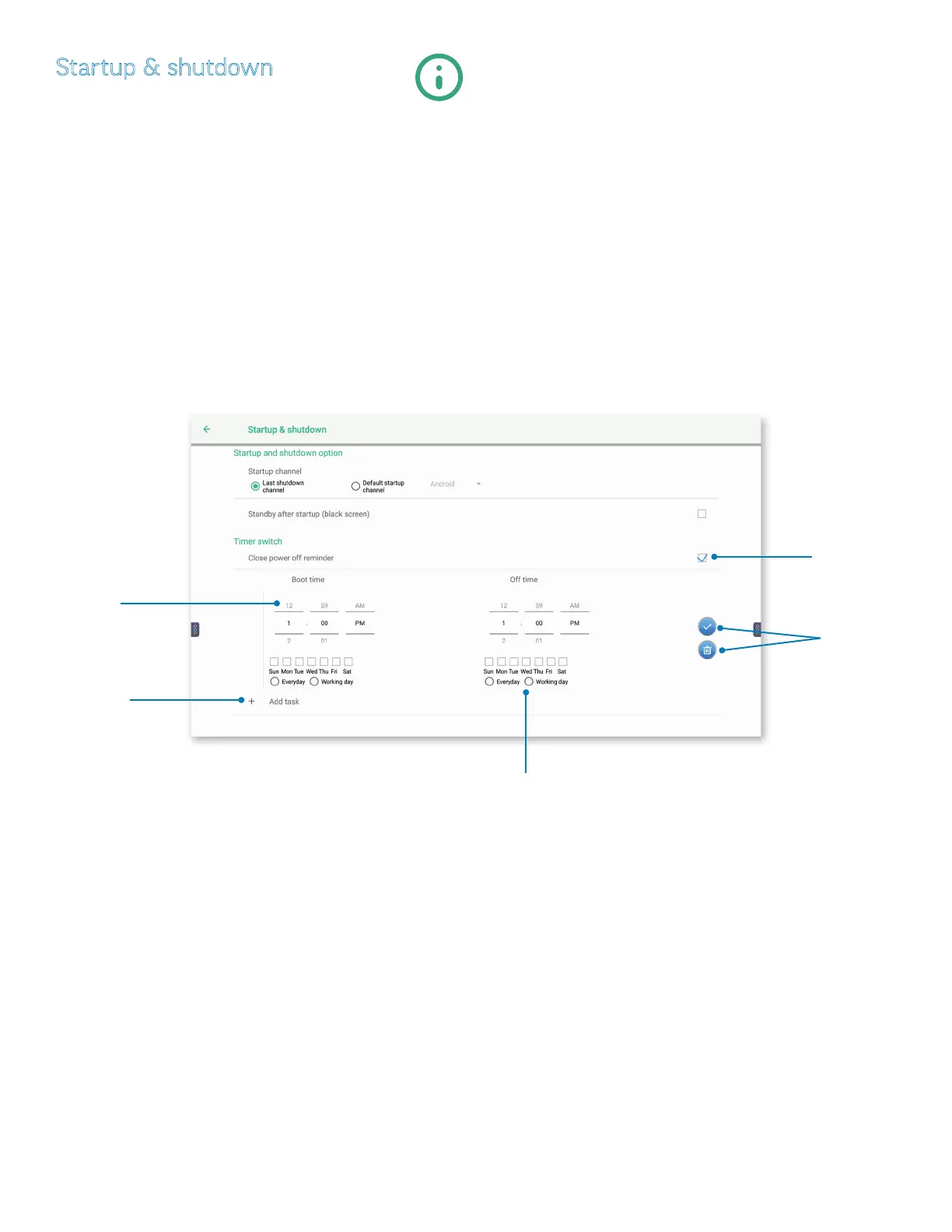
1) At Startup and shutdown option, tap to select a Startup channel:
a) Last startup channel (the last one running) or Default startup channel.
i) If you select Default startup channel, choose between Android, ChromeOS, HDMI1, HDMI2, or VGA.
b) Or, check the box to the right to select Standby after startup (black screen).
2) At Timer switch, set an automatic Boot time and O time:
a) Tap the “+” under Boot time to show a rolling clock.
i) Move the hour and minute dials up or down to set the Boot time and the O time.
ii) Set the eective day(s) with the check boxes under the clocks, or check Everyday or Working day.
iii) Tap the checkmark icon, or the trash icon, to conrm or cancel your settings.
iv) Tap the checkbox to the right of Close power o reminder to enable/disable the reminder.
Tap the “+”
symbol to
show a rolling
clock.
Move the hour
and minute
hands up or
down to set
the time.
Set the
eective days.
Tap to conrm
or cancel your
settings.
Tap to enable/dis-
able a power-o
reminder.



 To Next Page