Page 38 Interactive Touch Display Hardware Guide
Advanced storage functions
1) In the Settings menu, under Device, tap Storage, or its icon. The Storage window appears.
a) If a portable device is connected, the Storage window will show the amount of data used in the system (Device storage) as
well as the portable device (Portable storage).
2) Tap a category to show a list of the applications within that category, and the amount of data used by each.
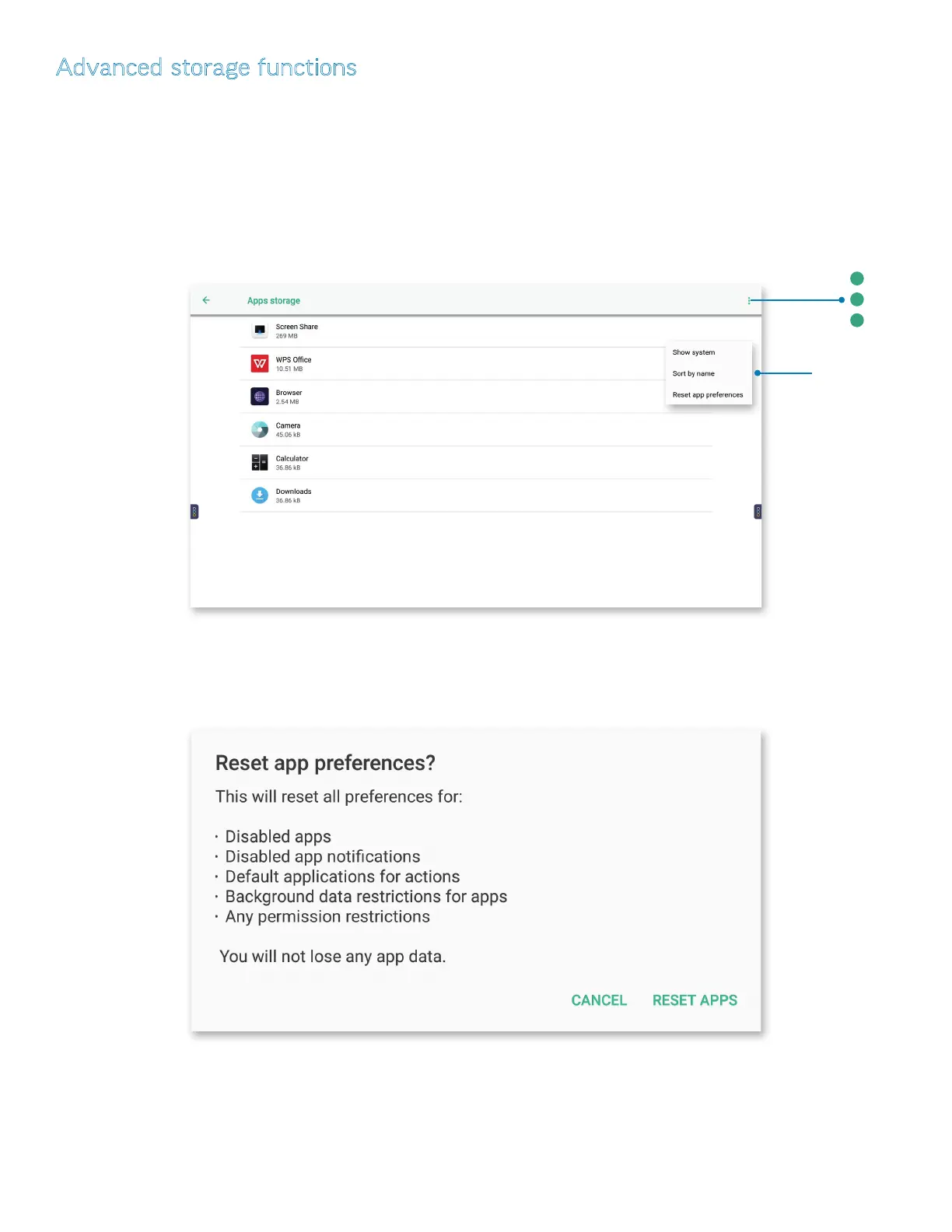
3) Tap the More icon at the upper right for a drop-down window with three selections:
a) Tap Show system/Hide system to switch between a list of all apps and their components, or only the applications.
b) Tap Sort by name/Sort by size to switch between an alphabetic list or a list based on le size.
Tap the
More
icon for a
drop-down
window.
c) Tap Reset app preferences. The Reset app preferences? window appears. Tap RESET APPS to reset the preferences for all
installed apps, or CANCEL to return to the previous screen.



 To Next Page