Page 53 Interactive Touch Display Hardware Guide
THE PC PORTS
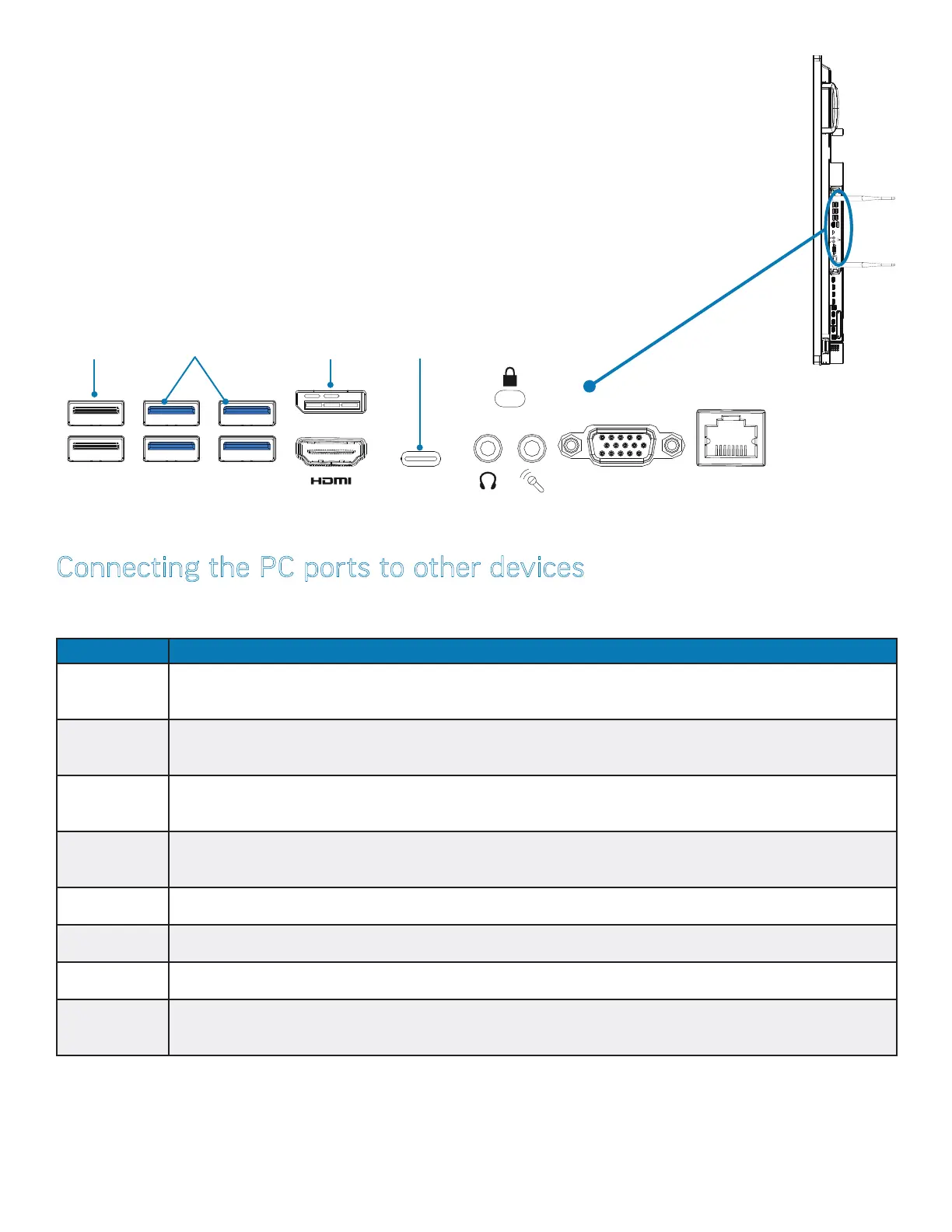
(The PC is an optional accessory) For all panel ports, see page 12 and page 13.
Connecting the PC ports to other devices
The PC and its ports are located on the right side panel (above). This table shows how to connect them.
NOTE: A slot for a Kensington lock is located under the padlock icon.
Port Connection Instructions
USB (x6) Accepts a USB 2.0 (black insert) or a 3.0 device (blue insert) connection.
DisplayPort Digital video out for Windows
HDMI Out Digital video out for Windows
USB-C Accepts a USB-C connection.
Headset Connect a 3.5 mm audio cable to display either the in-line or line-out device.
Microphone Connect a 35 mm microphone or cable for audio input. Overrides audio from all other sources when connected
VGA Connect a VGA computer cable from the monitor to an external computer.
LAN Connect an RJ45 cable to provide network connections for the PC module.
VGA LAN
Two USB
2.0 ports
(black insert)
USB-C
DisplayPort
Four USB
3.0 ports
(blue insert)
HDMI OUT 3.03.0 3.0 TOUCH 1 HDMI IN 1HDMI IN 1 HDMI IN 3 TOUCH 2
VGA
LAN



 To Next Page