LP340/340B/350 Service Manual 80
Now that the Serial Utility is installed on your computer, you’re ready to hook up the computer to
the projector and check the bias setting.
Connect the Computer and Projector
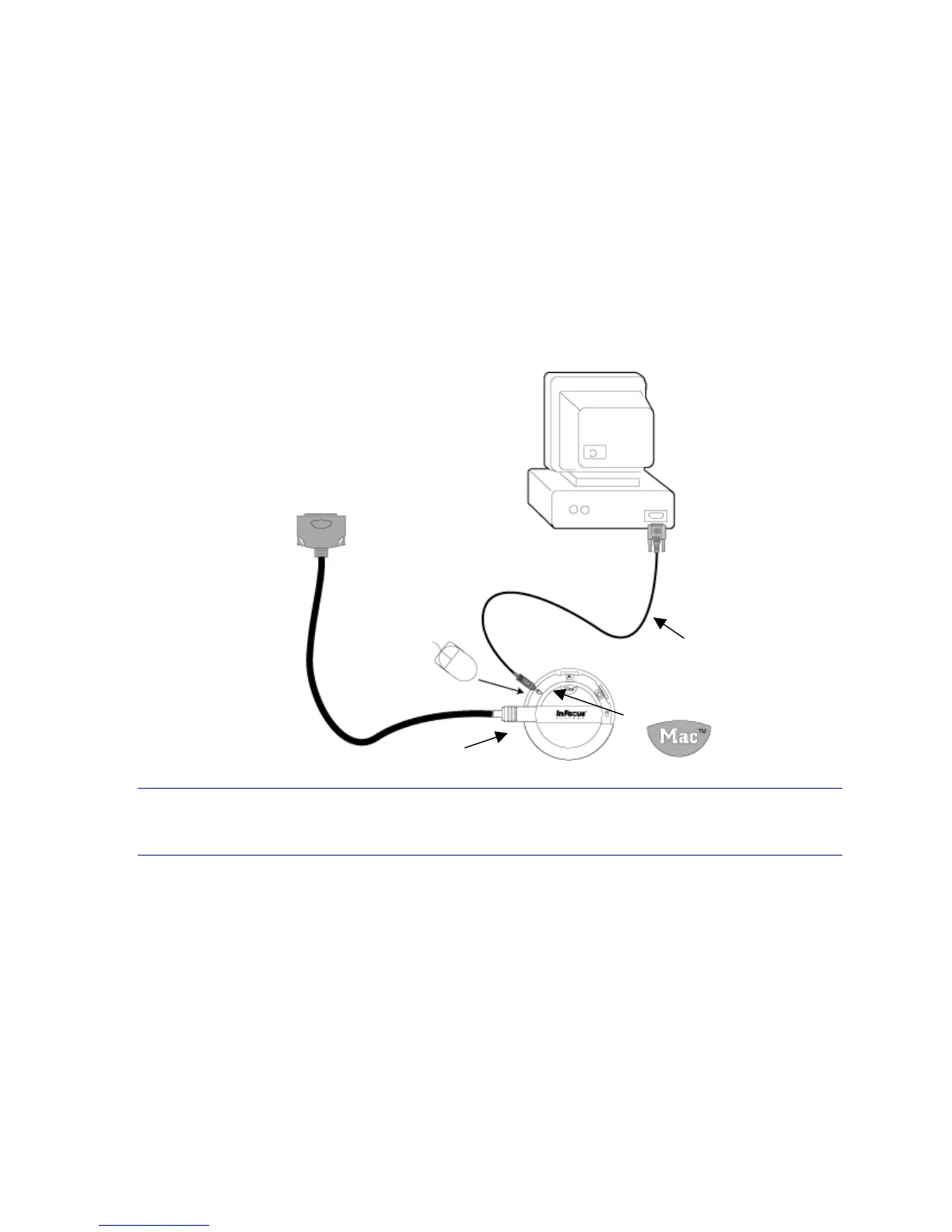
You use the CableWizard and serial cable to connect the projector and computer. The connections are
the same as that used to upgrade the software.
1 Turn the selector on the CableWizard until Mac appears in the CableWizard window.
2 Plug the PS/2 end of the serial cable into the mouse connector on the CableWizard.
3 Plug the other end of the serial cable into the Communication Port 1 (COM1) on the computer.
4 Connect the CableWizard connector to the CableWizard port on the projector I/O panel.
NOTE If needed, you can attach the serial cable to COM2. These instructions address use of either
serial port.
5 Plug the power cord into the projector and into a power source.
Now you’re ready to check and adjust the bias setting on the controller ECA.
To CableWizard connector on projector
CableWizard II
210-0087-00 cable
COM1 or COM2


 To Next Page