5G INDOOR ROUTER FG2000e USER GUIDE 66
SIM Tab (Admin Web UI)
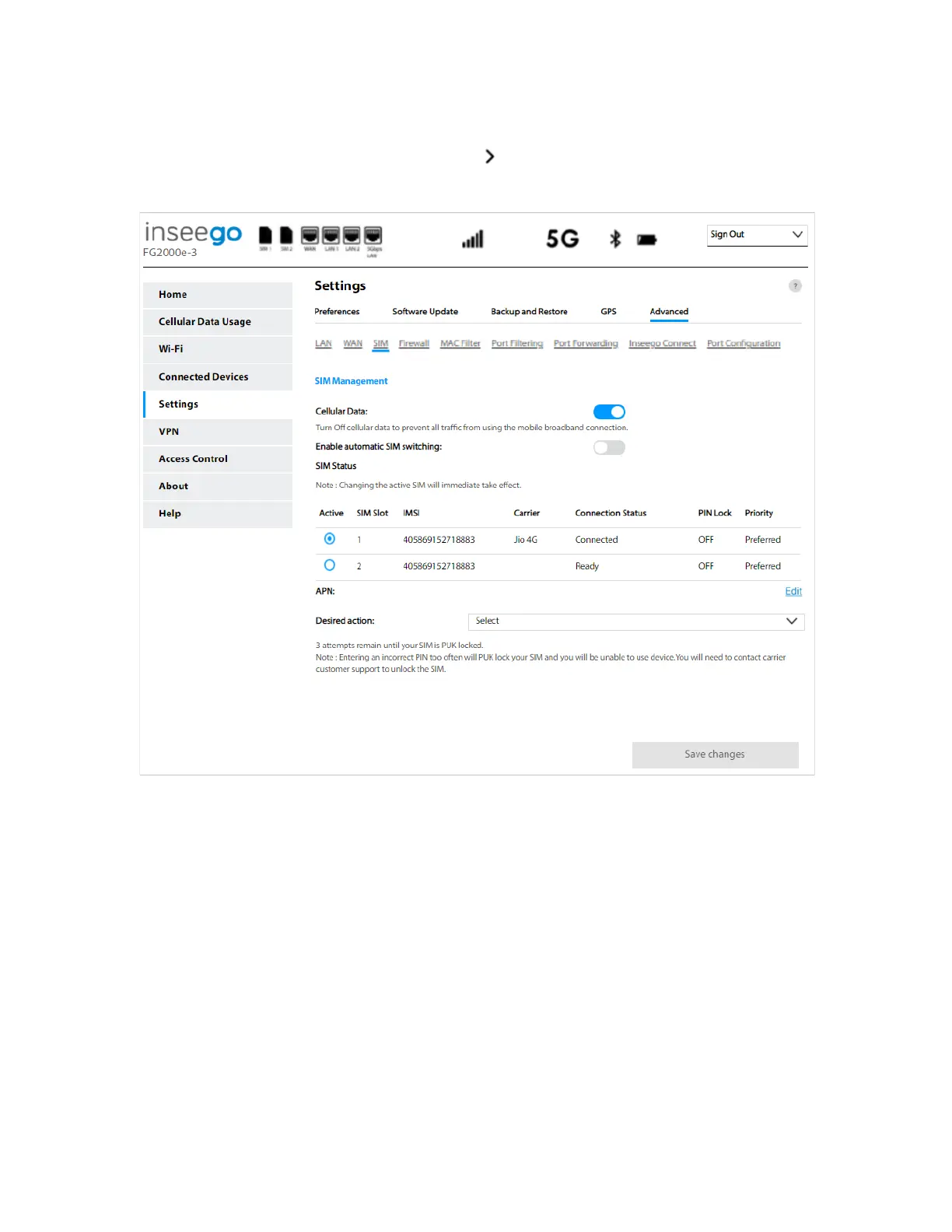
To manage your SIM from the Admin Web UI, select from the Home page SIM Status panel or select
Settings from the side menu. Then select the SIM tab.
NOTE: The SIM card in your FG2000e can be locked using a PIN. If the SIM card is locked, you must
enter the PIN before connecting to the mobile network. Once entered, the PIN is remembered until
the next shutdown. You may also need to provide the existing PIN to change a SIM. The default PIN is
available from your service provider.
SIM Management
Cellular Data: Use the ON/OFF slider when necessary to turn off cellular data and prevent access to
the mobile network. This prevents connected devices from connecting to the Internet and using your
FG2000e mobile data plan. For normal operation, this setting must be left on.
Enable automatic SIM switching: Move the ON/OFF slider to ON to turn on automatic SIM switching.
NOTE: When enabled, the SIM is switched automatically if the active SIM is disconnected. When OFF,
you can manually switch between SIMs and change SIM settings.



 To Next Page