ASSIST PLUS – Operating instructions V02 Description of the device
www.integra-biosciences.com 9
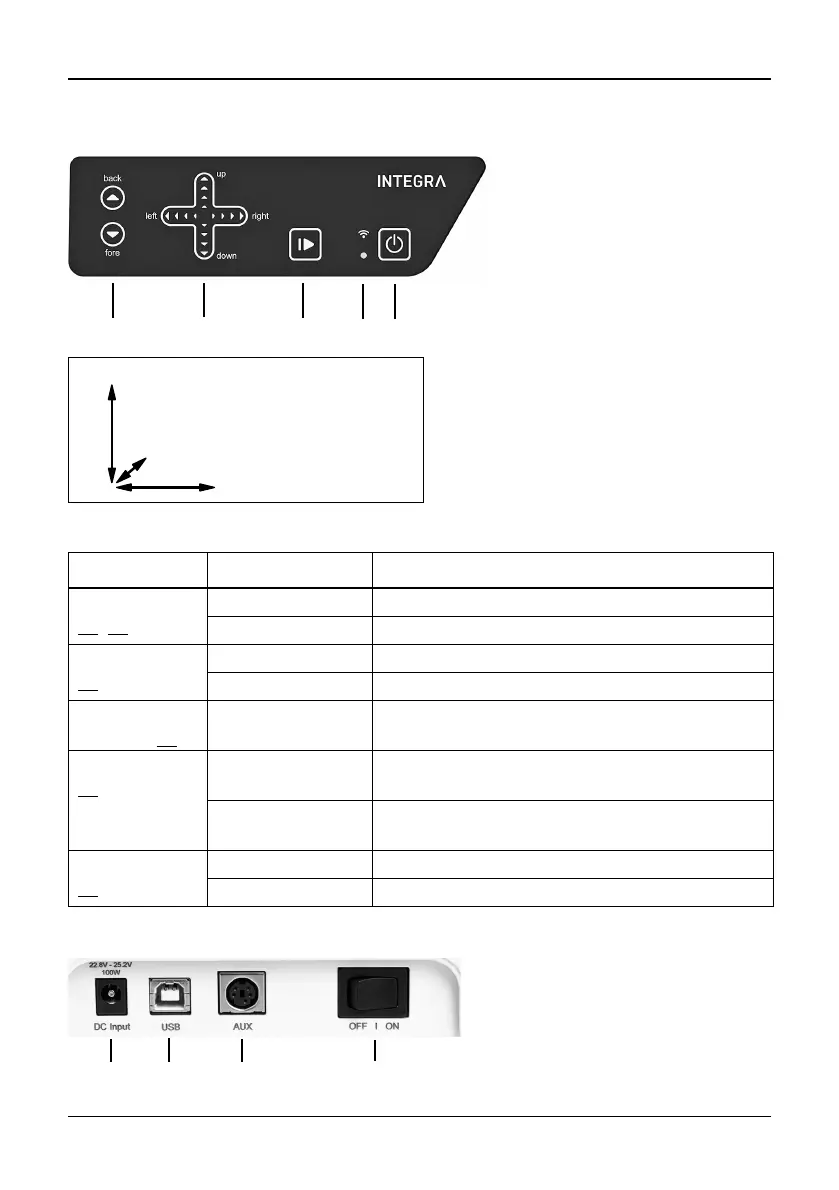
2.2.2 Touch panel
Each key lights white as soon it can be used.
2.2.3 Interfaces
15 Back and Fore arrow
keys move the pipette along
the Y-axis.
16 Up and Down arrow keys
move the pipette along the Z-
axis to teach pipetting heights.
Left and Right arrow keys
move the pipette along the X-
axis to access each position on
the deck.
17 Start/Pause key, to start/stop
operations.
18 Communication LED (on top)
and Error LED (at the bottom)
19 On/Standby key
Key Light Information/Action
Arrow
(15
, 16)
lights blue finger contact detected
flashes moving in this direction not allowed
Start/Pause
(17
)
flashes white press to start operation, homing or to quit error
lights white performing operation, press to pause
Communica-
tion LED (18
)
lights blue Bluetooth connection active
Error LED
(18 at the
bottom)
flashes red error not critical, press Start/Pause key or follow
the instructions on the pipette
lights red critical error, switch off ASSIST PLUS with On/
Standby key or Main switch
On/Standby
(19
)
lights white ASSIST PLUS is switched on
inner symbol dims standby program, press to switch on
20 Socket for mains adapter
21 USB port, for firmware
updates
22 AUX connection
23 Main switch
(Tower: right and left)
(Pipette arm: up and down)
(Pipette holder: back and fore)



 To Next Page