ASSIST PLUS – Operating instructions V02 Programming
34 INTEGRA Biosciences AG
5.7.4 Plate copy program
Application: This program can be used to copy all columns/rows from plate A to plate B
with optional tip change after each transfer. The well number and the orientation of the
plate must be the same.
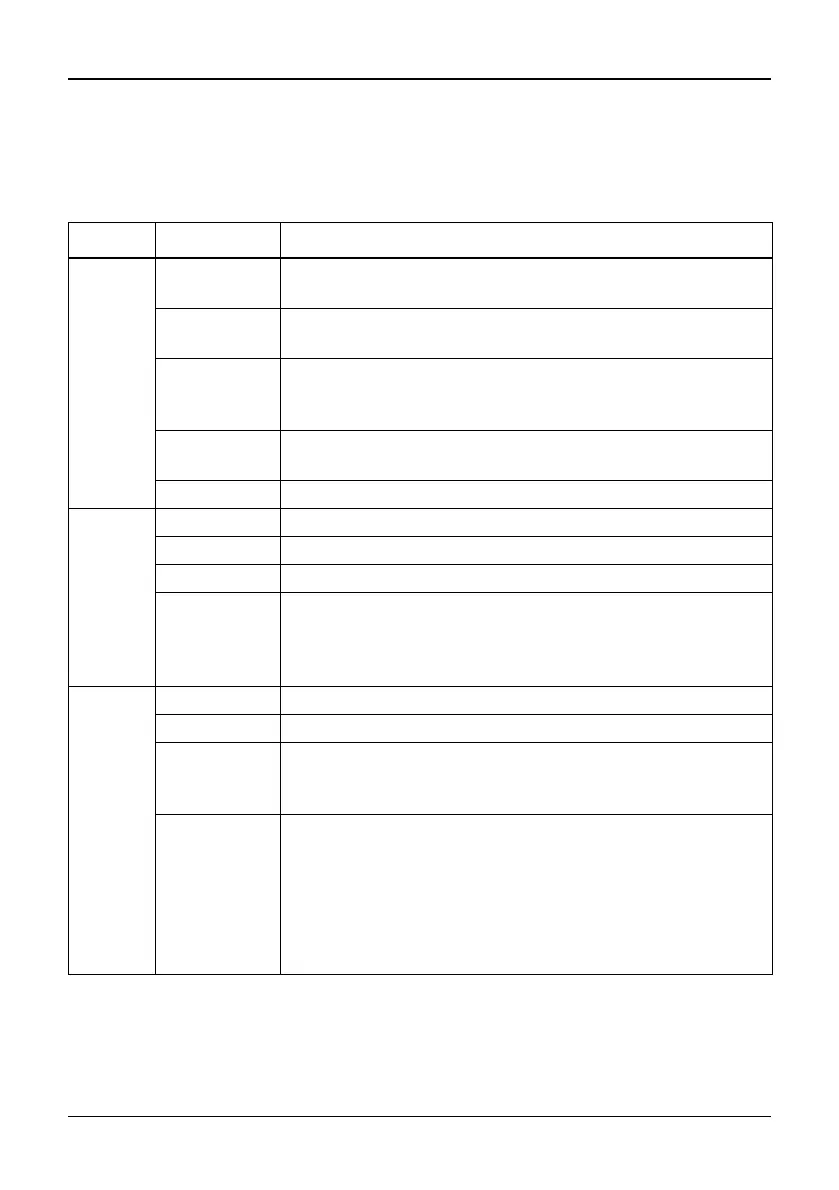
Options Steps Description of Plate Copy
Source Plate Sets the deck position (B or C) as location for the source
plate.
Wells Sets the type of well plate (12, 24, 48, 96 or 384) and defines
the well to well distance.
Orientation Sets the orientation of the plate (landscape, portrait).
Note: orientation can only be changed if it is compatible with
the pipette.
Clear Height Sets the travel height at which the GripTips move above the
source.
Tip Change If activated, tips are changed before each new aspiration.
Aspirate Aspirate Sets the aspiration volume.
Asp. Speed Sets speed uniquely for aspiration (1 = low, 10 = fast).
Height Sets the aspiration height of the source plate.
Mixing Mixes the sample in the source plate before the first aspira-
tion.
If on, define Mix volume, Mix Speed and number of Mix
Cycles.
Dispense Disp. Speed Sets speed of all dispensing steps (1 = low, 10 = fast).
Height Sets the height for the dispensing steps.
Mixing Mixes the sample in the target plate after dispensing.
If on, define Mix volume, Mix Speed and number of Mix
Cycles.
TipTouch It is highly recommended to activate a tip touch after a
dispensing step to remove drops that may cling to the pipette
tips.
• Sets where the tip touch should be performed.
“Liquid”: the tips will dip into the center of the wells.
“Side”: the tips will touch to the side of the wells.
• Defines the height for the tip touch (“TipTouch at”).



 To Next Page