ASSIST PLUS – Operating instructions V02 Programming
www.integra-biosciences.com 29
5.7.2 Repeat/Variable dispense programs
Application: These programs can be used for fast reagent addition to microplates from
one source container. Single transfers are also possible.
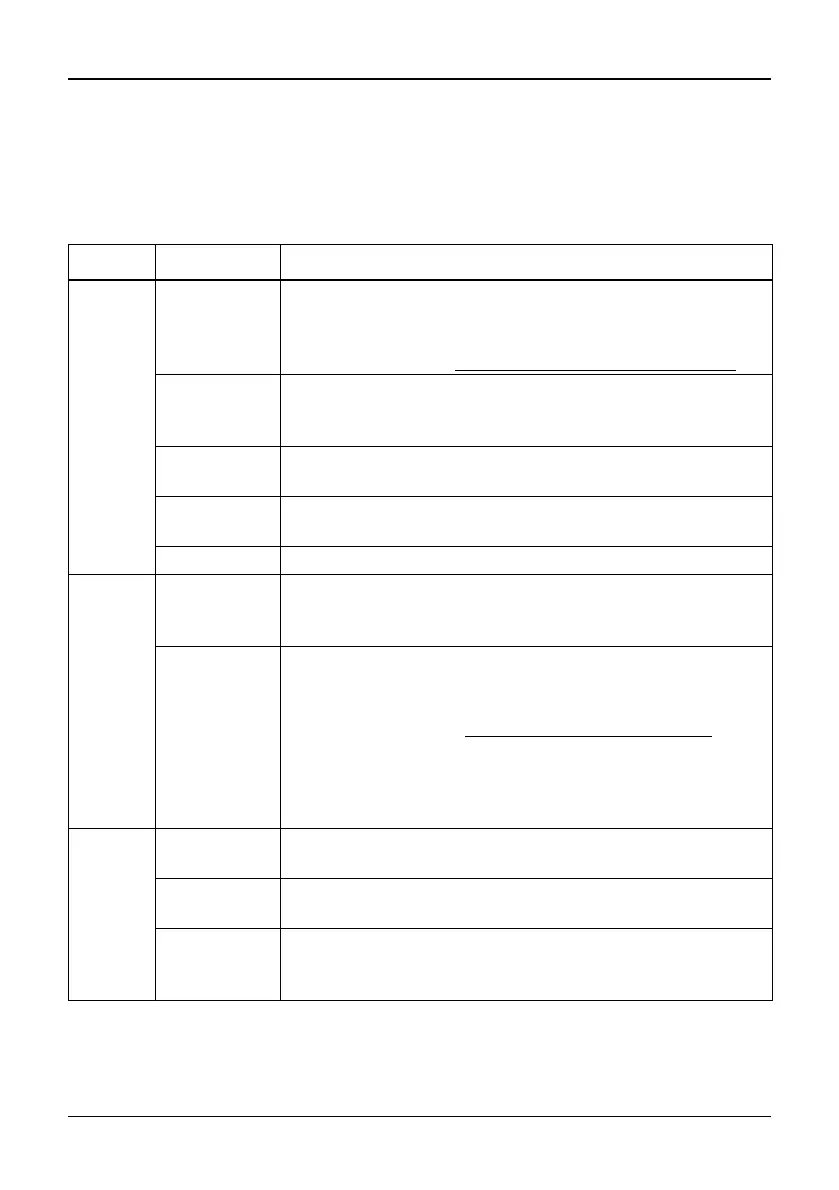
The settings for Variable dispense are identical to Repeat dispense except the dispense
steps in the target can have different volumes.
Options Steps Description of Repeat/Variable Dispense
Plate Wells Sets the type of well plate (12, 24, 48, 96 or 384) to be used
as (source)/target. On VOYAGER pipettes this automatically
defines the tip spacing. Note: only pipette compatible plates
can be selected, see “7.6
Plate compatibility” on page 45.
Orientation Sets the orientation of the plate (landscape, portrait).
Note: orientation can only be changed if it is compatible with
the pipette.
Clear Height Sets the travel height at which the GripTips move above the
plate(s) relative to the deck.
Single
Transfer
Instead of pipetting aliquots, a single transfer is performed.
Aspiration volume = Dispense volume.
Tip Change If activated, tips are changed before each new aspiration.
Source
(Reser-
voir)
Type Sets the source container where the initial sample is
aspirated from (Reservoir or Plate). Only INTEGRA reser-
voirs can be used in the Reservoir mode.
Tracking If Reservoir is selected and Tracking is active, the pipette
automatically adjusts the pipetting height according to the
defined tip immersion depth. Set the:
• Reservoir type, see “8.2
Consumables” on page 50.
• Start volume: the filling volume that is currently in the
INTEGRA reagent reservoir.
• Tip immersion: the approx. immersion depth of the pipette
tips (2-3 mm are recommended).
Source
(Plate)
Type Sets the source container where the initial sample is
aspirated from (Reservoir or Plate).
Plate Select the deck position (B or C) as location for the source
plate.
Column/Row Select the column/row of the plate where the sample is
aspirated from. Note: the column/row number depends on
plate orientation.



 To Next Page