Working with ENG: EO425 Page 27
ENG/DLB Instruction for Use - English
Date: 2011-09-27 Page 27
It is important to note that when switching from a monocular (2-channel) to
a binocular (3-channel) electrode montage within the individual test
configurations, it does not apply any electrode montage changes to the
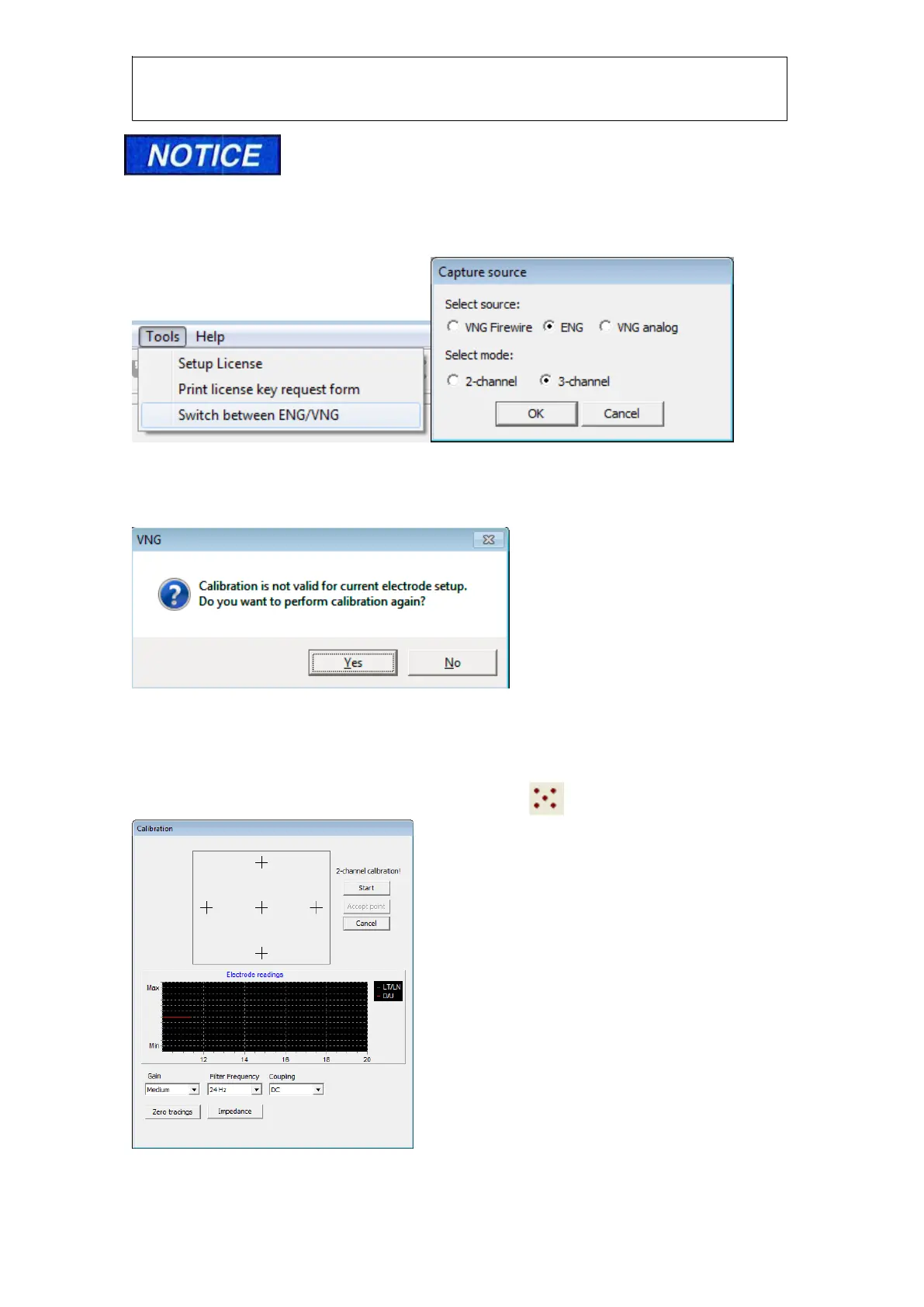
system configuration. If you wish to make a change to the default electrode montage you must
make the change in the system configuration. This can be done by going to ‘Tools’ and then
‘Switch between ENG/VNG’. A dialog box will then appear where you can select mode as either
monocular or binocular.
Figure 1.11 Switch between ENG/VNG Figure1.12 Select source
If you switch between montages, i.e. if you switch from a 2 channel montage to a 3 channel
montage, you will be prompted to recalibrate, as seen in the message below:
Figure 1.13 repeat calibration
Impedance test
Once the electrodes have adjusted to the patient, you need to do an impedance test. To do this
you open a test or a session, and click the calibration icon :
Figure 1.14 Calibration and impedance check














 To Next Page