User’s Manual of netMod Network Termination Unit
Configuring netMod with the netMod Task Bar Utility (nMtsk)
After the installation completion of the USB driver, the icon will appear in the system
tray of your system and will inform you about the B-channels status using the colour code
of netMod’s LEDs, as well as about the incoming and outgoing call type performed at that
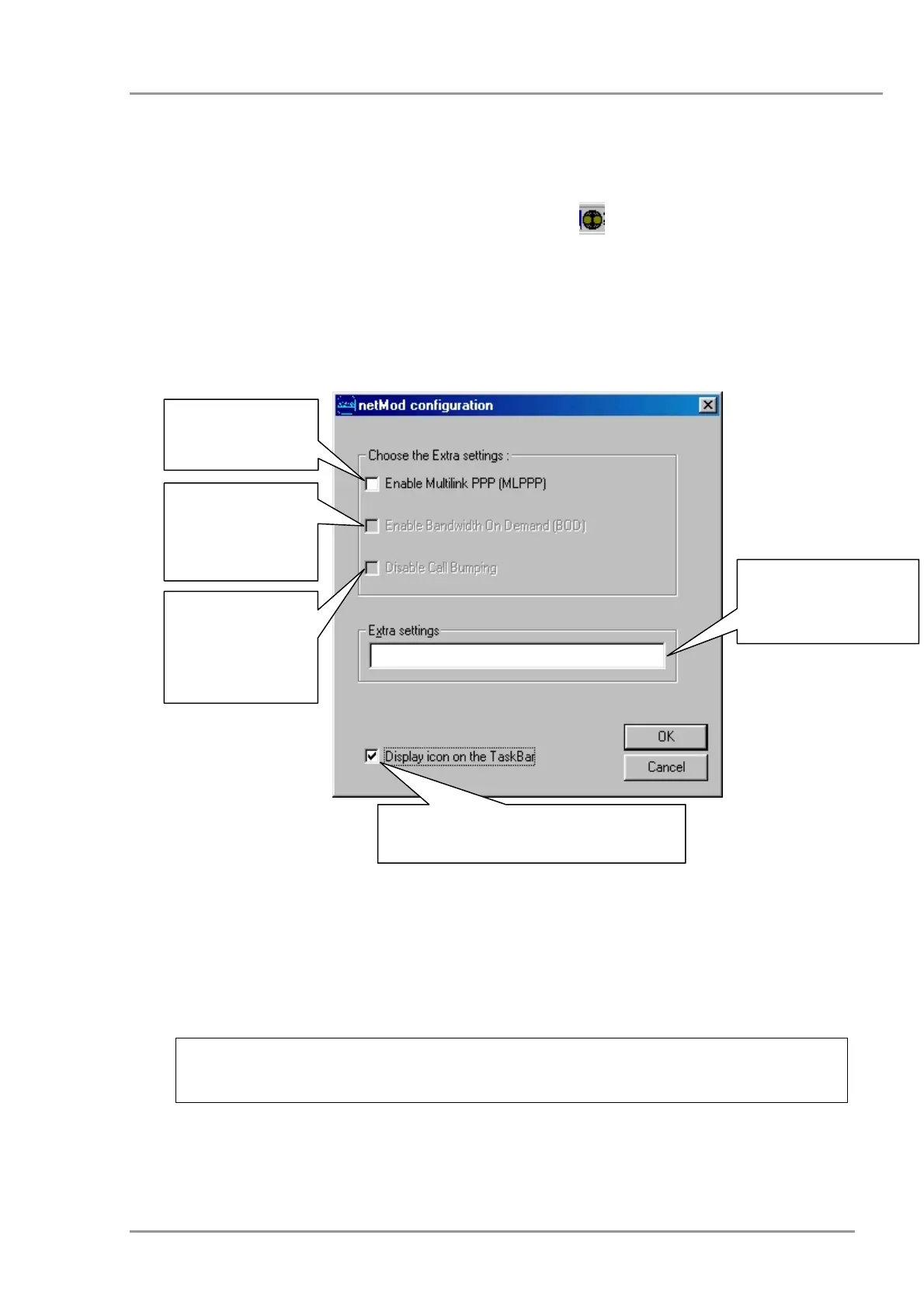
moment. By double clicking (or simple right-clicking and selecting “Settings”) on this icon
the netMod configuration application window will appear on your screen. The relevant
application functions are described in the following.
Hide/Unhide the nMtsk icon in the status
bar of your system.
Enter here any AT
command you wish to
be executed during
initialisation
Press here in
order to not accept
calls when both B-
channels are
occupied
Press here to
activate the
Bandwidth on
Demand
Press here to
activate the
Multilink PPP
In order to activate the settings press on “OK”, otherwise press “Cancel”.
By moving the cursor over the nMtsk icon, a text box will appear on your screen informing
you about the current status of the B-channels.
The nMtsk application icon appears only if the USB connection with
the PC is used.
4


 To Next Page