User’s Manual of netMod Network Termination Unit
CREATION OF A PASSIVE BUS (S-BUS)
ISDN devices can be connected to the netMod via the S-bus (four wire cable), by the
following ways:
Short Passive Bus 1
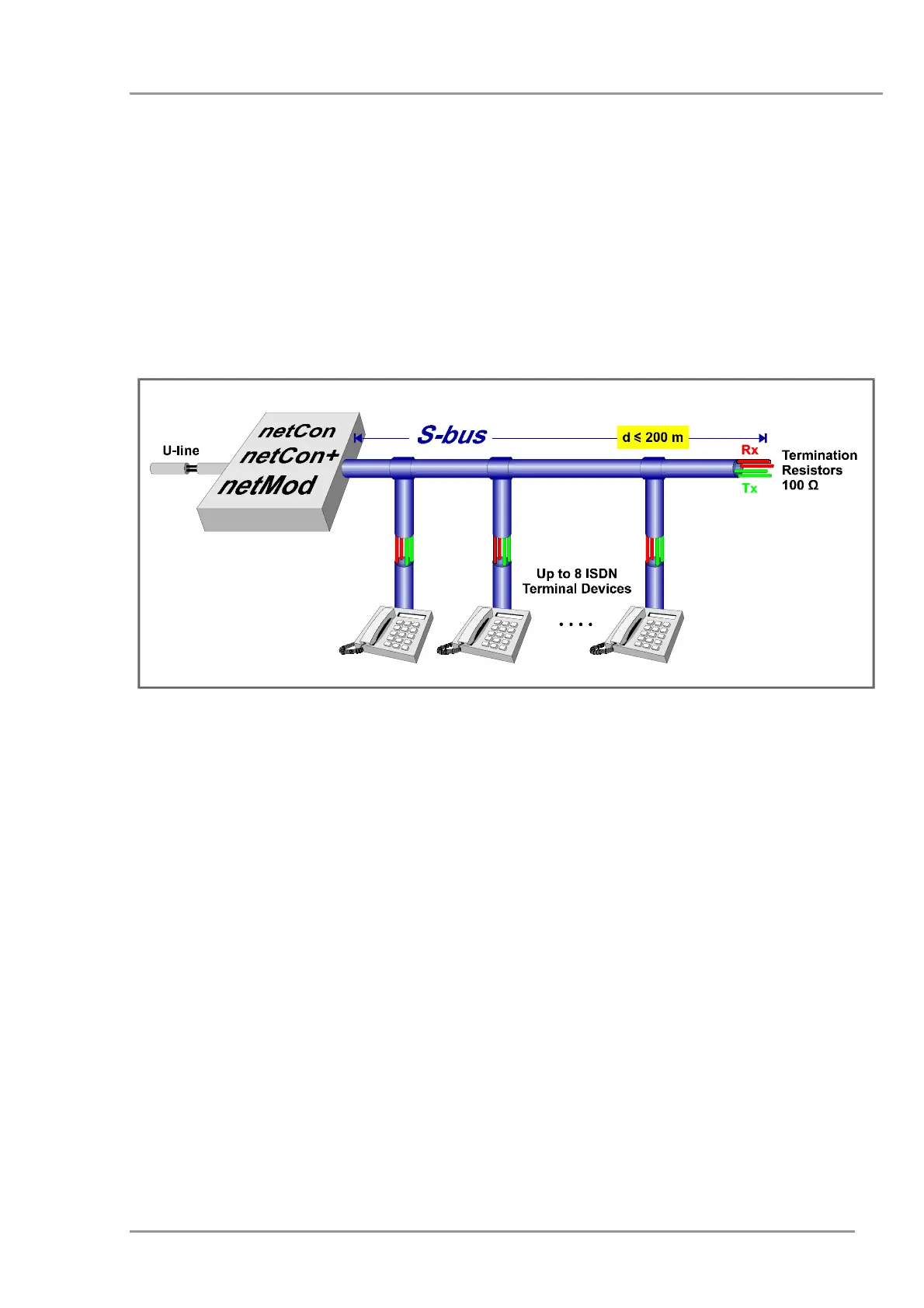
netMod is connected to the ISDN devices via the S-bus as shown in the figure below:
Figure 11: Short passive bus 1 connection
The switch SW1 has to be in position “ON” and the switch SW3 (see Figure 5) has to be in
position “OFF”. The distance of 200m is achieved for a cable of 0.6mm diameter.
The S-bus is connected to one of the two RJ-45 jacks in one end and has to be terminated
with two resistors of 100 ohm at the other end (see Figure 15). Up to 8 terminal devices
can be connected randomly along the S-bus.
If an extra ISDN terminal device is connected to the second RJ-45 jack, then up to 7 ISDN
terminal devices can be connected randomly along the S-bus.
79


 To Next Page