User’s Manual of netMod Network Termination Unit
In case of connection, the H/W flow control has to be activated in the computer’s data port
used for the connection to netMod.
The way of activation / deactivation of ML-PPP through the <Dial Up Networking> of
Windows’ 95/98/Me, is described below.
Having created a connection using the <Dial-Up Networking> from the <Accessories>
windows menu, you can activate / deactivate the ML-PPP when you access the Internet.
Open the <Dial-Up Networking> window, choose the connection <My Connection> that
you have created and press the right mouse button. From the menu that appears, select
the <Properties>.
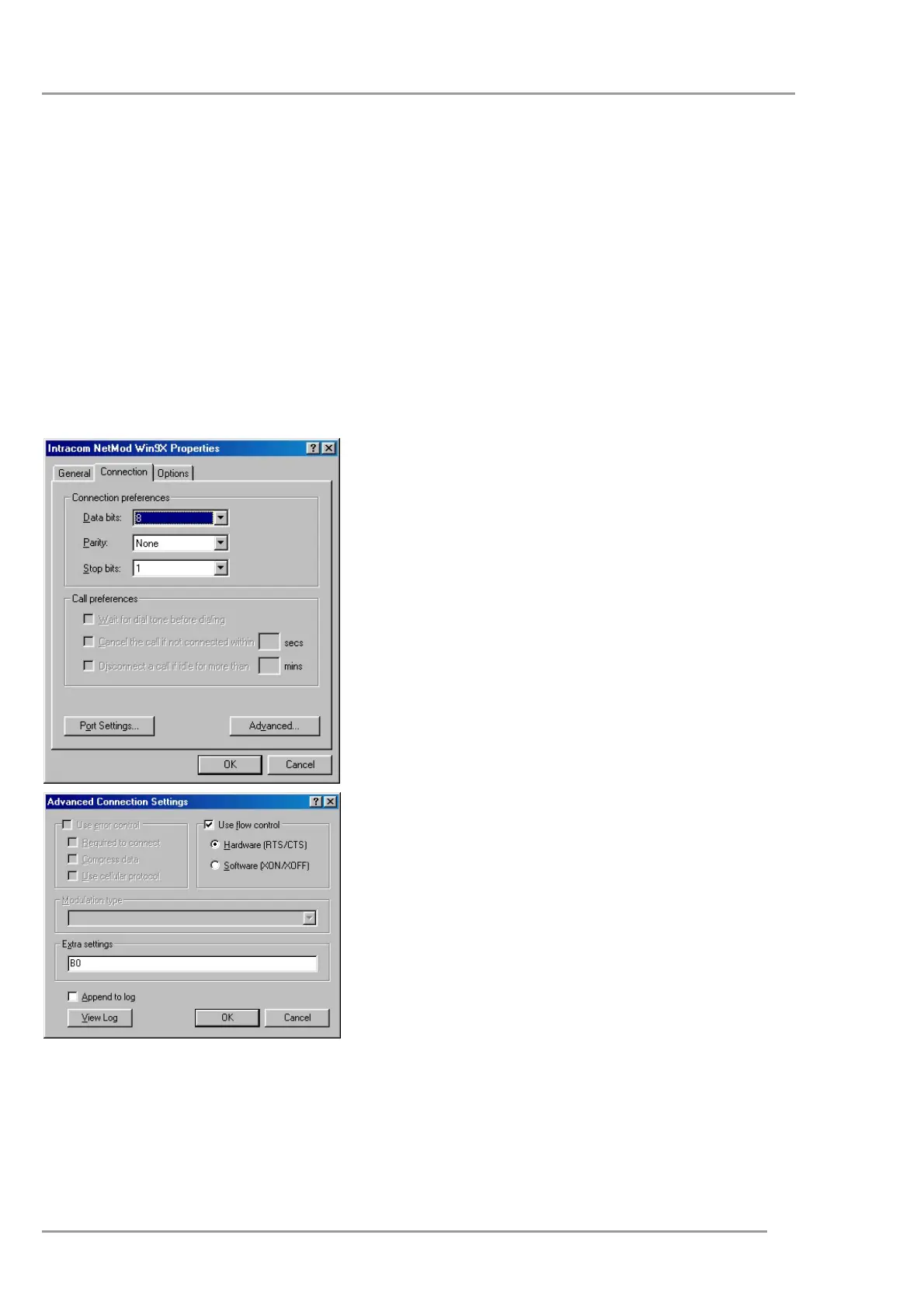
On the window that appears, select the <Connection> page.
Click on <Advanced>.
The next window will appear on your screen:
In the <Extra Settings> field enter the b0 command
and click on <ΟΚ>, if you want to activate the ML-
PPP and use data rates of 128kbps, whenever
needed for your Internet connection.
or
In the <Extra Settings> field enter the b40
command and then click on <ΟΚ> to deactivate
the ML-PPP and use the simple PPP with data
rates of 64kbps for your Internet connection.
52


 To Next Page