7
1.5 System LED and Button Information
1.5.1 LED and Button Information of Motherboard Rear
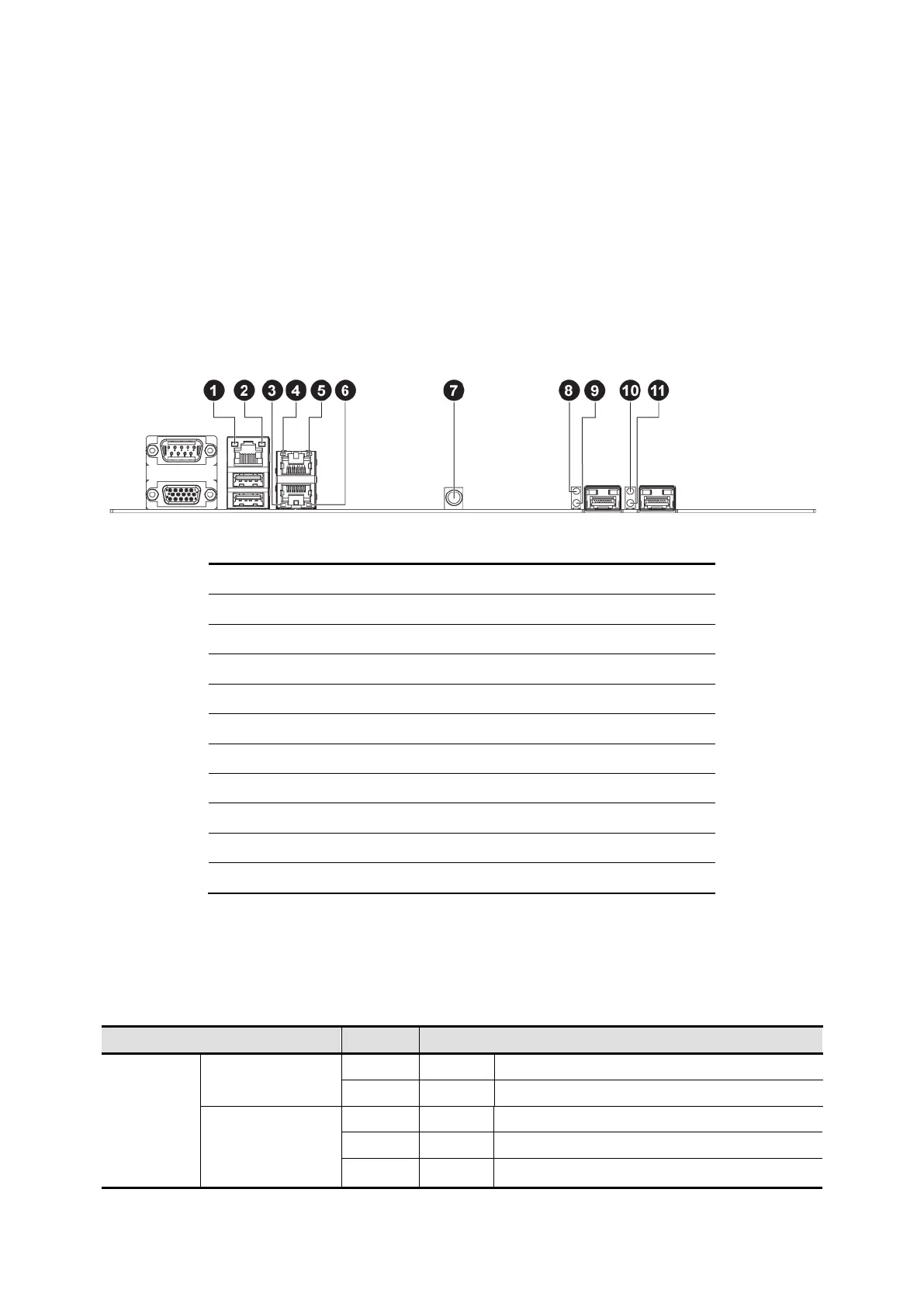
LED information of motherboard rear displays details regarding the NIC LEDs. Each NIC
port contains two LEDs that show the status of network activity, link or speed.
Figure 1-3 LEDs of Motherboard Rear
Dedicate NIC Activity LED
Gbe Link/Activity LED (NIC2) [for Gbe SKU]
Gbe Link/Activity LED (NIC1) [for Gbe SKU]
Gbe Speed LED (NIC1) [for Gbe SKU]
Gbe Speed LED (NIC2) [for Gbe SKU]
10Gbe LINK/ACT LED (NIC1) [for 10Gbe SKU]
10Gbe SPEED LED (NIC1) [for 10Gbe SKU]
10Gbe LINK/ACT LED (NIC2) [Optional for 10Gbe SKU]
10Gbe SPEED LED (NIC2) [Optional for 10Gbe SKU]
The detailed LED information is shown below:
Table 1-5 LED Information


 To Next Page