Chapter 10 PROGRAM MODE
4.
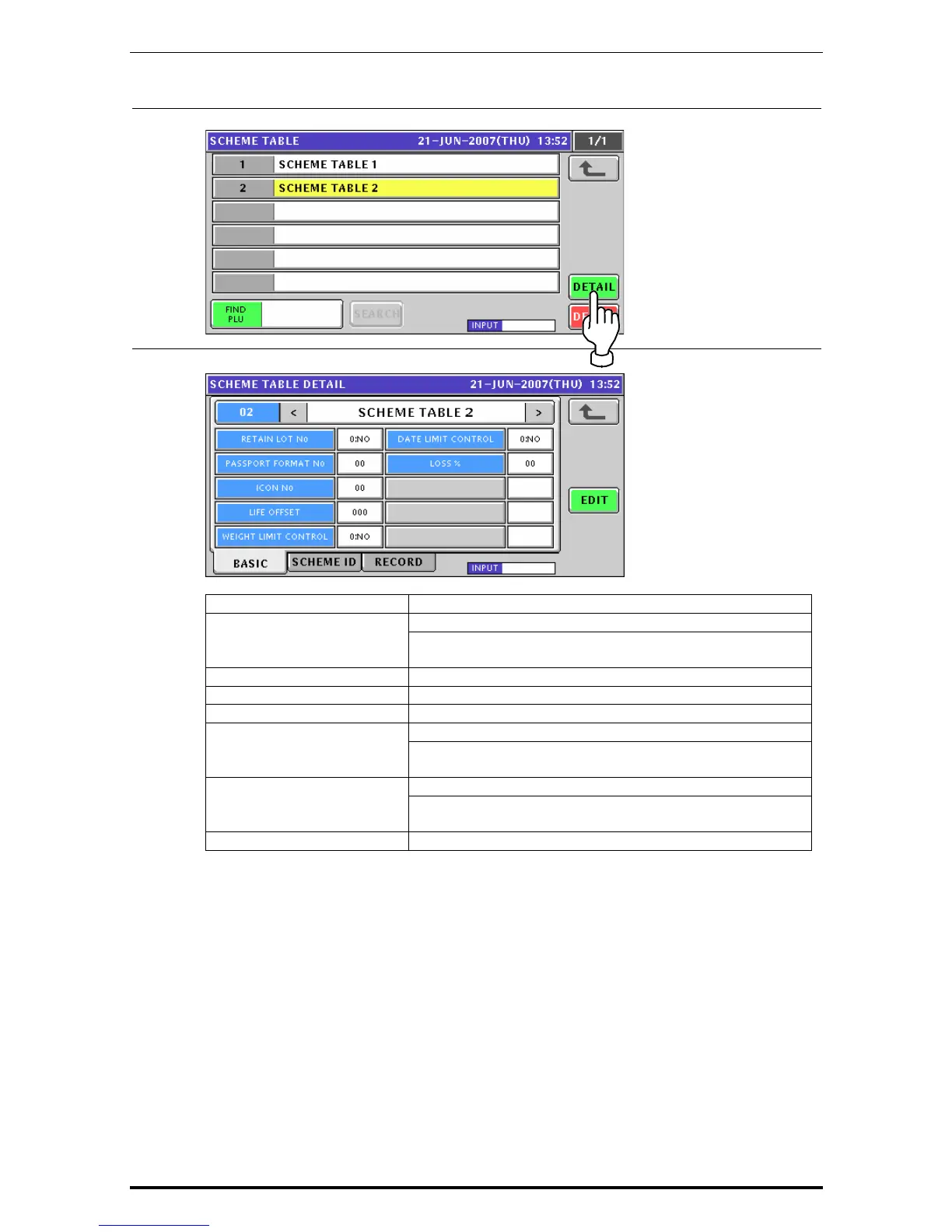
Press the [DETAIL] button.
5.
The Scheme Table Detail (Basic) screen appears.
ITEM DESCRIPTION
Press to select whether or not to use this lot number. RETAIN LOT No.
0: No
1: Yes
PASSPORT FORMAT No. Enter a numeric value and press this field.
ICON No. Enter a numeric value and press this field.
LIFE OFFSET Enter a numeric value and press this field.
Press to select whether or not to control the weight limit. WEIGHT LIMIT CONTROL
0: No
1: Yes
Press to select whether or not to control the date limit. DATE LIMIT CONTROL
0: No
1: Yes
LOSS % Enter a numeric value and press this field
Uni-7 User’s Manual 10-93


 To Next Page
 Loading...








