Getting Started XT200 User Manual
Janam Technologies LLC Version 2, April 2020 Getting Started 2-5
XT200 Battery Condition and Usage Information
Android provides information on battery charge level in percent, estimated amount of battery charge
remaining, when the last full charge took place, and how much of the battery capacity has been used
by various applications and device functions. This information can be accessed as follows:
On the home screen, swipe down from the top to open status bar,
then touch and hold Battery to get to Battery screen.
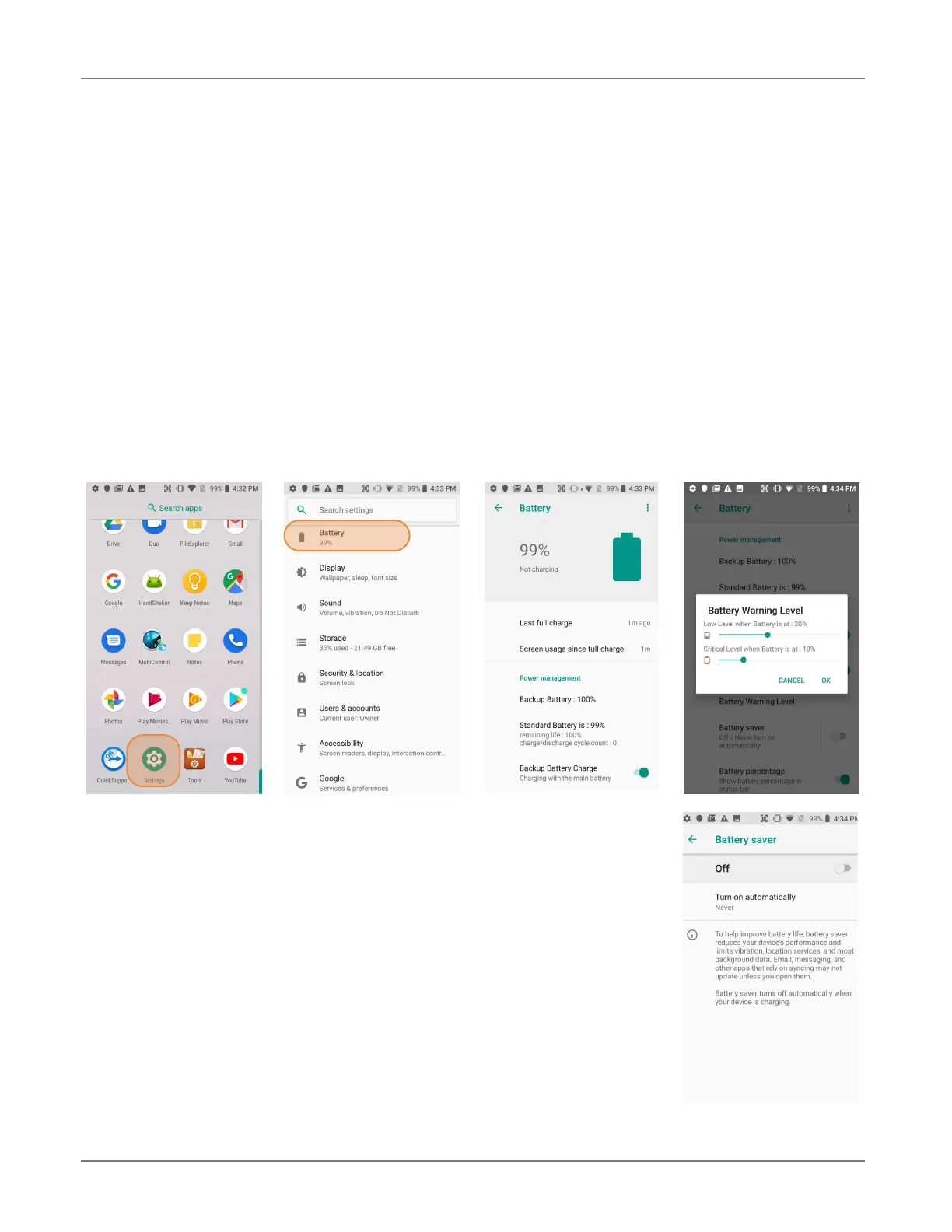
Or, from the apps screen, swipe up to get to the Settings icon,
tap on it to get to the Settings menu, tap on Battery to get to the Battery screen.
View battery status and level, and estimated battery life remaining.
To view battery usage by application, tap on Battery use.
Here, you can also set the Battery Warning Level.
Tip — Whenever practical, you can conserve battery life by:
1. Using the AC adapter to plug the
XT200 into an external power source.
2. Manually or auto-suspend device
operation as often as is practical.
3. Reducing screen brightness.
4. Turning off wireless functionality
(Wi-Fi, Bluetooth, location services, or GPS) when not in use.



 To Next Page