Getting Started XT200 User Manual
Janam Technologies LLC Version 2, April 2020 Getting Started 2-6
Turning the XT200 Rugged Mobile Computer On
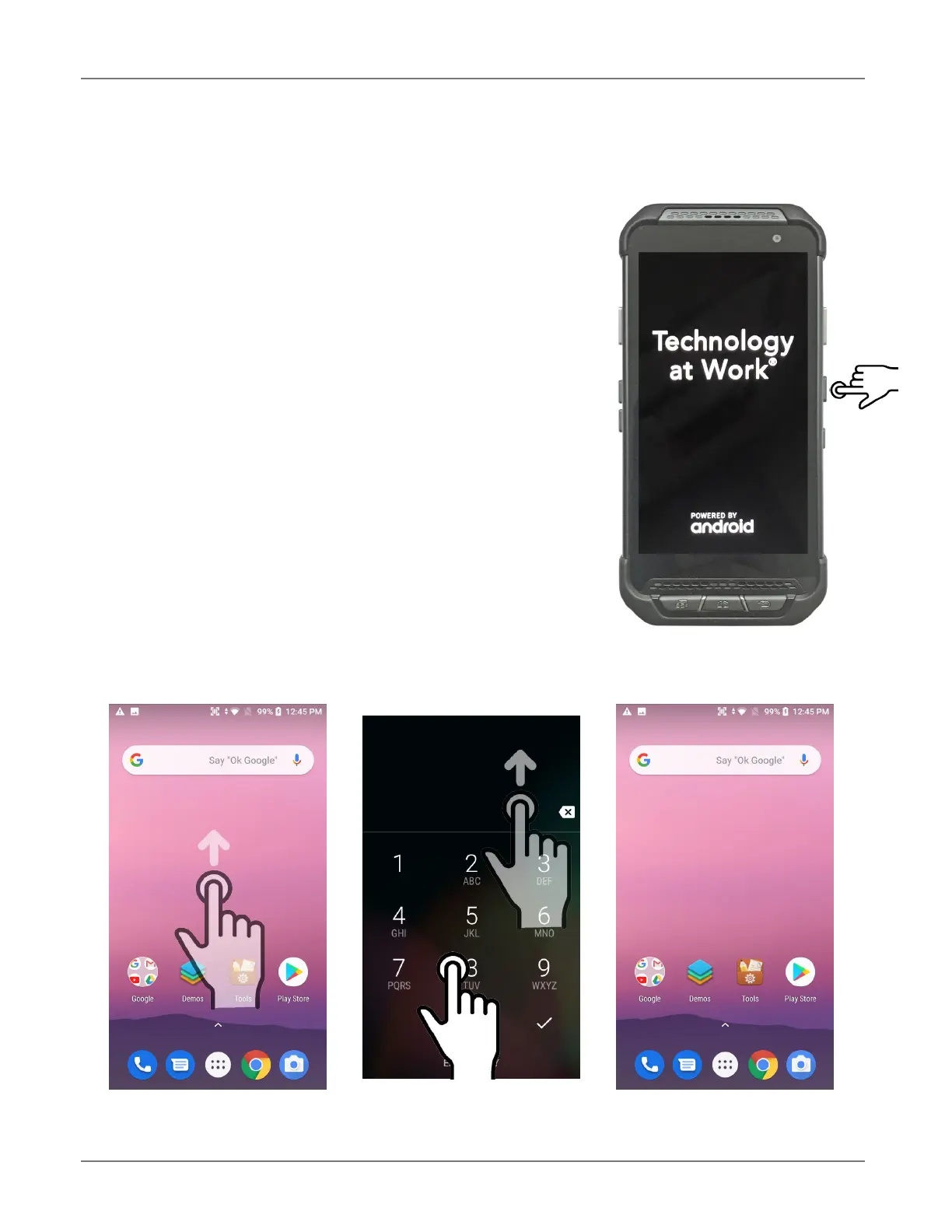
1. Press the Power Key on the right side of the XT200.
⎯ If the XT200 is being powered on for the first
time, follow the on-screen setup instructions.
⎯ When the XT200 is on, pressing the power
button briefly will suspend operation until
it is pushed again.
2. When powered on, an unsecured XT200 will first
display the Android lock screen. It can be
unlocked by swiping up on the screen. The lock
screen will be replaced with the home screen. For
information about securing the XT200 with a
password or pin code, refer to Chapter 3.
3. When powered on, a secured XT200 will also first
display the Android lock screen. Swipe up to get to
the pin code keypad. Enter your pin code. Once
the correct pin code has been entered and you’ve
tapped on the check mark, the welcome screen with the pin code keypad will be replaced
with the home screen. For information about securing the XT200 with a password or pin
code, refer to Chapter 3.
Unsecured: swipe up Secured: enter pin, then swipe up Both ways get to the start screen



 To Next Page