radio control system
EN
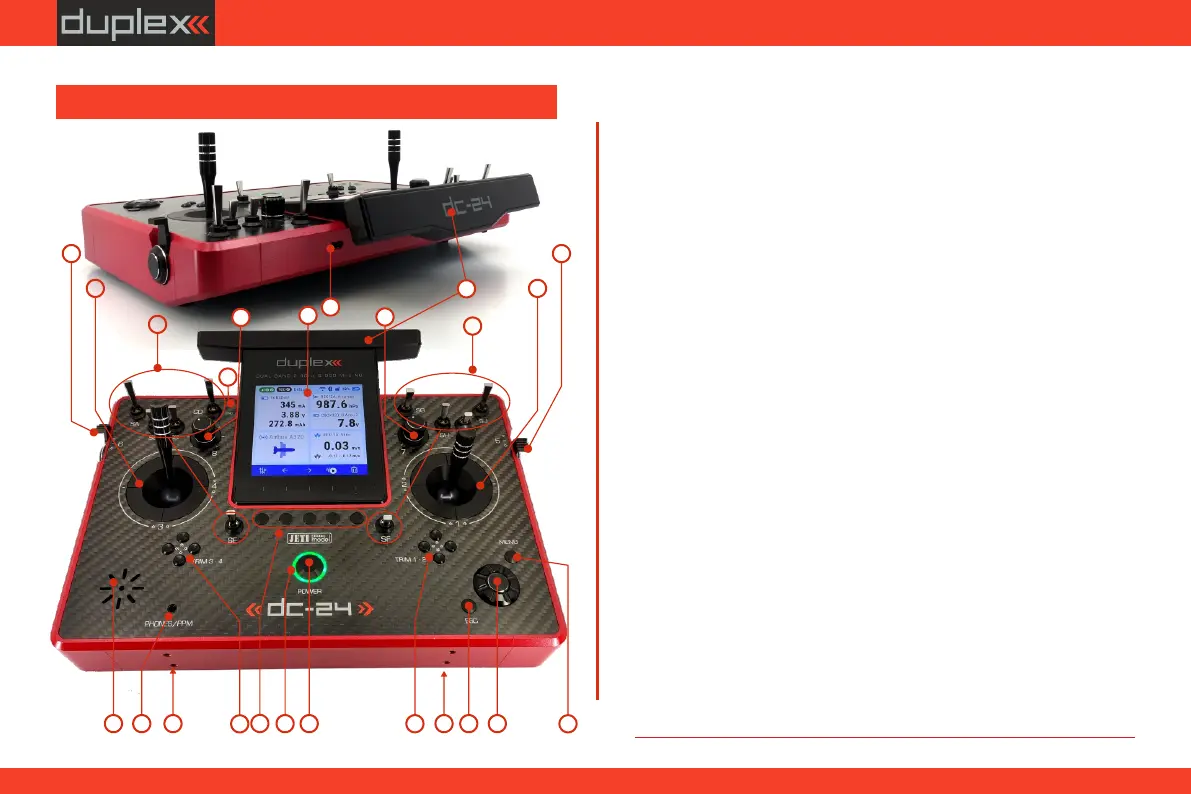
2.2.1 Control Identification
17. USB-C connector (Charging/connecting to PC)
19. LED Indicators
4. Digital Trims for the Left Stick T3, T4
12. Transmitter On/Off „Power Switch”
2. Left Stick 3, 4 – the DC-24II Transmitter Supports Modes 1-4, see
Control Sticks -> mode change
8. Rotary Control Knob „7"
9. Rotary Control Knob „8"
15. „ESC” Button
1. Right Stick 1, 2 – the DC-24II Transmitter Supports Modes 1-4, see
Control Sticks -> mode change.
7. Left Side Control Lever „6"
10. LCD Display
11. Function Buttons „F1 – F5"
3. Swappable and Assignable Switches: Sa, Sb, Sc, Sd, Se, Sf, Sg, Sh, Si, Sj
18. Headphone connector / PPM connector
14. „Menu” Button
5. Digital Trims for the Right Stick T1, T2
6. Right Side Control Lever „5"
13. „3D” Control Selector
16. Antenna/ Transmitter Handle
20. Speaker
21. Harness Bracket (optional accessory) Installation Holes
22. Microphone
3
1
2
3
4
5
67
8
9
11
12
13
15
14
16
17
1820
19
21 21
10
22
2.2 Description of the transmitter
11



 To Next Page