radio control system
EN
E
D
5
5
1
A
C
B
2
3
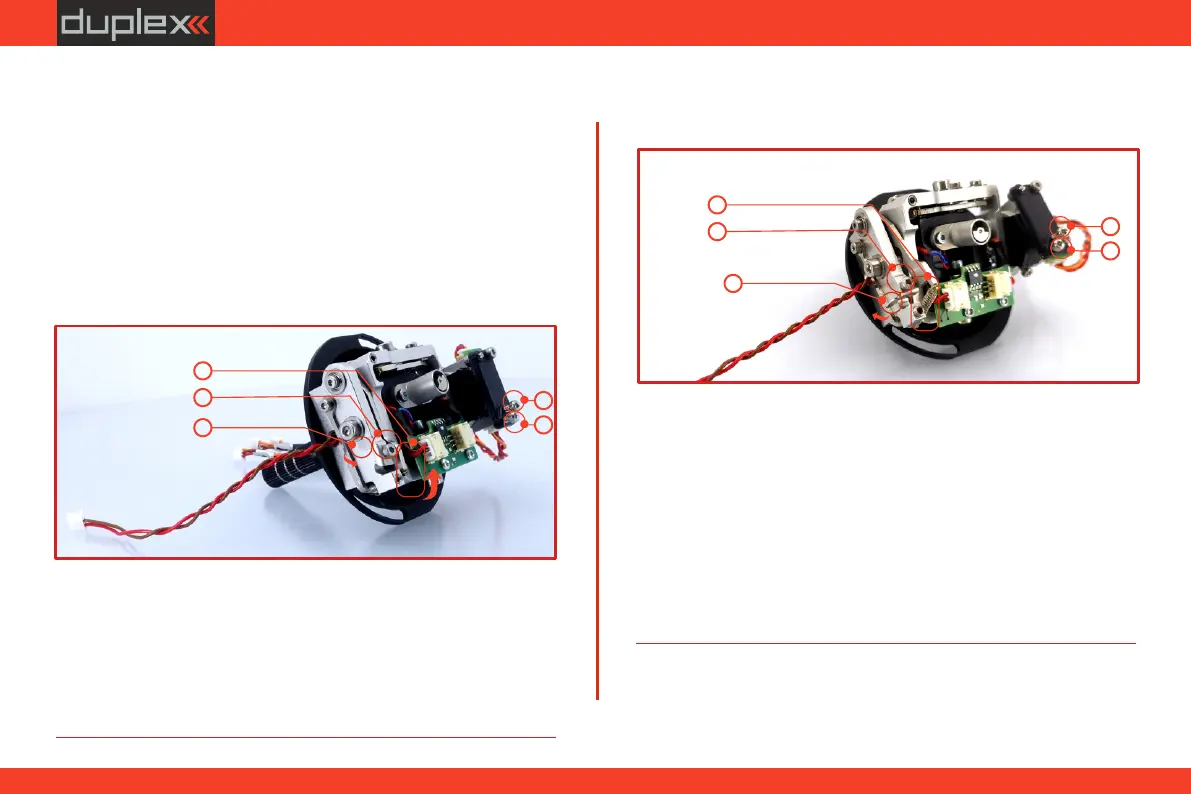
5.1.6 Changing the transmitter mode
The transmitter is equiped with universal multimode gimbals. Both
gimbals are identical and can be adjusted mechanically for modes 1-
5. After mechanical adjustment it is necessary to set a specific
transmitter mode in the menu System –> Configuration –> Stick
mode 1-4.
To change the quad sticks settings, unscrew the back cover of the
transmitter and disconnect the battery connector.
A. Setting the quad stick into the mode without locking
the middle position - gas
1. A. Loosen the screw
2. C. Lift the lever B so as it is possible to arrest the lock
4. A. Tighten the screw
3. Turn the lock C 90° in the direction of the arrow and arrest the lever
B in the upper position.
5. D E Tightening the the screws and sets the desired arresting with
steps and smooth brake.
B. Setting the multi-mode gimbal into the mode with
locking the middle position - elevator.
1. A. Loosen the screw
4. C Move the lever in the direction of the arrow to release the lever
B.
6. E D Loosen the screws and in a position so that the tension is
removed from the stick.
2. B. Slightly lift the lever
3. C B Turn the lock in the direction of the arrow and arrest the lever
in the upper position.
5. A. Tighten the screw
E
D
5
5
1
A
C
B
2
3
38



 To Next Page