radio control system
EN
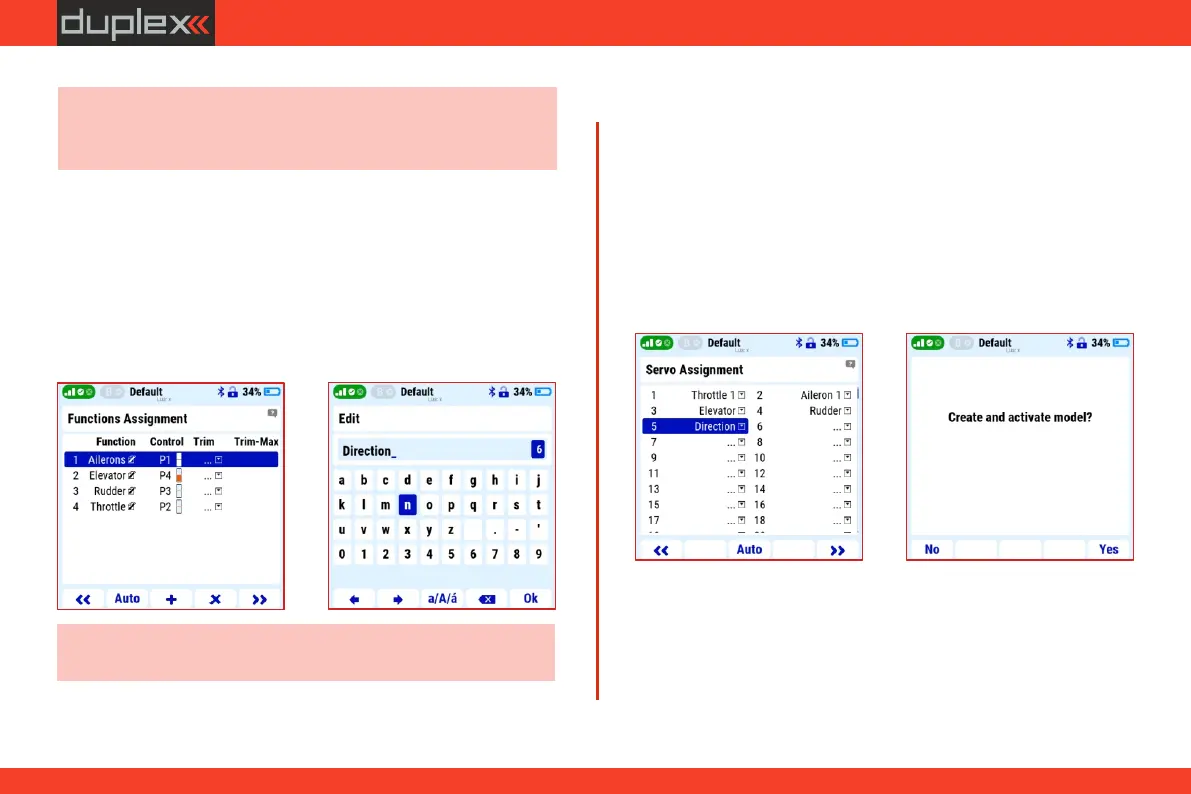
1. If necessary, the servo assignment can be changed manually.
ź by the "F5" (Yes) button, the model is saved in the transmitter's
memory (SD card, MODEL folder).
The system automatically assigns the created functions to individual
receiver outputs.
3.11.3 Servo assignment
2. Press the "F5" button to enter the next window of the wizard.
Create and activate model?
Note: do not assign any "control" to the "direction" function, it will
be mixed with the rudder later.
2. Press the "F5" button to enter the next window of the wizard.
The created functions and their controls are displayed. If necessary, it
is now possible to change the function names and their associated
controls.
3.11.2 Functions assignment
Note: the template does not include the option to specify the
function of the controlled landing gear leg/wheel. Functions that
are not in the template will now be skipped and created later.
1. Use the "F3" (+) key to enter the name of the new front leg control
function, e.g. "direction" (front wheel of the landing gear).
For now, we skip the "Servo setup" and "Pair/bind the receiver(s)
now" menus in the wizard.
24



 To Next Page