radio control system
EN
3
2
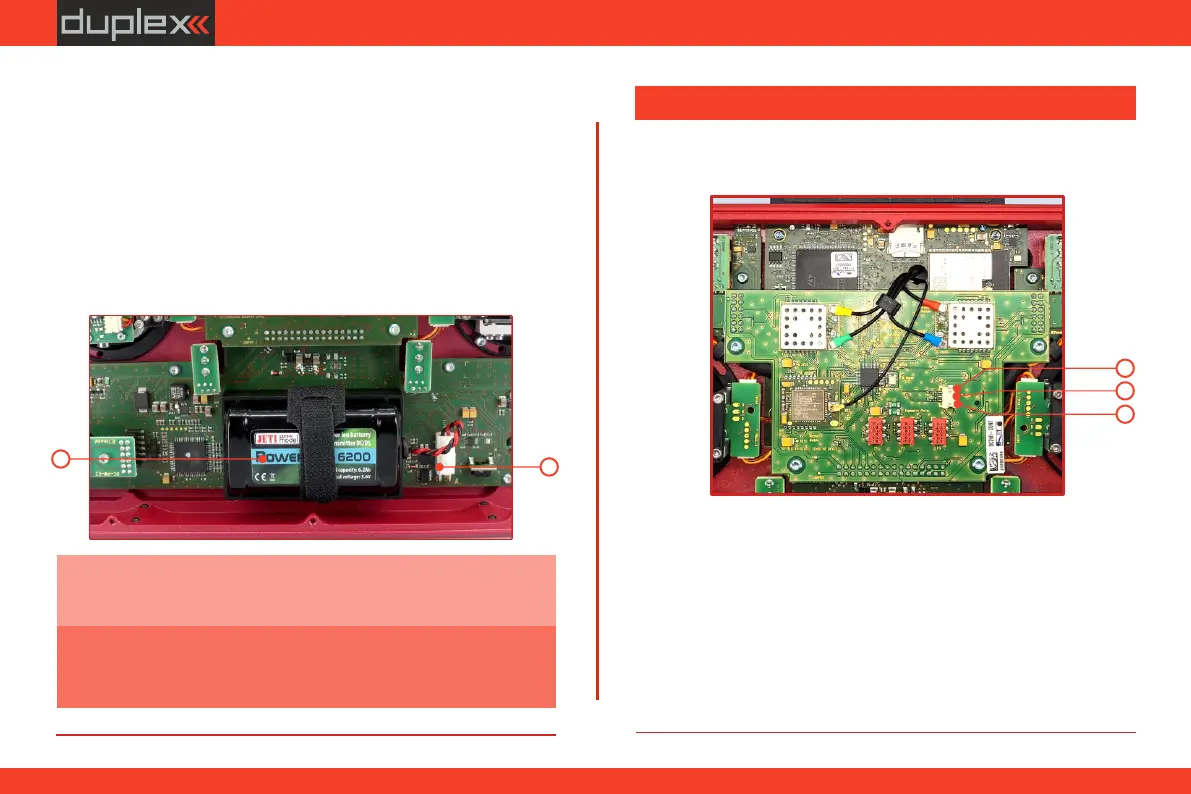
5.4.2 Battery Replacement
1. Switch off the transmitter and remove the 10 screws that secure
the radio back cover. Next, remove the radio back cover.
3. Loosen the battery fastening strap and remove the battery.
Should you decide to replace the transmitter battery, please follow
these steps:
2. Disconnect the transmitter battery connector.
Warning: DC-24 II transmitters should only be operated only with
original or manufacturer approved battery packs. The use of other
battery packs will void the warranty.
Note: If the transmitter battery has been disconnected for longer
than 1 minute, the time, and date will be deleted.
The brightness of the LED corresponds to the backlight intensity
setting of the display.
5.5 PPM Input/Output connector
PPM input/output.
The transmitter has an available internal three-pin connector for
źTelemetry EX
1. PPM output (3V logic)
źPPM16 pos.
2. Negative (-) pin
źPPM8 neg./pos.
3. PPM input (3V logic)
Setting options for PPM output (configurable in „System -
>Configuration"):
1
2
3
43



 To Next Page