radio control system
EN
3.11.10 Displayed telemetry
The Duplex system allows the recording and transmission of much
telemetry data. It is up to each user to choose which data is
important to them. When using the MEZON EVO controller, you
have complete telemetry of the main battery and the motor, e.g.
used capacity from the main battery, voltage of the main battery,
motor RPM, etc. It is good to display important telemetry data on the
main screen for quick check up and for some other data it is useful to
create alarms and voice message.
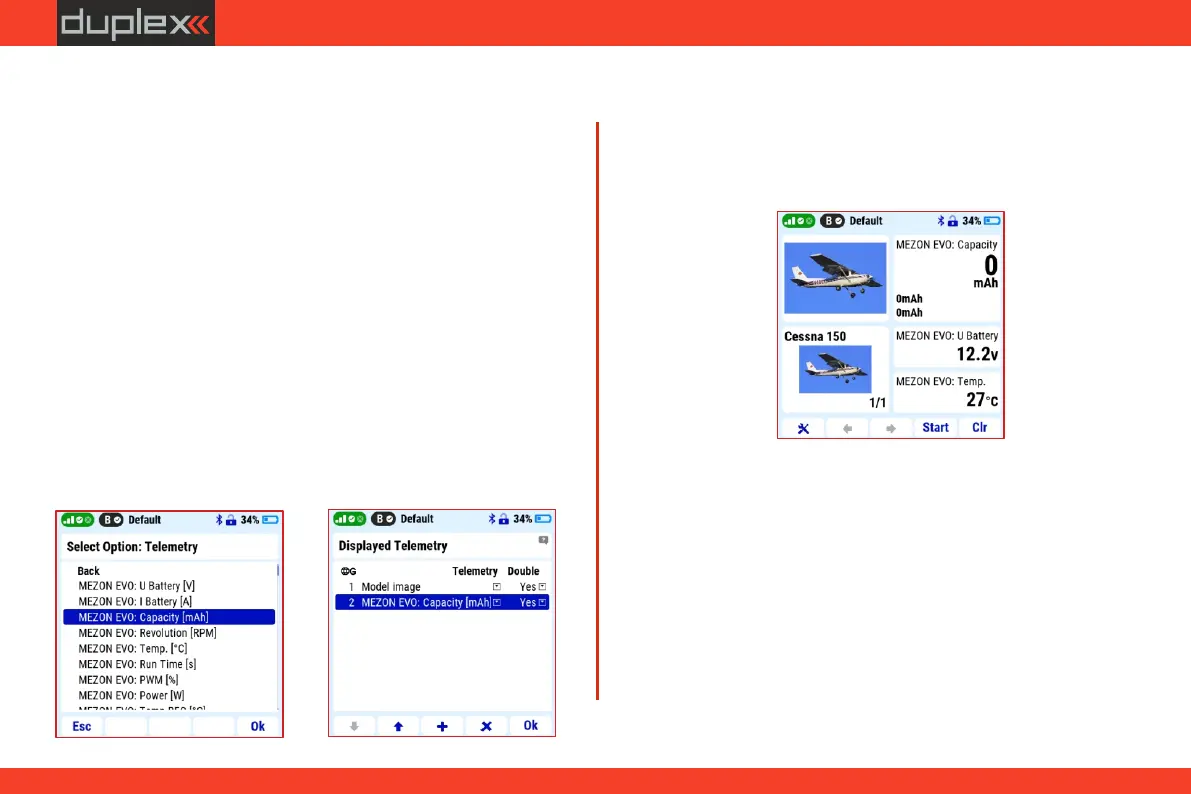
2. Confirm by "F5 (Yes)" button - "Use double size".
4. To fill the unused screen area, you can add informative telemetry
Main screen settings
1. In "Main menu/Timers-Sensors/Displays telemetry" select the
"System" option by the "F3" (+) button and select the "Model
Image" item.
3. Using the same procedure and the "F3" button, select the
"Telemetry" option and the "MEZON EVO: Capacity" item.
data, e.g. about the voltage of the main battery and the
temperature of the controller. These can be displayed in a non-
double size format.
The Cessna 150 main screen will then look like this:
For each model, it is possible to select and set alarms that warn of
reaching the selected limit values. For the Cessna 150 model, these
can be, for example, an alarm on the used battery capacity and the
temperature of the controller.
Alarm on used capacity
The alarm warns that the set limit of used energy from the main
battery has been reached.
1. In "Main menu/Timers-Sensors/Alarms" create a new alarm by
the "F2" (+) button.
2. Select "MEZON EVO: Capacity" in the "Sensor/Telemetry"
3.11.11 Alarms
28



 To Next Page