radio control system
EN
ź th e c u r r e n t s e t vo l u me i s
displayed in the first line.
The transmitter is equipped with a speaker and can notify of various
events, alarms or reached limits by playing sound or voice output.
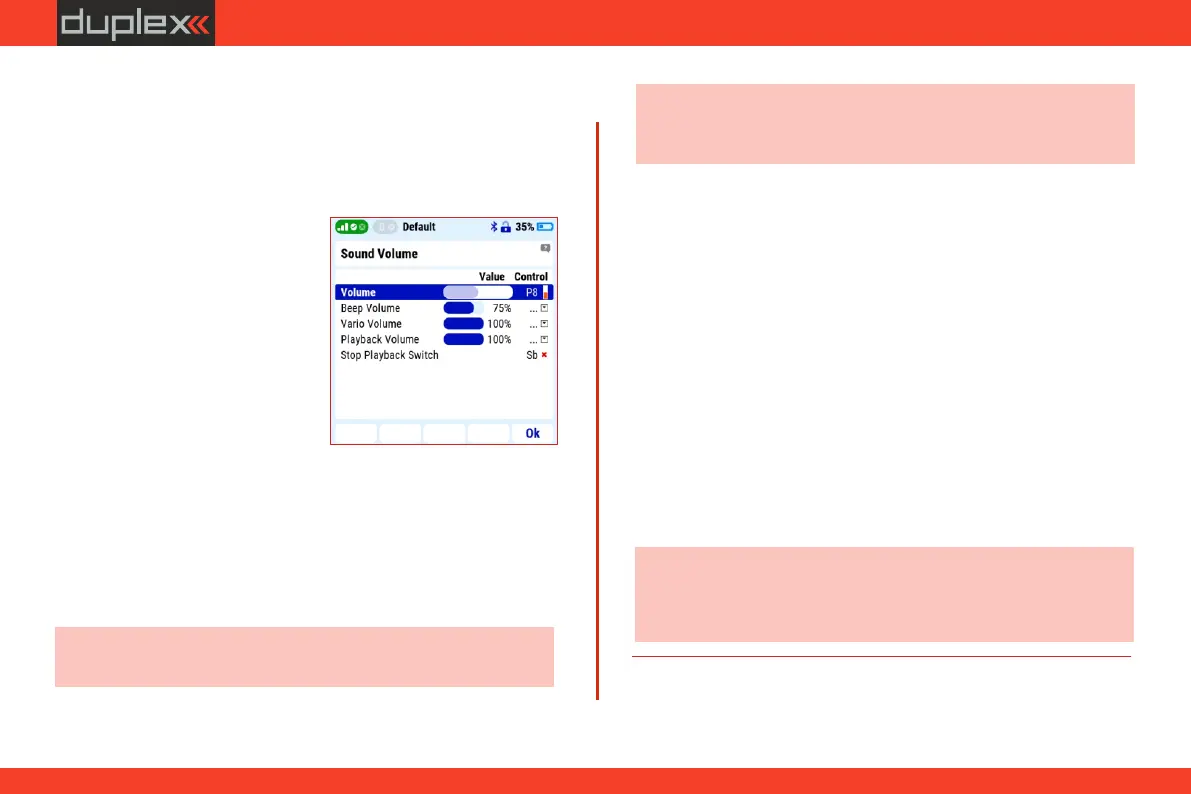
The current volume setting is displayed in this menu.
3. To confirm, press the F5 (OK) button.
1. Use the „3D” controller to select
the "Volume" line and activate the selection.
4. Press the 3D controller to confirm the selection.
Note: for example, suitable volume controls are potentiometers
„P7" or „P8".
3.4.2 Volume
ź detailed transmitter s o u nd
settings can be found in "Main
menu/System/Sound volume".
Audio volume
Potentiometer assignment:
ź th e vol u me s ettin g c a n b e
controlled from the menu or with
the assigned controller, for
example by potentiometer.
5. Move the control you want to control the transmitter volume.
2. Move the potentiometer you want to control the volume, it will
be detected automatically.
3.4.4 Intensity
Note: the time and the intensity of the backlight plays a significant
role in energy consumption. In the case of permanent and intense
backlighting of the display, the operating time of the transmitter
will be shortened.
„Duration 60s“ – after 60s of inactivity, the backlight turns off. Any
action of the controls turns the backlight on
again.
„ON“ – LCD backlight permanently on.
The intensity of the LCD backlight can be manually adjusted in 11
steps, or an "Automatic backlight" option can be selected, in which
the transmitter adjusts the intensity according to the ambient light
conditions.
3.4.3 Backlight type
Note: if you assign a control to the volume control and turn it down
to the minimum value, the sounds of the transmitter will be turned
off completely (including alarms).
The backlight of the display can be set to:
„OFF“ – LCD backlight permanently off.
„Duration 10s“ – after 10s of inactivity, the backlight turns off. Any
action of the controls turns the backlight on
again.
15



 To Next Page