radio control system
EN
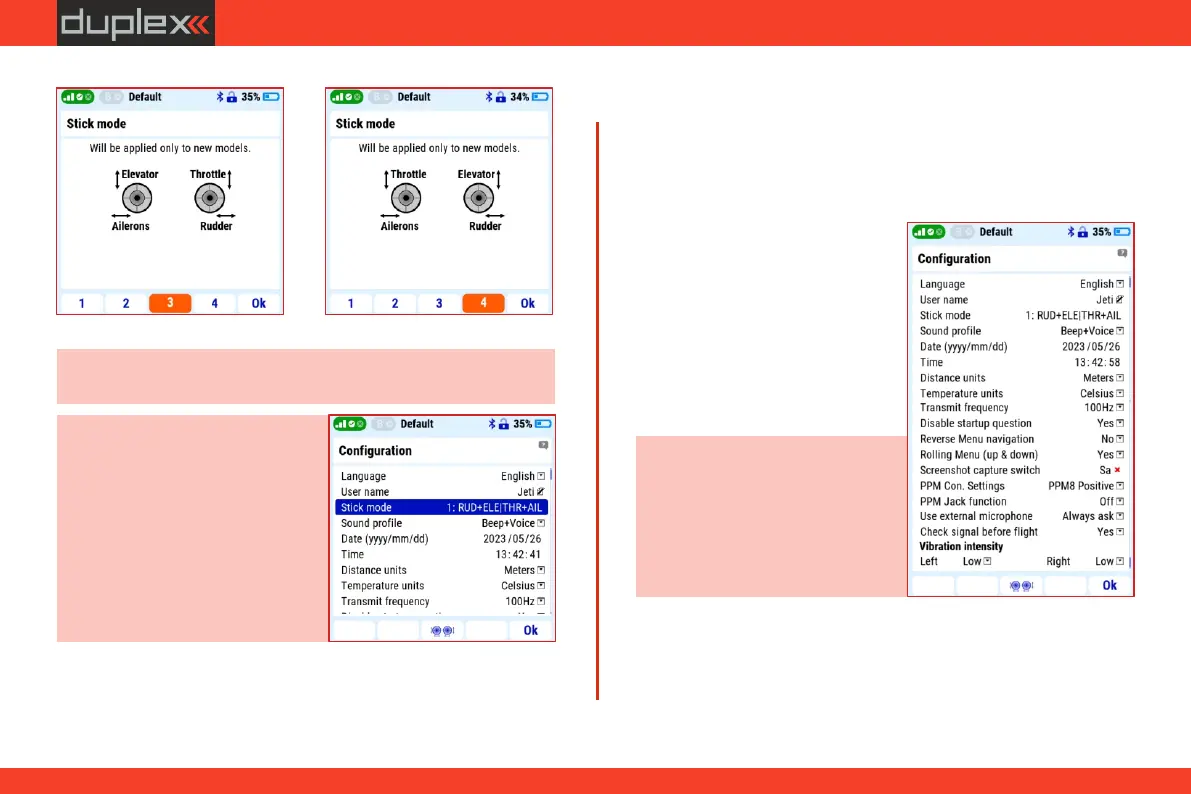
Note: before starting to create a new model in a new transmitter,
always select the correct mode first.
If it is necessary to change the function of the throttle stick
mechanically when changing the mode, proceed according to the
chapter "5.1 Stick controls" .
Note: if you switch between modes
1 and 3 (both have the throttle stick
on the right) or between modes 2
and 4 (both have the throttle stick
on the left), to change the mode just
select your preference in the menu
" M a i n m e n u / S y s t e m /
Configuration/MODE ".
Mode3 Mode 4
3.8.2 Set username, date, time, units, frequency and
screenshot capture switch
Stick mode: - see chapter 3.8.1
Date: - enter the correct date
Username: - you can enter your
name or any word.
Note: the transmitter assigns a
date and time to the LOG records
of the telemetry values. It is
important to enter the correct
values for correct orientation in
the telemetry records.
Time: - enter the correct
time.
Language: - see chapter 3.2
In the "Main menu/System Configuration" menu there are a
number of user-adjustable parameters that affect the function of the
transmitter. Therefore, it is advisable to set them immediately after
turning on the transmitter for the
first time.
19



 To Next Page