radio control system
EN
3.9 Telemetry
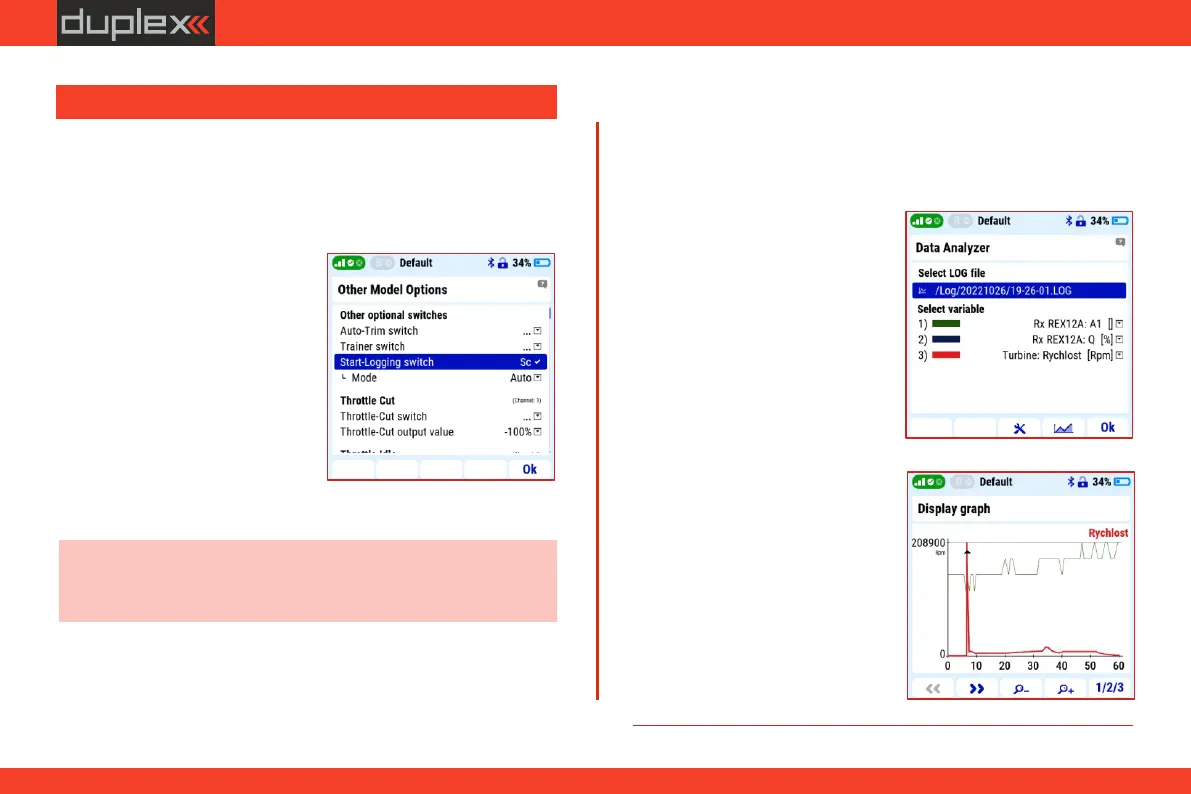
Enable and disable telemetry
recording:
Manually starting the recording
before each flight is possible but
impractical. Therefore, in the menu
" M a i n m e n u / A d v a n c e d
Properties/Other model options"
in the item "Start-Logging switch"
there is an option to assign a switch
for automatic activation of the
recording.
The Duplex system stores telemetry data in the transmitter's
memory. The data is mainly the values of telemetry sensors, the
status of communication between the transmitter and the model,
and also information about the position of the stick controllers
during the flight of the model.
Note: a suitable setting is, for example, to select the "Auto" mode.
In this mode, telemetry recording will start at the same time as any
timers are running (such as the model's flight time, etc.).
7. The „3D” controller moves the
cursor with the current value.
1. Open the "Select LOG file" link
and select the exact data LOG
file. They are sorted by date and
time of storage and model
name.
2. In the "Select variable" item,
select the exact parameter from
the menu. A menu of available
p a r a me te r s i s d i sp l ay e d
automatically.
5. Buttons „F3" and „F4" change
the size of the graph section.
Method:
Graphs of up to three telemetry data with their values can be
displayed on the transmitter screen in "Main menu/Applica-
tions/Data analyzer".
6. the „F 5" b u tto n s w i tc h e s
individual curves.
3.9.1 Display of telemetry data on the transmitter screen
3. Press „F4" button under the
graph icon to display graphs
with values.
4. The „F1" and „F2" buttons
move the timeline.
21



 To Next Page