radio control system
EN
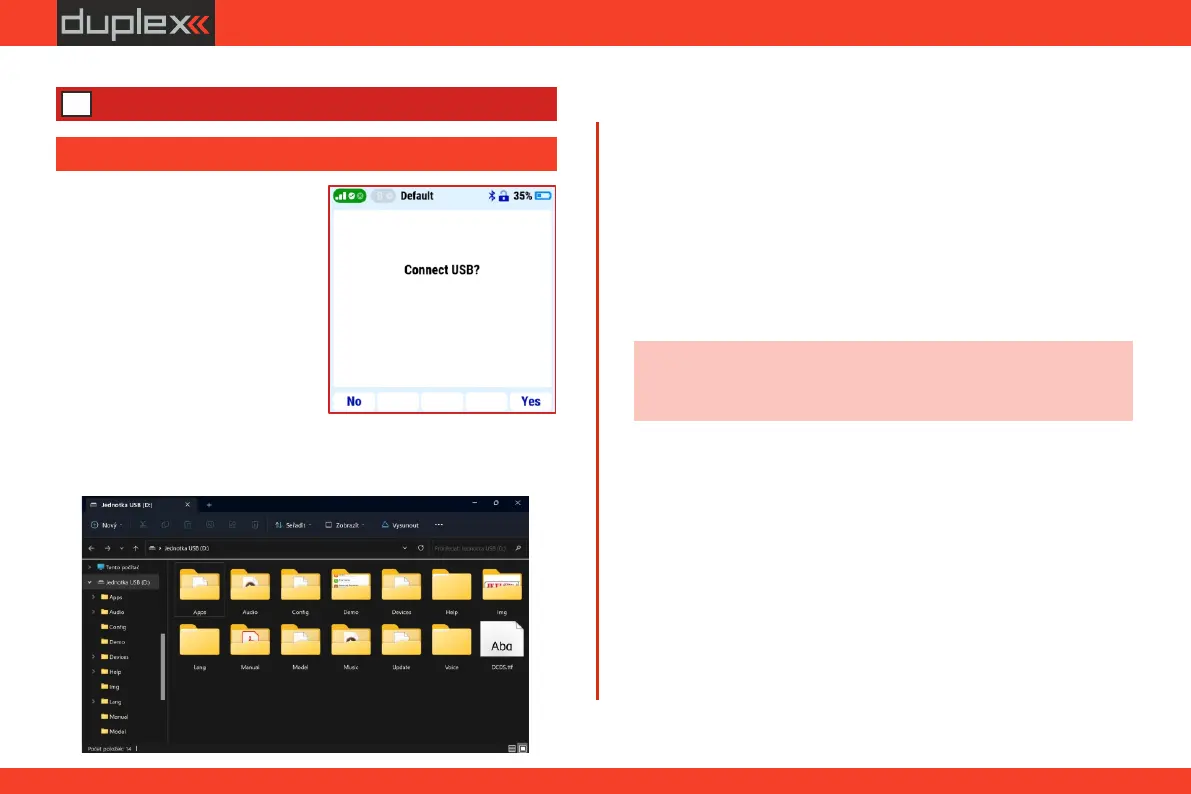
The transmitter has a US B -C
connector for connecting to a
computer. The cable is included in
the delivery of the transmitter. The
transmitter is compatible with
W i n d o w s , M A C a n d L i n u x
o p e r a t i n g s y s t e m s . A f t e r
connecting the transmitter to the
computer, the transmitter will ask
for connection confirmation. After
confirmation, it is connected as an
ex ter nal U S B dr i ve and H I D
standard game device.
4.1.1 Folder structure and description
The transmitter has its own fixed directory structure. Most of them
are internal data of the transmitter, to which it is not recommended
to change in any way.
The following folders are important for users:
Model: - folder contains the data of all your created models.
Individual models can be shared with others, transferred
to other DC transmitters, or backed up (recommended).
Note: the transmitter startup speed may be affected by the size of
the image on the screen. We recommend using images up to
100kB (resolution up to 320x240px).
Log: - the transmitter stores telemetry data records in this
folder. Subfolder names are created automatically in
year/month/day format. The sub-files contain telemetry
data of individual flights during the day (the name of the
file is according to the time of saving).
Manual: - folder with all of the instruction manuals in PDF format.
Img: - folder for images of your models. Supported image
formats are *.png and *.jpg.
Audio: - audio files used by the transmitter are stored in this folder.
If you create your own audio files or download audio files
from the Internet, save them in this directory. Supported
file formats are *.waw and *.mp3.
Music: - a folderfor storing music files in *.wav and *.mp3 format,
for example: flight training with music.
4.1 Connecting to a PC via a USB cable
NEW
4 Connecting to a PC
31



 To Next Page