radio control system
EN
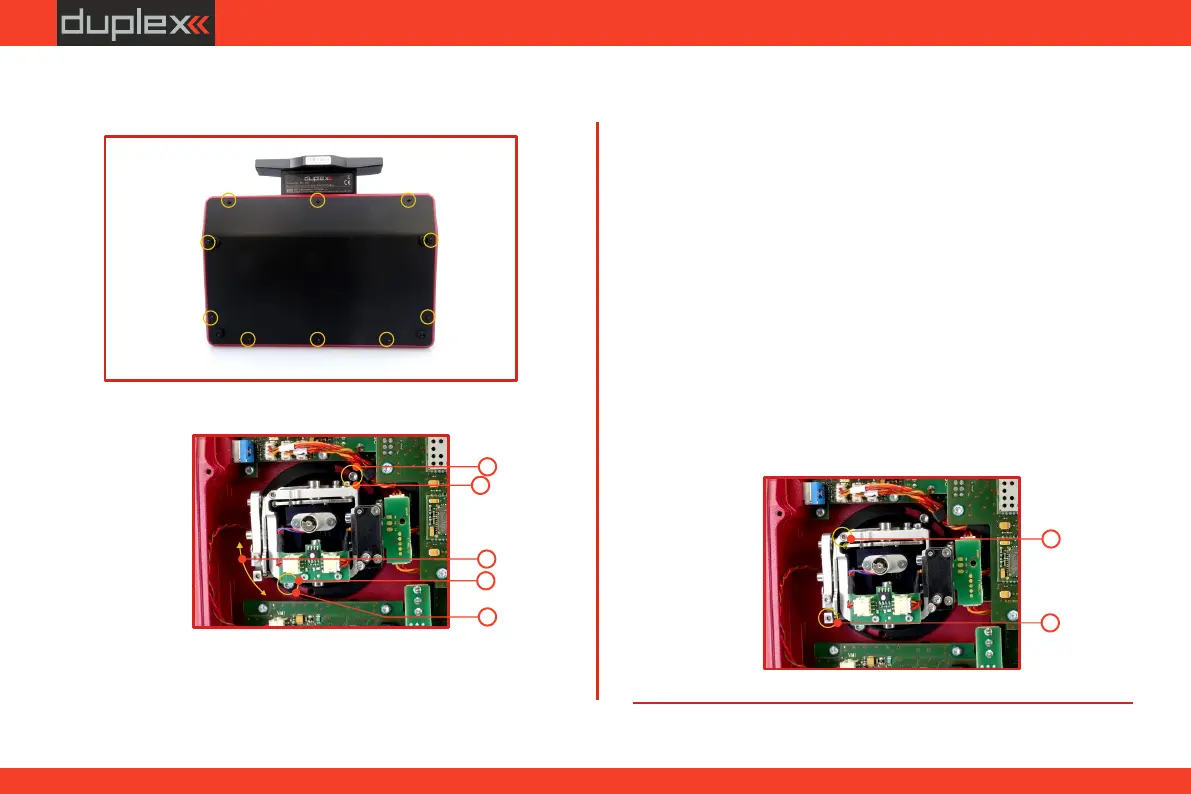
2. Loosen both machine screws securing the control stick.
assembly.
5. Reconnect transmitter battery pack and reinstall radio back
cover and cover screws.
3. Adjust (rotate) to desired position.
4. Securely tighten both machine screws securing the control stick
assembly.
3
4
4
2
2
Be sure to disconnect the transmitter battery pack
connector.
5.1.3 Control Stick Tension Adjustment
The stick gimbal tension is fully adjustable for each axis. This allows
you to fully customize your radio's control feel. Simply adjust each
gimbal's spring to your desired tension.
2. Use indicated machine adjustment screws to change the
desired spring tension. By turning the screw counterclockwise,
you will loosen spring tension. As a result the moving resistance
of the control stick will decrease. By turning the screw
clockwise, you will tighten spring tension. As a result the
moving resistance of the control stick will increase.
3. Reconnect transmitter battery pack and reinstall radio back
cover and cover screws.
Be sure to disconnect the transmitter battery pack
connector.
1. Switch off the transmitter and remove the 10 screws that secure
the radio back cover. Next, remove the radio back cover.
2
2
36



 To Next Page